<?xml version="1.0" encoding="utf-8"?>
<feed xmlns="http://www.w3.org/2005/Atom">
    <title>James E. Lee&apos;s Blog</title>
    <link rel="alternate" type="text/html" href="http://jameselee.alwaysaskwhy.com/blog/" />
    <link rel="self" type="application/atom+xml" href="http://jameselee.alwaysaskwhy.com/blog/atom.xml" />
   <id>tag:jameselee.alwaysaskwhy.com,2007:/blog/1</id>
    <icon>http://jameselee.alwaysaskwhy.com/blog/images/favicon.ico</icon>
    <logo>http://jameselee.alwaysaskwhy.com/blog/images/alwaysaskwhy-logo.png</logo>
    <updated>2007-06-02T01:08:58Z</updated>
    
    <generator uri="http://www.sixapart.com/movabletype/">Movable Type 3.2ysb5-20051201</generator>
<entry>
    <title>Use Google Talk&apos;s voicemail feature as a general purpose voice memo service</title>
    <link rel="alternate" type="text/html" href="http://jameselee.alwaysaskwhy.com/blog/2007/06/use_google_talk_voicemail_as_voice_memo_service.html" />
    <id>tag:jameselee.alwaysaskwhy.com,2007:/blog//1.199</id>
    <published>2007-06-01T21:15:24Z</published>
    <updated>2007-06-02T01:08:58Z</updated>
    <summary> What? Send yourself a voicemail message using Google Talk and you&apos;ll get it as an MP3 audio file via email. This makes it a great general purpose voice memo service. The ability to record up to 10 minutes of...</summary>
    <author>
        <name>James E. Lee</name>
        
    </author>
            <category term="Computers &amp; Technology" />
            <category term="Hacks, Tips, &amp; Tricks" />
    
    <content type="html" xml:lang="en" xml:base="http://jameselee.alwaysaskwhy.com/blog/">
        <![CDATA[<h2>
What?
</h2>
<img hspace="15" align="left" title="Google logo" alt="Google logo" src="http://alwaysaskwhy.com/jameselee/blog/images/Google_Logo_25wht.gif" />
<h3>
Send yourself a <a href="http://www.google.com/support/talk/bin/answer.py?answer=44262&query=voicemail">voicemail message using Google Talk</a> and you'll get it as an MP3 audio file via email.  This makes it a great general purpose voice memo service.
</h3>

<img vspace="10" alt="Google Talk voice memo service" src="http://alwaysaskwhy.com/jameselee/blog/images/GoogleTalk-send-voicmail-to-self-2007.06.01.png">

<p>
The ability to record up to 10 minutes of audio and get it as an MP3 via email makes Google Talk's voicemail a useful and flexible tool for recording audio.  <b>Sending yourself voicemail gives you several options:</b>  listen to the MP3 using Gmail's embedded player,  forward it to others (<em>even if they don't use Google Talk</em>), download it, post it to a blog or website, etc.
</p>

<h2>
How?
</h2>
<h3>
Send yourself voicemail using Google Talk in 3 easy steps.
</h3>
<p>
Before you begin, you'll need some kind of microphone or <a href="http://googletalk.blogspot.com/2007/01/headsets-making-your-google-talk.html">headset</a> (I use the Bluetooth headset I bought for my mobile phone) setup as your computer's audio input device.  Once that's setup, go to Google Talk's Settings to make sure the right input device is selected.  For now, you have to use the desktop version of Google Talk &mdash; <a href="http://www.google.com/support/talkgadget/bin/answer.py?answer=58339">voicemail is not currently supported in the Gadget version</a>.
</p>

<ol>
<li>
<b>Search</b> - Search for yourself in the "Search all contacts" field. (Hey, <a href="http://googletalk.blogspot.com">Google Talk Team</a>: It would be really nice if we could send voicemail to ourselves without having to search first!)
</li>
<li>
<b>Hover</b> - Once your name comes up, hover over it, and a dialog box will pop up.  Click the "Send voicemail" button.  (If "Call" is the only button that comes up, use that; it'll ring briefly and indicate that the call was not answered, and you'll see the "Send voicemail" button.) 
</li>
<li>
<b>Record</b> - Wait for the "meep", record your message, and click "End Call".  You'll receive the voicemail message via email shortly afterward.
</li>
</ol>
<p>
The Google Talk Blog has more <a href="http://googletalk.blogspot.com/2006/11/how-to-part-4-voicemail.html">information about using voicemail</a>.
</p>

<h2>
Tips & Tricks
</h2>
<ul>
<li>
To find all your voicemail messages, click the phone icon at the bottom of Google Talk, or type <b>label:voicemail</b> in Gmail's search box.
</li>
<li>
Easily record a quick podcast without having to find & setup additional software.  (<a href="http://audacity.sourceforge.net">Audacity</a> is a free, open source option for more extensive audio recording.)
</li>
<li>
Enrich email to far-away family & loved ones with the sound of your voice, even if they don't use Google Talk.
</li>
</ul>
<p>
Thanks for yet another great free service, Google, and for such a well-designed & useful service, <a href="http://googletalk.blogspot.com">Google Talk Team</a>!
</p>]]>
        
    </content>
</entry>
<entry>
    <title>Feedback and suggestions for Google Calendar</title>
    <link rel="alternate" type="text/html" href="http://jameselee.alwaysaskwhy.com/blog/2007/03/feedback_and_suggestions_for_google_calendar.html" />
    <id>tag:jameselee.alwaysaskwhy.com,2007:/blog//1.195</id>
    <published>2007-03-22T06:00:00Z</published>
    <updated>2007-05-29T08:12:35Z</updated>
    <summary> Here are my ideas for improving Google Calendar Display the current time, in all views. Knowing the current time of day is relevant and useful when working with a calendar. I often find myself switching browser tabs to look...</summary>
    <author>
        <name>James E. Lee</name>
        
    </author>
            <category term="Recommendations" />
    
    <content type="html" xml:lang="en" xml:base="http://jameselee.alwaysaskwhy.com/blog/">
        <![CDATA[<img alt="Google Calendar Logo" align="right" valign="top" hspace="10" vspace="10" src="http://alwaysaskwhy.com/jameselee/blog/images/Google-Calendar-logo-2007.03.gif">

<h2>
Here are my ideas for improving Google Calendar
</h2>
<ul>
<li>
<b>Display the current time, in all views.</b> Knowing the current time of day is relevant and useful when working with a calendar.  I often find myself switching browser tabs to look at the clock gadget on my Personalized Homepage when I'm looking at my day.  I'm sure there's a desire not to clutter the interface, but an unobtrusive clock could be added; perhaps a simple digital readout under the current month display.  As a bonus, add a thin horizontal time indicator bar in Day and Week view that moves vertically down as the day progresses.  The hour indicator on the left of the page could be highlighted in the same color as the bar.  This is a quick & easy way to see where you are in the day relative to what's on the agenda.
</p>
<p>
 <b>Update:</b> 2007.03.22 - A day after I wrote this, <a href="http://www.lifehacker.com/software/google-calendar/18-tips-for-getting-good-with-google-calendar-246333.php">Lifehacker published a post with an image that shows an example of this horizontal indicator</a> &mdash; go check it out to see what I mean.  The post was an intro to today's <a href="http://webworkerdaily.com/2007/03/22/rock-your-google-calendar-in-18-ways/">Rock Your Google Calendar in 18 Ways</a>, by Anne Zelenka at Web Worker Daily.  She noted that GCal doesn't seem to get a lot of love or attention lately; well, see below for some from me.  Thanks for your useful post, Anne!
</p>
</li>
<li>
<b>Add background shading to Saturday & Sunday in Month View.</b>  On the small month indicator, Saturday and Sunday are lightly shaded, making them easy to distinguish from weekdays.  This useful visual cue would be a great enhancement for the main Week and Month views.
</li>
<li>
<b>Sync with mobile devices.</b>  (I'm happy to see this is already on <a href="http://www.google.com/support/calendar/bin/answer.py?answer=55677">the list</a>, but I have some comments.) The SMS/text messaging interface is useful, and it's really nice to be able to add events that way.  I hope this won't go away or be deprecated even when sync is enabled.  For planning, though, we need to be able to refer to the calendar, and browse it.  The inability to sync is a serious deficiency, and kept me away from Google Calendar for a long time &mdash; the fact that so many of us use it without sync is a testament to how good everything else is!
<p>
<b>Update:</b> 2007.05.24 - Google released the mobile web service, <a href="http://googleblog.blogspot.com/2007/05/calendar-for-mobile-devices.html">Calendar for mobile devices</a>.  Thanks, Google!  This goes a long way toward solving the problem of real mobile access.  I still think sync is the ideal, but maybe that'll be an option for the future.  It would be nice to be able to delete entries, though, as well as modify them.  (I know it's new.)
</p>
</li>
<li>
<b>Add ability to link events to other calendars as an alternative to copying them.</b>  I copy several events among my and my wife's calendars, because we each want the ability to filter the other's calendar, but still see things we're doing together.  That means when I update an event, I have to do so in two places.  Since I have the ability to write to her calendar, it would be nice to designate some events as linked, so they show up independently on shared calendars, but can be updated on either one, with the changes reflected on both.
</li>
</ul>
<p>
This list, which I'm publishing in March 2007 &mdash; when Google Calendar is just shy of its first birthday &mdash; is almost certain to grow and develop.
</p>

<h2>
Google Calendar is amazing
</h2>
<p>
I recently switched to <a href="http://calendar.google.com">Google Calendar</a> and I'm really impressed.  I wanted to use it when it first came out, but was waiting to switch from <a href="http://calendar.yahoo.com">Yahoo Calendar</a> because I (and <a href="http://feeds.smartphonethoughts.com/~r/smartphonethoughts/~3/102617406/index.php">many others</a>) wanted an easy, <em>Google-supported</em> way to sync with <a href="http://jameselee.alwaysaskwhy.com/blog/2005/08/audiovox_smt5600_smartphone_tips_and_tricks.html">my Windows Mobile smartphone</a>.  I switched anyway, and even without mobile phone sync, I can't get over how much I like Google Calendar.
</p>
<p>
The team that built it invested a lot of research and effort into doing so, and it shows.  For a look at how they did it, check out <a href="http://rake.sh/blog/2006/09/14/the-road-to-google-calendar/">Rakesh Agrawal's blog post with notes and commentary</a> about Product Manager Carl Sjogreen's presentation [<a href="http://www.carsonworkshops.com/summit/2006/sanfrancisco/slides/carl_sjogreen.pdf">.pdf</a>] at the Future of Web Apps Summit, 2006.  
</p>
<p>
<b>Google Calendar <em>feels</em> good and is enjoyable to use &mdash; it makes me <em>want</em> to use a calendar, and that makes me more organized and productive.</b>  It's a great example of what a web application can be now.  It's fast, easy, and knows it's connected to the web.  Google Calendar isn't perfect &mdash; in fact, it's <em>beta</em> &mdash; but it's worth serious consideration.
</p>]]>
        
    </content>
</entry>
<entry>
    <title>Keep an eye on Grazr — If you use feeds, you&apos;ll want this widget</title>
    <link rel="alternate" type="text/html" href="http://jameselee.alwaysaskwhy.com/blog/2007/03/keep_an_eye_on_grazr.html" />
    <id>tag:jameselee.alwaysaskwhy.com,2007:/blog//1.193</id>
    <published>2007-03-07T07:00:00Z</published>
    <updated>2007-08-16T23:00:50Z</updated>
    <summary> Grazr is a really cool feed widget you should check out If you&apos;ve discovered the benefits of using feeds, you should take a look at Grazr. It&apos;s an embeddable, web-based feed browser widget that augments your primary feed reader...</summary>
    <author>
        <name>James E. Lee</name>
        
    </author>
            <category term="Feeds &amp; Outlining" />
            <category term="Recommendations" />
    
    <content type="html" xml:lang="en" xml:base="http://jameselee.alwaysaskwhy.com/blog/">
        <![CDATA[<h2>
Grazr is a really cool feed widget you should check out
</h2>
<img alt="Grazr logo" align="left" vspace="5" hspace="10" src="http://grazr.com/images/gzlogo.png">
<h3>
If you've discovered the <a href="http://jameselee.alwaysaskwhy.com/blog/2006/12/benefits_of_using_feeds.html">benefits of using feeds</a>, you should take a look at <a href="http://grazr.com">Grazr</a>.  It's an embeddable, web-based feed browser widget that augments your primary feed reader & lets you <a href="http://jameselee.alwaysaskwhy.com/blog/2006/04/use_grazr_to_skin_opml_and_feeds.html">put feeds anywhere on the web</a>.
</h3>
<div class="clear"></div>
<p>
Grazr isn't a replacement for a full-fledged feed reader &mdash; it's an <em>addition</em> to your toolkit: a blazing fast feed widget that makes sharing and interacting with feed content easy.  It's multimedia capable, so you can look at pictures, listen to audio, and watch video in the feed, all without having to subscribe.  You can put a Grazr widget on several popular personalized start pages, a blog post/sidebar, a regular web page, even your Windows desktop.
</p>
<h2>
Grazr.com recently achieved two important milestones
</h2>
<ul>
<li>
<b>Funding</b> - Grazr just <a href="http://feedonomics.grazr.com/index.php/archives/90">completed a Series A financing round of $1.5M</a>.  They've already developed an impressive tool, but clearly that's just the beginning.
</li>
<li>
<b>Outline & feed hosting</b> - Now you can host your web outlines (OPML) & feeds in <a href="http://grazr.com/register">your own account</a> at grazr.com.  This is a great service for people who want to use and share web outlines and feeds, but don't have a web server on which to host them.  I have my own web server, but just as hosting & sharing my links at <a href="http://del.icio.us">del.icio.us</a> is far better than I could do it myself, I expect Grazr.com to add significant value when you use their service to host feeds and outlines.
</li>
</ul>
<p>
These are two very positive events for the company, and I'm excited to see what they'll do next.  You can help influence that by participating in the <a href="http://forums.grazr.com">forums</a>.  The team really listens to and values input from people who use Grazr, so if you have ideas, share them!
</p>

<h2>
Grazr makes feeds fun and easy
</h2>

<p>
Grazr was originally built to let people <a href="http://eirepreneur.blogs.com/eirepreneur/2006/01/do_purple_cows_.html">"graze"</a> feed content without having to subscribe.  It makes feeds fun and easy, and lets people use them without having to understand how they work, install software, or sign up for anything. It will help feeds break out of subscription jail, and that should promote more innovation in how feeds are used.  
</p>
<p>
I expect to see a lot more from <a href="http://blog.grazr.com">the Grazr team</a>, and I think we'll all be beneficiaries of their successes.  Congrats, and keep up the good work!
</p>


<h2>
Example Grazrs
</h2>
<h3>
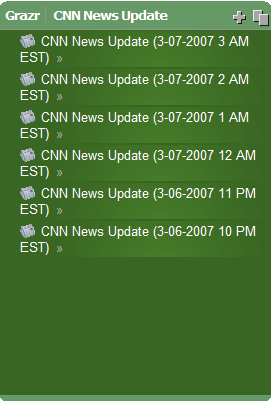
Explore interesting Flickr photos, watch the most recent YouTube featured videos, and listen to CNN updated news updates.  
</h3>
<p>
(If you're reading this in a feed reader, click on an image below to launch the corresponding Grazr.)
</p>
<table border="0" width="99%">
<tr>
  <td width="33%">
<!-- INTERESTING FLICKR PHOTOS -->
<div style="height:400px;width:100%;"><a href="http://grazr.com/gzpanel.html?menu=off&theme=default&view=o&font=Optima&file=http://feeds.feedburner.com/flickr_interestingness" target="gz"><img src="http://alwaysaskwhy.com/jameselee/blog/images/SCREENSHOT-Grazr-Flickr-interesting-photos-2007.03.png" border="0"></a><script defer="defer" type="text/javascript" src="http://grazr.com/gzloader.js?menu=off&amp;theme=default&amp;view=o&amp;font=Optima&amp;file=http://feeds.feedburner.com/flickr_interestingness"></script>
</div>
</td>
  <td width="33%">
<!-- YOUTUBE: FEATURED VIDEOS (by the editors) -->
<div style="height:400px;width:100%;"><a 

href="http://grazr.com/gzpanel.html?menu=off&theme=sateen_blue&file=http://youtube.com/rss/global/recently_featured.rss" 

target="gz"><img src="http://alwaysaskwhy.com/jameselee/blog/images/SCREENSHOT-Grazr-YouTube-featured-videos-2007.03.png" border="0"></a><script defer="defer" type="text/javascript" 

src="http://grazr.com/gzloader.js?menu=off&amp;theme=sateen_blue&amp;file=http://youtube.com/rss/global/recently_featured.rss

"></script></div>
  </td>
  <td width="33%">
<!-- INTERESTING FLICKR PHOTOS -->
<div style="height:400px;width:100%;"><a href="http://grazr.com/gzpanel.html?menu=off&theme=sateen_green&file=http://rss.cnn.com/services/podcasting/newscast/rss.xml" target="gz"><img src="http://alwaysaskwhy.com/jameselee/blog/images/SCREENSHOT-Grazr-CNN-news-update-2007.03.png" border="0"></a><script defer="defer" type="text/javascript" src="http://grazr.com/gzloader.js?menu=off&amp;theme=sateen_green&amp;file=http://rss.cnn.com/services/podcasting/newscast/rss.xml"></script></div>
  </td>
</tr>
</table>

<h3>
Here's a <a href="http://jameselee.alwaysaskwhy.com/blog/2006/12/lets_call_them_live_outlines.html">web outline</a> that displays the 3 feeds above in a single Grazr panel
</h3>
<!-- DEMO OUTLINE THAT PUTS THE FEEDS ABOVE ALL TOGETHER -->
<div style="height:500px;width:100%;"><a href="http://grazr.com/gzpanel.html?addbar=off&view=3p&menu=off&theme=sateen_black&file=http://grazr.com/data/jameselee/keep-an-eye-on-grazr-demo-outline.xml" target="gz"><img src="http://alwaysaskwhy.com/jameselee/blog/images/SCREENSHOT-keep-an-eye-on-grazr-demo-outline.png" border="0"></a><script defer="defer" type="text/javascript" src="http://grazr.com/gzloader.js?addbar=off&amp;view=3p&amp;menu=off&amp;theme=sateen_black&amp;file=http://grazr.com/data/jameselee/keep-an-eye-on-grazr-demo-outline.xml"></script>
</div>
]]>
        
    </content>
</entry>
<entry>
    <title>Yahoo increases authentication timeout</title>
    <link rel="alternate" type="text/html" href="http://jameselee.alwaysaskwhy.com/blog/2007/02/yahoo_increases_authentication_timeout.html" />
    <id>tag:jameselee.alwaysaskwhy.com,2007:/blog//1.190</id>
    <published>2007-03-01T04:50:00Z</published>
    <updated>2007-03-01T08:49:13Z</updated>
    <summary> Problem Yahoo services require re-authentication too often. Being forced to sign in to Yahoo services again and again was frustrating. I use several on a daily basis, almost always from well-protected computers at home &amp; work. I appreciate the...</summary>
    <author>
        <name>James E. Lee</name>
        
    </author>
            <category term="Usability &amp; User Interface" />
    
    <content type="html" xml:lang="en" xml:base="http://jameselee.alwaysaskwhy.com/blog/">
        <![CDATA[<img alt="Yahoo keep me signed in" align="left" hspace="10" vspace="10" src="http://alwaysaskwhy.com/jameselee/blog/images/SCREENSHOT-Yahoo-keep-me-signed-in-2007.02.28.png">
<h2>
Problem
</h2>
<h3>
Yahoo services require re-authentication too often.
</h3>
<p>
Being forced to sign in to Yahoo services again and again was frustrating.  I use several on a daily basis, almost always from well-protected computers at home & work.  I appreciate the value of security, but the timeout was short enough to be annoying, especially given my access from very low-risk environments.  
</p>
<p>
This stood in stark contrast to using Google services, where I'm asked to re-authenticate so rarely that I don't even notice &mdash; <em>that's</em> how it should be.
</p>
<h2>
Solution
</h2>
<h3>
Keep me signed in &mdash; for 2 weeks
</h3>
<p>
Yahoo recently added a "Keep me signed in" checkbox that allows me to stay signed in for 2 weeks.  This relatively minor improvement has a big impact because it <b>helps reduce friction</b> when using Yahoo services.  User-configurable timeouts would be ideal, but this is an effective solution.  It will certainly help keep me signed in to and enjoying Yahoo services.
</p>
<p>
Thanks, Yahoo!
</p>]]>
        
    </content>
</entry>
<entry>
    <title>Burn your Yahoo Pipes</title>
    <link rel="alternate" type="text/html" href="http://jameselee.alwaysaskwhy.com/blog/2007/02/burn_your_yahoo_pipes.html" />
    <id>tag:jameselee.alwaysaskwhy.com,2007:/blog//1.180</id>
    <published>2007-02-14T19:00:00Z</published>
    <updated>2007-02-15T03:37:47Z</updated>
    <summary><![CDATA[ What? Mix feeds with Yahoo Pipes &mdash; enhance and analyze them by publishing with Feedburner. Yahoo Pipes is a feed mixing service, and Feedburner provides tools for enhancing, analyzing, and publishing feeds. It doesn't always make sense to combine...]]></summary>
    <author>
        <name>James E. Lee</name>
        
    </author>
            <category term="Feeds &amp; Outlining" />
    
    <content type="html" xml:lang="en" xml:base="http://jameselee.alwaysaskwhy.com/blog/">
        <![CDATA[<h2>
What?
</h2>
<h3>
Mix feeds with Yahoo Pipes &mdash; enhance and analyze them by publishing with Feedburner.
</h3>

<img alt="Burn your Yahoo! Pipes" vspace="10" src="http://alwaysaskwhy.com/jameselee/blog/images/Burn-your-Yahoo-Pipes.png">

<p>
<a href="http://pipes.yahoo.com">Yahoo Pipes</a> is a feed <em>mixing</em> service, and <a href="http://www.feedburner.com">Feedburner</a> provides tools for <em>enhancing, analyzing, and publishing</em> feeds.  It doesn't always make sense to combine the two, but when it does, these complimentary services provide a good set of feedmastering tools.
</p>
<h2>
When?
</h2>
<h3>
Publish with Feedburner when a pipe's feed is more valuable than its architecture.
</h3>
<p>
Creating a Yahoo Pipe produces two significant outputs:
<ul>
<li>
<b>Architecture</b> - The ability to <a href="http://pipes.yahoo.com/pipes/">publish pipes</a> makes it easy to copy and build on each others' work.  This is how a lot of us started learning HTML when the web was new, and it's a great way to share knowledge and help something catch on fast.  Publish your pipe with Yahoo Pipes when its <em>architecture</em> is important.
</li>
<li>
<b>Feed</b> - In some cases, the feed a pipe produces is more important than sharing its architecture.  Gina Trapani at Lifehacker writes about <a href="http://www.lifehacker.com/software/feeds/geek-to-live--create-your-master-feed-with-yahoo-pipes-235726.php">using Pipes to create a master feed of all the feeds you publish</a>.  In this case, the feed and its readership stats are likely more valuable to the publisher than the details of its construction would be to other people.  (Gina offers her useful example pipe for people to copy, but most will consider this a pretty basic pipe once they get the hang of <a href="http://jameselee.alwaysaskwhy.com/blog/2005/07/metafeeds-feed-mixing_aggregate_multiple_feeds_into_one.html">feedmixing</a>).  Publish your pipe's feed with Feedburner when its <em>feed</em> is important.
</li>
</ul>
<p>
I'm not encouraging anyone to withold publishing pipes using the Pipes publishing interface, but when the pipe's feed is more important than its architecture, publishing it using Feedburner offers several <a href="http://marshallk.com/how-and-why-to-use-feedburner">benefits</a>.
</p>

<h2>
Why?
</h2>
<h3>
Feedburner is an <a href="http://www.feedburner.com/fb/a/commercial">established</a> feed publishing service that provides valuable feed analysis and management tools, making it a good front end for publishing feeds.
</h3>
<ul>
<li>
<b>Free basic <a href="http://www.feedburner.com/fb/a/publishers/standardstats">readership statistics</a></b>, with graphs.
</li>
<li>
<b><a href="http://www.feedburner.com/fb/a/publishers/pingshot">Feed promotion services</a></b> that make sure feed search engines know about your updates.
</li>
<li>
<b>Human-readable feed address.</b>  You can choose a meaningful name and address for your feed, rather than publishing the complex one produced by your pipe.  This makes it easier to talk about and identify when you are working with your feeds outside the Pipes interface.  (Hint: Name your Feedburner feed the same as you name the pipe that produces it, so they're easy to match up.)
</li>
<li>
<b>Flexibility and persistence.</b>  Publishing your feed via Feedburner means its address will remain the same if you decide to use something other than Yahoo Pipes to produce it.
</li>
<li>
<b>Centralized feed publishing & management.</b>  If you're already using Feedburner (e.g., to publish your blog's feed), you may want to consider using it as a central service for publishing <em>all</em> your feeds.
</li>
<li>
<b>Add various <a href="http://www.feedburner.com/fb/a/publishers/feedflare">enhancements</a></b> to your feed.
</li>
</ul>

<h2>
How?
</h2>
<h3>
Build, burn, and share.
</h3>
<ul>
<li>
<b>Build a pipe.</b> Create a Yahoo Pipe and "run" it to get its feed address.  <b>Don't publish the pipe</b> &mdash;   if you do, people will subscribe directly to its feed, and you want them to use your burned feed.  (Running the pipe gives you its feed address without publishing the pipe.)
</li>
<li>
<b>Burn the pipe's feed.</b> Create a new feed in Feedburner using the pipe's feed as the "Original Feed".  Feedburner will guide you through adding any enhancements you want.
</li>
<li>
<b>Share the burned feed.</b>  Feedburner offers various feed promotion and publishing services, but once you've burned it and have the new human-readable address you chose for it, you can share it any way you like &mdash; email, social networking services, etc.
</li>
</ul>]]>
        
    </content>
</entry>
<entry>
    <title>Yahoo! Pipes: Feedmixing — and a lot more — done right!</title>
    <link rel="alternate" type="text/html" href="http://jameselee.alwaysaskwhy.com/blog/2007/02/yahoo_pipes_feedmixing_and_more_done_right.html" />
    <id>tag:jameselee.alwaysaskwhy.com,2007:/blog//1.178</id>
    <published>2007-02-08T06:47:28Z</published>
    <updated>2007-02-10T10:22:06Z</updated>
    <summary> After I had my &quot;aha! moment&quot; about feeds, I wrote up a wishlist of what I wanted to see in a feedmixing service. Several months later, I read Ray Ozzie&apos;s post Wiring the Web, in which he said, RSS...</summary>
    <author>
        <name>James E. Lee</name>
        
    </author>
            <category term="Computers &amp; Technology" />
            <category term="Feeds &amp; Outlining" />
    
    <content type="html" xml:lang="en" xml:base="http://jameselee.alwaysaskwhy.com/blog/">
        <![CDATA[<ul>
<li>
After I had my "<a href="http://www.webmd.com/content/article/85/98629.htm">aha! moment</a>" about <a href="http://jameselee.alwaysaskwhy.com/blog/feeds/">feeds</a>, I wrote up a <a href="http://jameselee.alwaysaskwhy.com/blog/2005/07/metafeeds-feed-mixing_aggregate_multiple_feeds_into_one.html">wishlist of what I wanted to see in a feedmixing service</a>.
</li>
<li>
Several months later, I read Ray Ozzie's post <a href="http://rayozzie.spaces.live.com/blog/cns!FB3017FBB9B2E142!285.entry">Wiring the Web</a>, in which he said,
<div class="quote">
RSS has the potential to be the “UNIX pipe of the internet”
</div>
and thought, "<em>exactly!</em>"
</li>
</ul>
<p>
Apparently, some smart people at Yahoo! were listening to both of us, and they sure did deliver!
</p>
<img alt="Yahoo! Pipes icon" vspace="10" src="http://alwaysaskwhy.com/jameselee/blog/images/Yahoo-Pipes-logo.gif">
<p>
I've only just begun to play with <a href="http://pipes.yahoo.com">Yahoo! Pipes</a>, and I can already say, it's gonna be hot!  I considered my feedmixing wishlist fairly forward-thinking for its time, but a quick glance at the things Pipes can do <em>and the ways it lets you do them</em> shows some real vision.
</p>
<p>
From the Pipes website:
<div class="quote">
Pipes is a hosted service that lets you remix feeds and create new data mashups in a visual programming environment. The name of the service pays tribute to Unix pipes, which let programmers do astonishingly clever things by making it easy to chain simple utilities together on the command line
</div>
<p>
That's really just the beginning of how to think about it; the true description and definition of Pipes will evolve through the innovation it's sure to produce.
</p>
<p>
Unfortunately, I don't have time to play with or write about Pipes more right now, but I definitely plan to do both, and I strongly encourage you to go check it out.  The site provides a good <a href="http://pipes.yahoo.com/docs/overview">overview</a> &mdash; for some in-depth discussion, explanation, and analysis, read Tim O'Reilly's <a href="http://radar.oreilly.com/archives/2007/02/pipes_and_filte.html">Pipes and Filters for the Internet</a>.  I look forward to having a lot of fun, and doing some really cool things with Yahoo! Pipes!
</p>]]>
        
    </content>
</entry>
<entry>
    <title>Create a feedmap to help people find, preview, and subscribe to your feeds</title>
    <link rel="alternate" type="text/html" href="http://jameselee.alwaysaskwhy.com/blog/2007/01/create_a_feedmap.html" />
    <id>tag:jameselee.alwaysaskwhy.com,2007:/blog//1.164</id>
    <published>2007-01-10T09:00:00Z</published>
    <updated>2007-08-16T23:01:02Z</updated>
    <summary><![CDATA[ What? A "feedmap" is an outline that provides a central place to find, subscribe to, and see how feeds are organized &mdash; much like a traditional web sitemap. A feedmap takes the idea further by making it possible to...]]></summary>
    <author>
        <name>James E. Lee</name>
        
    </author>
            <category term="Feeds &amp; Outlining" />
    
    <content type="html" xml:lang="en" xml:base="http://jameselee.alwaysaskwhy.com/blog/">
        <![CDATA[<h2>
What?
</h2>
<img alt="Live outline icon" align="left" vspace="5" hspace="10" src="http://alwaysaskwhy.com/jameselee/blog/images/live-outline-icon-30x60.png">
<h3>
A "feedmap" is an <a href="http://jameselee.alwaysaskwhy.com/blog/2006/12/lets_call_them_live_outlines.html">outline</a> that provides a central place to find, subscribe to, and see how feeds are organized &mdash; much like a traditional web sitemap.  A feedmap takes the idea further by making it possible to preview and actually interact with feed content.
</h3>
<div class="clear"></div>

<p>
We didn't realize we needed sitemaps until the web became popular and websites became complex.  Although feeds aren't quite mainstream yet, many sites already publish more than one. As this trend continues, people will want a central place to find feeds.  Some sites already recognize this, and publish a <a href="http://del.icio.us/jameselee/feeds%2Blist%2Bexample">list of feeds</a>.  A feed<em>map</em> expands on this by showing how feeds are organized, and letting people preview and interact with the content.  Since it's written in <a href="http://en.wikipedia.org/wiki/OPML">OPML</a>, a feedmap;
<ul>
<li>
allows publishers to <b>organize</b> feeds in a meaningful structure
</li>
<li>
makes it easy for people to <b>preview</b> feeds
</li>
<li>
can be <b>imported</b> into most feed readers
</li>
<li>
makes it easy to <b>subscribe</b> to individual feeds
</li>
<li>
may enable people to <b>subscribe to entire feedmaps</b> in the future
</li>
</ul>
</p>

<h3>
An example feedmap
</h3>
<p>
Here's a <a href="http://grazr.com/gzpanel.html?theme=default&view=3p&menu=off&file=http://grazr.com/data/jameselee/my-blog-feedmap.xml" target="gz">feedmap for my blog</a>, (if you're reading this in a feed reader, you'll have to use the link) displayed in <a href="http://grazr.com">Grazr</a>:
</p>

<div style="height:550px;width:650px;">
<a href="http://grazr.com/gzpanel.html?theme=default&view=3p&menu=off&file=http://grazr.com/data/jameselee/my-blog-feedmap.xml" target="gz">
<img src="http://alwaysaskwhy.com/jameselee/blog/images/SCREENSHOT-my-blog-feedmap-2007.01.png" border="0"></a>
<script defer="defer" type="text/javascript" src="http://grazr.com/gzloader.js?theme=default&amp;view=3p&amp;menu=off&amp;file=http://grazr.com/data/jameselee/my-blog-feedmap.xml">
</script>
</div>
<p>
<b>Update:</b> 2007.01.15 - There have been some intermittent problems displaying my blog's feedmap in Grazr.  I'm working with the Grazr team to try to figure out what's going on, and plan to contact Yahoo! Webhosting support as well.  Sorry for the inconvenience!  Since the problem is intermittent, it's possible you might be able to see the feedmap in the Grazr panel on my blog's sidebar; it's also listed there, and sometimes that loads even though this example doesn't.
</p>
<p>
<b>Update:</b> 2007.03.31 - Yahoo's tech support has been quite unhelpful in resolving the problem I mention above, so I'm hosting my feedmap at <a href="http://grazr.com">Grazr.com</a>'s new hosting service, which wasn't available when I created this post.  Ultimately, that's where I want to store my outines.  Unfortunately, this allows the outline to display quickly, but doesn't solve the problem of actually displaying the feed content within Grazr, since there's something blocking a couple of grazr.com's servers from accessing my Yahoo-hosted site.  I'm really disappointed that I wasn't able to get better support from Yahoo.  I haven't given up, but they seem to have decided to ignore my most recent response in our correspondence.
</p>


<h2>
Audience
</h2>
<p>
Anyone who publishes more than one feed should consider publishing a feedmap.
</p>

<h2>
Why?
</h2>
<h3>
A feedmap organizes feeds in one place using a standard format, and lets people preview feed content without being forced to subscribe.
</h3>

<p>
The newest versions of popular web browsers are just beginning to get better at helping people subscribe to feeds, but they're still not very good at it, and subscribing won't always be the goal.  <b>Once feeds become mainstream, people will see them as another source of potential information overload and become more selective about subscribing.</b>  As James Corbett predicted, <a href="http://eirepreneur.blogs.com/eirepreneur/2006/01/do_purple_cows_.html">we'll want to <em>graze</em> feeds more and subscribe less</a>.  
</p>
<p>
There's a new generation of embeddable, "widgetized", web-based feed browsers that are purpose-built for grazing feeds and interacting with feed content &mdash; <a href="http://grazr.com">Grazr</a>, <a href="http://optimalbrowser.com">Optimal</a>, and <a href="http://www.bitty.com/widgets/?ctor=opml">Bitty Browser</a> are examples.  Grazr is my favorite; it lets you see pictures, listen to audio, and watch video, <em>right in the feed</em>.  You don't have to worry about subscribing, but it's easy to do by right clicking on the feed, copying the link, and pasting it into a feed reader.
</p>

<h2>
How?
</h2>
<h3>
Build it in OPML, display it in Grazr
</h3>
<p>
This post isn't a tutorial, it's a recommendation for feed publishers to start publishing feedmaps.  The details are an exercise for the reader, but it's not hard to create a feedmap:
</p>
<ul>
<li>
<b>Use OPML to build your feedmap.</b>  <a href="http://en.wikipedia.org/wiki/OPML">OPML</a> is an outlining language you use to define the structure of your feedmap.  Among its other uses, OPML has become the de facto standard for <a href="http://jameselee.alwaysaskwhy.com/blog/2005/05/feed_subscriptions_are_portable.html">import and export of feed reader subscription lists</a>.  If you're familiar with HTML, OPML is easy to pick up, and the Grazr team has developed really good <a href="http://grazr.com/gzpanel.html?view=o&toolbar=off&font=Verdana&fontsize=9pt&file=http://docs.grazr.com/manual/help-opml-primer.xml">OPML primer</a> that will get you started.
  <ul>
  <li>
OPML isn't an "official" standard, but until or unless one emerges, having your feedmap in a well-known format that's as widely used as OPML will increase the likelihood that it's easy to convert.
  </li>
  </ul>
</li>
<li>
<b>Use Grazr to display your feedmap.</b>  <a href="http://grazr.com">Grazr</a> is the key to bringing a feedmap to life, since it makes feeds immediately usable.  You don't have to use Grazr to display your feedmap &mdash; you could just link to the raw OPML file &mdash; but that's like linking to the source code of a web page.  To make it easy for people to check out your feeds, display it in a feed browser.
  <ul>
  <li>
To display your feedmap, you can either embed a Grazr panel into your site, or <a href="http://jameselee.alwaysaskwhy.com/blog/2006/04/use_grazr_to_skin_opml_and_feeds.html">provide a link to your feedmap displayed in Grazr</a>.
  </li>
  </ul>
</li>
</ul>

<h3>
Tips & Tricks
</h3>
<ul>
<li>
<b>Make your feedmap modular.</b>  If your site publishes various feeds in different topic areas, consider creating separate OPML files for each area and <a href="http://www.opml.org/stories/storyReader$151">including</a> them in the feedmap.  This way you can use them in other outlines, and people can access the specific one they want.  (Determining the appropriate level of granularity for doing this will undoubtedly become an art.)
</li>
</ul>]]>
        
    </content>
</entry>
<entry>
    <title>Terms like OPML &amp; XOXO are too technical and specific — let&apos;s call them &quot;live outlines&quot;</title>
    <link rel="alternate" type="text/html" href="http://jameselee.alwaysaskwhy.com/blog/2006/12/lets_call_them_live_outlines.html" />
    <id>tag:jameselee.alwaysaskwhy.com,2006:/blog//1.66</id>
    <published>2006-12-31T01:55:00Z</published>
    <updated>2007-08-16T23:01:20Z</updated>
    <summary><![CDATA[ What? I propose we use the term "live outline" to refer to dynamic content &mdash; such as OPML files that contain lists of feeds &mdash; that people create using XML outline formats. I've seen some discussion about what to...]]></summary>
    <author>
        <name>James E. Lee</name>
        
    </author>
            <category term="Feeds &amp; Outlining" />
            <category term="Recommendations" />
    
    <content type="html" xml:lang="en" xml:base="http://jameselee.alwaysaskwhy.com/blog/">
        <![CDATA[<h2>
What?
</h2>
<img alt="Live outline icon" align="left" vspace="5" hspace="10" src="http://alwaysaskwhy.com/jameselee/blog/images/live-outline-icon-30x60.png">
<h3>
I propose we use the term "live outline" to refer to dynamic content &mdash; such as OPML files that contain lists of feeds &mdash; that people create using XML outline formats.
</h3>
<div class="clear"></div>
<p>
I've seen some discussion about what to call the information organized using these formats, but there doesn't seem to be a convention for referring to them in general.  This leads to difficulties sharing ideas related to the formats, and explaining them to people who aren't familiar with them.  I really like <a href="http://support.opml.org/howToEditReadingList#whatIsAReadingList">Dave Winer's idea of a reading list</a>, but that's just one kind of live outline; these formats can be used to create live outlines that can serve various purposes (for example, <a href="http://grazr.com/gzpanel.html?toolbar=off&view=o&file=http://jameselee.alwaysaskwhy.com/outlines/forBlog.xml">the one on my blog's sidebar</a> or a <a href="http://grazr.com/gzpanel.html?toolbar=off&view=s&file=http://jameselee.alwaysaskwhy.com/demo/outlines/travel.xml">travel outline</a>).
</p>
<p>
"Live outline" is friendlier and easier to talk about (and say!) than "OPML", "XOXO", etc.  It's a good general term everyone can use and understand without too much difficulty.  It's fine to use "outline" and "outlining" in context; "live" can be omitted when people know what's being discussed.
</p>

<h2>
Audience
</h2>
<p>
This proposal is intended for people creating content and applications using structured outlines based on XML formats, such as <a href="http://en.wikipedia.org/wiki/OPML">OPML</a>, <a href="http://en.wikipedia.org/wiki/XOXO">XOXO</a>, and <a href="http://en.wikipedia.org/wiki/OML">OML</a>.
</p>


<h2>
Why?
</h2>
<h3>
To encourage widespread adoption and use of these formats and reltated technologies, we need simple, non-technical terms that convey meaning well.  People are much more open to learning something new if it has a name they can relate to, understand, and pronounce.  
</h3>
<p>
Live outlines will have a significant and growing role in how people consume, organize, and share feeds:
<ul>
<li>
<a href="http://jameselee.alwaysaskwhy.com/blog/2005/05/feed_subscriptions_are_portable.html">OPML is already a de facto standard for export/import of feed subscription lists</a>.
</li>
<li>
Hopefully, Dave Winer's idea of feed readers allowing people to subscribe to reading lists (and other live outlines)  will become a reality soon.  This is a <em>really</em> good idea!
</li>
<li>
Tools like <a href="http://grazr.com">Grazr</a> make it easy for anyone to <a href="http://jameselee.alwaysaskwhy.com/blog/2006/04/use_grazr_to_skin_opml_and_feeds.html">browse, navigate, and share live outlines</a>.
</li>
</ul>
</p>
<p>
If we want people to get comfortable using structured outline formats, we need to talk about them in terms that won't alienate or put people off.  Try telling someone about the cool OPML file you're building, and watch how quickly their eyes glaze over.  Changing the language we use can make all the difference, and we already have a familiar example of this:  Consider the idea that <strong>live outline is to OPML document as web page is to HTML document</strong>.  People can relate to the idea of writing a web page, and it's easy to talk about web pages; a major reason is the lack of hard-to-pronounce technical acronyms.
<p>

<ul>
<li>
<b>People are already familiar with the concept of an <a href="http://en.wikipedia.org/wiki/Outline">outline</a></b>.  They don't have to learn an entirely new concept to understand a live outline, just a new use for something they already know.
</li>
<li>
<b>People can easily understand that live = dynamic (e.g., feeds)</b>.  Again, though, "live" sounds better and is easier to say than "dynamic".  I know that OPML, etc. are not just for feeds, but I think organizing and managing feeds will be the highest-profile common use for the formats, at least for a while.
</li>
<li>
<b>Firefox has already begun to popularlize the term and concept of "<a href="http://www.mozilla.com/en-US/firefox/livebookmarks.html">live bookmarks</a>"</b>.  We can take advantage of that and extend the idea to live outlines.
</li>
<li>
<b>Non-technical people who use these outlines aren't going to (and shouldn't) care much about the details of the format in which they're written.</b>.  They'll need to recognize names for compatibility, but only until services and applications interoperate well (how many feed readers support RSS and not ATOM, or require a specific version of either?)  Recognition can be important for a while when a technology is new, but how many people that use the web care about the language in which web pages are written?  In most cases, they don't want to know.
</li>
</ul>
<p>
I'm not arguing that we should stop using format-specific terms in technical discussions and documents; they certainly have their place.  I just want to promote the use of terms that insulate people from unnecessarily technical, specific acronyms that aren't likely to be relevant to them.  Plus, I want a <em>general</em> way to talk about the information structures we build with these formats.  "Live outline" conveys meaning without being overly technical or specific to a particular format or technology.  I hope the term will help these formats and creative uses of them proliferate more quickly and easily.
</p>

<h2>
What do you think?
</h2>
<p>
I hope this proposal will provoke some discussion.  Unfortunately, I've had to disable comments due to spam (and the lack of a good mitigation capability), but if you have thoughts on this proposal, link to this post from your blog.  If  discussion ensues, I'll add a live search feed of links to this post to tie it all together.
</p>]]>
        
    </content>
</entry>
<entry>
    <title>Diagramming Tip: Write first, then draw the box</title>
    <link rel="alternate" type="text/html" href="http://jameselee.alwaysaskwhy.com/blog/2006/12/diagramming_tip_write_first_then_draw_the_box.html" />
    <id>tag:jameselee.alwaysaskwhy.com,2006:/blog//1.170</id>
    <published>2006-12-21T17:55:26Z</published>
    <updated>2006-12-22T02:24:58Z</updated>
    <summary> What? When you&apos;re drawing a diagram, write the words first. Draw the box or circle around the words after you&apos;ve finished writing what will go in the container. Why? Writing first ensures the words will fit inside the container,...</summary>
    <author>
        <name>James E. Lee</name>
        
    </author>
            <category term="Hacks, Tips, &amp; Tricks" />
    
    <content type="html" xml:lang="en" xml:base="http://jameselee.alwaysaskwhy.com/blog/">
        <![CDATA[<h2>
What?
</h2>
<h3>
When you're drawing a diagram, write the words first.  Draw the box or circle around the words <em>after</em> you've finished writing what will go in the container.  
</h3>

<img alt="Diagramming tip: write the words first" vspace="10" src="http://alwaysaskwhy.com/jameselee/blog/images/EXAMPLE-diagramming-write-words-then-draw-box-2006.12.21.png">


<h2>
Why?
</h2>
<h3>
Writing first ensures the words will fit inside the container, since you'll draw it around what you've <em>already</em> written.  You won't get stuck trying to squeeze the words into a space that's too small.
</h3>
<p>
How many times have you seen people draw boxes on a whiteboard, <em>then</em> try to fit words and phrases into them, and have to start writing smaller or erasing the lines to make more room?  Writing the words first 
<ul>
<li>
eliminates the problem of running out of space, 
</li>
<li>
results in a nicer looking diagram, and 
</li>
<li>
helps you look better while creating it.
</li>
</ul>
</p>
<p>
Sometimes it's good to be <em>inside</em> the box.
</p>]]>
        
    </content>
</entry>
<entry>
    <title>Benefits of using feeds</title>
    <link rel="alternate" type="text/html" href="http://jameselee.alwaysaskwhy.com/blog/2006/12/benefits_of_using_feeds.html" />
    <id>tag:jameselee.alwaysaskwhy.com,2006:/blog//1.161</id>
    <published>2006-12-15T23:00:00Z</published>
    <updated>2006-12-28T18:07:00Z</updated>
    <summary> For both subscribers and publishers, feeds are a useful addition to the tools we use to distribute, consume, and manage information. Benefits of subscribing to feeds Key steps toward addressing the problem of information overload include classifying &amp; prioritizing...</summary>
    <author>
        <name>James E. Lee</name>
        
    </author>
            <category term="Email &amp; Web" />
            <category term="Feeds &amp; Outlining" />
            <category term="Productivity" />
    
    <content type="html" xml:lang="en" xml:base="http://jameselee.alwaysaskwhy.com/blog/">
        <![CDATA[<img align="left" alt="Feed Icon"  hspace="15" vspace="15" valign="middle" src="http://alwaysaskwhy.com/jameselee/blog/images/feed-icon-24x24.jpg">
<h2>
For both subscribers and publishers, feeds are a useful addition to the tools we use to distribute, consume, and manage information.
</h2>

<h3>
Benefits of subscribing to feeds
</h3>

<p>
Key steps toward addressing the problem of information overload include classifying & prioritizing the information you receive, and reducing the amount of work required to get the information you want.  <a href="http://en.wikipedia.org/wiki/Web_feed">Feeds</a> and a <a href="http://en.wikipedia.org/wiki/Feed_reader">feed reader</a> can help you redirect some information <em>away from your email inbox</em> and automate the retrieval of information you may currently be getting manually.  
</p>

<ul>
<li>
<b>You can stop checking websites for updated content &mdash; the content comes to you.</b>  Once you subscribe to a website's feed, you never have to go back and check for updated information.  Think about how many sites you visit on a regular basis &mdash news, sports, weather, stocks, blogs, etc.  A feed reader <em>automatically</em> checks sites you choose on a regular basis, and lets you know if there's anything new.  You can truly "set it and forget it".
</p>
<p>
Dave Winer, widely credited as the "father of RSS", described feeds as <strong><a href="http://www.scripting.com/2005/09/11.html#When:9:18:48PM">automated web surfing</a></strong>:
<div class="quote">
"...when people ask what RSS is, I say it's <em>automated web surfing</em>. We took something lots of people do, visiting sites looking for new stuff, and automated it. It's a very predictable thing, that's what computers do -- automate repetitive things."
</div>
</p>
</li>
<li>
<b>Free up your email inbox for correspondence.</b>  As an information tool, email has long been overloaded as a catch-all for information people want to send and receive.  A lot of the email we get isn't <a href="http://dictionary.reference.com/search?q=correspondence">correspondence</a>, and often doesn't deserve a high priority.  The problem is, we don't have enough control over what we get via email &mdash; it just arrives and competes for our attention.  One part of the solution is to direct information away from your email inbox and into your feed reader, a tool that's purpose-built for managing information you want to see but don't need to necessarily respond to via email.
</li>
<li>
<b>Put "read-only" information in its place.</b>  Feeds are well suited to one-way and "read-only" communication, and a good feed reader can help you manage a wide range of information you might be getting now via email or by visiting individual web sites.  You can use feeds to:
  <ul>
  <li>
  keep current with the latest news
  </li>
  <li>
  monitor stock prices
  </li>
  <li>
  get weather updates
  </li>
  <li>
  check the traffic report
  </li>
  <li>
  <a href="http://jameselee.alwaysaskwhy.com/blog/2005/05/tracking_packages_perfect_job_for_a_feed_reader.html">track a package</a>
  </li>
  <li>
  share links to websites
  </li>
  <li>
  monitor topics of interest (using a "search feed"; a feed of search engine results)
  </li>
  <li>
  read blogs
  </li>
  <li>
  <a href="http://jameselee.alwaysaskwhy.com/blog/2006/12/use_feeds_to_stay_current_with_discussion_groups.html">keep up with busy discussion groups</a>
  </li>
  </ul>
<p>
Consider how much less cluttered your email inbox might be if you redirected some of the information above to a feed reader.   It's worth noting that the tagline for <a href="http://reader.google.com">Google Reader</a> is "Your inbox for the web."  Email is great for two-way communication, but for information you just want to read, a feed is often a better choice.
</p>
</li>
<li>
<b>You can unsubscribe with confidence.</b>  <em>You</em> own and manage your list of feed subscriptions, not the publishers.  Unlike with email lists, when you want to unsubscribe from a feed, it's your choice and it happens immediately &mdash; you don't have to ask, wait for confirmation, or wonder if it's really going to happen.
</li>
<li>
<b>The content has a consistent look & feel.</b>  Given the variety of website designs, getting to the actual content you want on each website can take a while.  With a good feed reader, the content is all displayed using a consistent interface.  Feeds are typically more content-centric than design-centric.  Some feeds contain ads, but they're often displayed inconspicuously compared to looking at the same content on the publisher's website.
</li>
</ul>


<h3>
Benefits of publishing feeds
</h3>
<p>
Publishing feeds lets you maintain and update your content centrally, and stop worrying about how to distribute it.
</p>
<ul>
<li>
<b>You get the centralization benefits of a web page & distribution benefits of email.</b>  Once you send email, you can't make changes if the information needs to be updated; you have to send a new message.  When you publish a feed, you maintain the content centrally.  When you update content, subscribers automatically get the current version &mdash in some cases highlighted as updated, depending on the feed reader &mdash; even if they already seen the previous version.  Any time they refer back to it, they'll have access to the most current version; with email, they'd have an out-of-date copy.  (Note that some feed readers keep copies of previous versions.)
</li>
<li>
<b>You don't have to do anything to notify your audience.</b>  Feeds solve the problem of notification; there's no  more having to ask people to "check back soon" for updates, or ask for their email address.  Neither the publisher nor the subscriber has to do any work to be notified when new content is published; feed readers do the work for us.
</li>
<li>
<b>You don't have to maintain email lists &mdash; you can stop sending content and let subscribers come get it.</b> When you publish a feed, subscribers take responsibility for consuming your content.  You just publish it, and you're done; people who want it can get it.  People may be more likely to subscribe knowing that they have full control over  unsubscribing.  (If you want to know who your subscribers are, you can create an individual subscription form and publish a unique feed for each subscriber.  This could be a great way to provide spam-free,  individualized, direct communication with your audience.)
</li>
<li>
<b>There's a high probability your audience wants what you publish.</b> People have to consciously subscribe to feeds, and don't usually do so by accident.  When someone subscribes to your feed, there's a good chance it's because they want the information you provide.
</li>
<li>
<b>Non-email communication may be better received by your audience.</b>  People are tired of being inundated by email, and often ignore it when they feel overwhelmed.  By publishing a feed, you give people a choice in how they consume your content, and they may be more likely to do so as a result.
</li>
</ul>]]>
        
    </content>
</entry>
<entry>
    <title>Use feeds to stay current with discussion groups without cluttering your email inbox</title>
    <link rel="alternate" type="text/html" href="http://jameselee.alwaysaskwhy.com/blog/2006/12/use_feeds_to_stay_current_with_discussion_groups.html" />
    <id>tag:jameselee.alwaysaskwhy.com,2006:/blog//1.163</id>
    <published>2006-12-15T22:00:00Z</published>
    <updated>2007-03-06T16:29:34Z</updated>
    <summary> What? You can reduce noise and clutter in your email inbox by subscribing to feeds of discussion groups and forums. Keep your email subscription so you can participate, but filter the group&apos;s email list messages away from your inbox....</summary>
    <author>
        <name>James E. Lee</name>
        
    </author>
            <category term="Feeds &amp; Outlining" />
            <category term="Productivity" />
    
    <content type="html" xml:lang="en" xml:base="http://jameselee.alwaysaskwhy.com/blog/">
        <![CDATA[<h2>
What?
</h2>
<img align="left" alt="Feed Icon"  hspace="10" vspace="10" valign="middle" src="http://alwaysaskwhy.com/jameselee/blog/images/feed-icon-24x24.jpg">
<h3>
You can reduce noise and clutter in your email inbox by subscribing to feeds of discussion groups and forums.  Keep your email subscription so you can participate, but filter the group's email list messages away from your inbox.
</h3>
<div class="clear"></div>
<ul>
<li>
<b>Check to see if your discussion group publishes a feed.</b>  If you're on an email list for a discussion group or forum, but don't usually participate in the discussion, see if you can subscribe to a <a href="http://en.wikipedia.org/wiki/Web_feed">feed</a> of the discussion.  For example, you can subscribe to feeds for both <a href="http://groups.google.com/support/bin/search.py?query=feed">Google Groups</a> and <a href="http://help.yahoo.com/help/us/groups/rss/">Yahoos Groups</a>.  (Regrettably, feeds from Yahoo Groups seem to be just summaries of each post.)
</li>
<li>
<b>Subscribe to the feed, but don't remove yourself from the email list.</b>  Instead, setup a filter in your email to bypass your inbox, and send the list messages to a folder.  This gets them out of your way, but allows you to access them if you want to respond to a message.
</li>
</ul>

<h2>
Why?
</h2>
<h3>
Use your feed reader for "read-only" monitoring, and reserve your email inbox for correspondence.
</h3>
<p>
Redirecting the discussion to your <a href="http://en.wikipedia.org/wiki/Feed_reader">feed reader</a> reduces the clutter and interruptions competing for attention in your email inbox.  This reduces the burden on email &mdash; a tool we all know is overloaded &mdash; and makes it easier to use for <a href="http://dictionary.reference.com/search?q=correspondence">correspondence</a>; <em>two-way</em> communication.
</p>]]>
        
    </content>
</entry>
<entry>
    <title>Put multiple Google Reader gadgets on your Personalized Homepage</title>
    <link rel="alternate" type="text/html" href="http://jameselee.alwaysaskwhy.com/blog/2006/12/put_multiple_google_reader_gadgets_on_your_homepage.html" />
    <id>tag:jameselee.alwaysaskwhy.com,2006:/blog//1.155</id>
    <published>2006-12-07T07:00:00Z</published>
    <updated>2006-12-07T20:07:24Z</updated>
    <summary> What? You can see several of your Google Reader subscriptions at once by putting multiple Google Reader gadgets on your Personalized Homepage. Each gadget can display a different folder or tag in your Reader subscription list. If you use...</summary>
    <author>
        <name>James E. Lee</name>
        
    </author>
            <category term="Feeds &amp; Outlining" />
            <category term="Hacks, Tips, &amp; Tricks" />
            <category term="Productivity" />
    
    <content type="html" xml:lang="en" xml:base="http://jameselee.alwaysaskwhy.com/blog/">
        <![CDATA[<h2>
What?
</h2>
<img hspace="15" border="0" align="left" title="Google logo" alt="Google logo" src="http://alwaysaskwhy.com/jameselee/blog/images/Google_Logo_25wht.gif" />
<h3>
You can see several of your Google Reader subscriptions at once by putting <em>multiple</em> Google Reader gadgets on your Personalized Homepage.  Each gadget can display a different folder or tag in your Reader subscription list.
</h3>
<p>
If you use Google Reader (it's worth serious consideration!) and you're not using the <a href="http://www.google.com/ig/directory?url=http://www.google.com/ig/modules/reader.xml">Reader gadget</a> on your Personalized Homepage, you're really missing out.  This miniature interface to the full version of Google Reader is extremely useful, with pop-up "bubbles" for quick reading, the ability to switch between your folders & tags (but sadly not individual subscriptions) and smooth scrolling, all without taking you away from your homepage.  You can multiply the benefits of using the gadget by putting more than one on a single homepage tab.
</p>

<img alt="Google Homepage Reader Gadget Birds-Eye View" vspace="10" src="http://alwaysaskwhy.com/jameselee/blog/images/SCREENSHOT-Google-Homepage-Reader-Gadget-Birds-Eye-View-2006.12.png">

<h2>
Why?
</h2>
<h3>
Look at a single page for a "birds-eye view" of your Google Reader feeds.
</h3>
<ul>
<li>
<b>Scan the latest headlines or read entire articles right from your homepage.</b>  You don't need to go to Reader to see your feeds.  You can get a quick update on several feeds at a glance, right from your homepage.  If you want to read more than a headline, just click on it, and a "bubble" will pop-up and display the entire article.  It's lightning fast, and you don't leave the homepage.
</li>
<li>
<b>Syncs with full version of Google Reader.</b>  All the Reader gadgets stay in sync with your full version of Reader, so if you read or star something in a Reader gadget, it'll be that way in the full version, and vice versa.  <em>The basic feed gadget doesn't do this</em>, since it has nothing to do with Reader.
  <ul>
  <li>
  This is a key feature, and it's worth highlighting:  I can use the full version of Reader, Reader gadgets, or <a href="http://www.google.com/reader/m/">Reader Mobile</a> to read feeds from almost anywhere, and state is always maintained.  That means there's no downside to any of the methods, and it makes reading feeds easy and efficient.
  </li>
  </ul>
</li>
<li>
<b>Manage just one set of subscriptions.</b>  You've long been able to put multiple basic feed gadgets on your homepage, but if you do that and use Reader as your primary feed reader, you've got two sets of subscriptions to deal with.  The Reader gadget uses the subscriptions you're already managing in Reader.
</li>
</ul>

<h2>
How?
</h2>
<h3>
Add a Google Reader gadget, press the Back button, add another, repeat.  It's that simple.
</h3>

<p>
<strong>Tip: Create a separate tab.</strong>  If you plan to put multiple Reader gadgets on your homepage, you may want to start by making a separate <a href="http://jameselee.alwaysaskwhy.com/blog/2006/09/google_personalized_home_page_picks_up_the_tab.html">homepage tab</a> for them.  Once you've done that, make sure you've got that tab selected, since gadgets get added to the current tab.
</p>
<p>
To add multiple Google Reader gadgets to your Google Personalized Homepage, follow these steps:
</p>
<ol>
<li>
<b>Find it.</b> Find the <a href="http://www.google.com/ig/directory?url=http://www.google.com/ig/modules/reader.xml">Google Reader gadget</a> in the <a href="http://www.google.com/ig/directory">Homepage Content Directory</a>.  (You can either click on the link here, or go to your homepage, click on "Add stuff", and search for "reader").
</li>
<li>
<b>Add it.</b> Click the "Add it now" button.
  <ul>
  <li>
  This will take you back to the Homepage Content Directory, and you'll see a "Back to homepage" link at the top left of the page.  <strong>Do not click that link yet.</strong>
  </li>
  <li>
  If you are not redirected to the Homepage Content Directory, you'll probably see the "Add it now" button disappear, and in its place, a check mark next to "Added".  If you see that, you should be able to reload the page, and skip the next step.
  </ul>
</li>
<li>
<b>Go back.</b> Use your web browser's Back button to go back to the previous page.
</li>
<li>
<b>Add it again.</b> Click the "Add it now" button again.
</li>
<li>
<b>Repeat.</b> Repeat the two steps above until you've added as many Reader gadgets as you want.
</li>
<li>
<b>End.</b> After you've added your last one, click on the "Back to homepage" link.
</li>
</ol>

<h2>
Tips & Tricks
</h2>
<ul>
<li>
<b>Each Reader gadget is an individual.</b>  You may find that you want different behavior for different feeds, depending on what they contain or how often they update.  Try configuring gadgets to display various numbers of items, or changing whether or not they display items you've read.
</li>
<li>
<b>See what you've starred.</b>  I star articles to highlight them for further reading or action.  Putting my Starred Items on my "BirdsEyeView" tab ensures I don't forget about them, and makes them quick & easy to access.
</li>
<li>
<b>You can scroll within each gadget.</b>  If you want to see more than the max of 10 items per gadget, you don't have to open Reader, you can just click on the up/down arrows, or hover over the gadget and <em>use the scroll wheel on your mouse</em>.
</li>
</ul>

<h2>
Feedback and suggestions to the developers
</h2>
<p>
I've become a strong advocate of Google's Personalized Homepage, and an was instant convert to Reader as of it's redesign.  I'm really impressed that the two work together so well, and the developers of both should be proud.
</p>
<p>
To the <a href="http://googlereader.blogspot.com/">developers of Reader and the Reader gadget</a>, thanks for such a nicely executed, well thought-out tool (and service)!  Please consider these suggestions:
</p>
<ul>
<li>
<b>Enable us to choose individual subscriptions to display in the gadget.</b>  Currently, the gadget allows us to choose a folder or tag to display, but not individual feeds.  (Each "folder" in Reader is a mix of the feeds it contains.)  I know "<a href="http://www.reallysimplesyndication.com/riverOfNews">river of news</a>" style feed reading is all the rage, and it certainly has its benefits (<a href="http://jameselee.alwaysaskwhy.com/blog/2006/03/how_and_why_to_mix_feeds.html">I've advocated feedmixing</a> myself). That said, it would be nice to be able to specify a particular feed to display in a gadget, just as we can do in the mobile version of Reader.
</li>
<li>
<b>I'd like the <em>option</em> to auto-hide the bubble if I move the mouse away from it.</b>  That would mean one less mouse click, and potentially faster navigation.  (Note the word "option"!)
</li>
</ul>

<h2>
Credit
</h2>
<p>
I was inspired to try putting multiple Reader gadgets on my homepage by thinking about:
</p>
<ul>
<li>
<a href="http://almostwithyou.com">Dave Barnard</a>'s comment that he'd like to be able to customize what shows up on <a href="http://popurls.com/">PopUrls</a>.
</li>
<li>
Marshal Kirkpatrick's recent comments on using a startpage as a component of his feed-reading in his recent <a href="http://marshallk.com/open-sourcing-my-techcrunch-work-flow">Open Sourcing My TechCrunch Workflow</a> post.  Marshall writes:
<div class="quote">
Almost anything can be read by RSS feed, so you can display almost anything on a startpage. These services fulfill a very specific function for a person working on the web - they provide a one click view of updates from various sources, inside the browser and distinct from the more heavy duty environment of a feed reader.
</div>
Exactly!
</li>
</ul>
]]>
        
    </content>
</entry>
<entry>
    <title>My Hardware Toolkit</title>
    <link rel="alternate" type="text/html" href="http://jameselee.alwaysaskwhy.com/blog/2006/10/my_hardware_toolkit.html" />
    <id>tag:alwaysaskwhy.com,2006:/jameselee/blog//1.147</id>
    <published>2006-10-23T06:00:00Z</published>
    <updated>2007-01-31T08:43:19Z</updated>
    <summary> I&apos;m not a construction professional, handyman, or even much of a do-it-yourself enthusiast. I am a homeowner, though, and from time to time I have to do stuff that requires tools. Having the appropriate, good quality tools makes doing...</summary>
    <author>
        <name>James E. Lee</name>
        
    </author>
            <category term="Gadgets, Tools, &amp; Gear" />
    
    <content type="html" xml:lang="en" xml:base="http://jameselee.alwaysaskwhy.com/blog/">
        <![CDATA[<p>
I'm not a construction professional, handyman, or even much of a do-it-yourself enthusiast.  I am a homeowner, though, and from time to time I have to do stuff that requires tools.  Having the appropriate, good quality tools makes doing any job a <em>lot</em> easier (and often safer), and frankly, makes me a lot more likely to want to do it!
</p>
<p>
I've already written about <a href="http://alwaysaskwhy.com/jameselee/blog/2005/11/my_digital_toolkit.html">My Digital Toolkit</a>, and as I've been building up my set of <em>hardware</em> tools, it occured to me that it might be useful for others if I share the list of what's in my physical toolkit and why.  I'm not going to list every tool, just the ones I think are especially cool or useful.  Rather than duplicate what the vendor lists as the benefits of each, I'll try to focus on talking about why I like each tool.
</p>
<p>
<img alt="Toolkit" hspace="10" src="http://alwaysaskwhy.com/jameselee/blog/images/toolkit.jpg">
</p>
<p>
They're not listed in any particular order, though I've loosely grouped them by powered/not powered and put them into two major categories.  I've also purposely linked to the <em>manufacturers'</em> websites, rather than to any  particular vendor, since <strong>part of the reason for putting this list together is to show my appreciation for the tools and the manufacturers that created them</strong>, not the resellers.
</p>

<h2>
A List of My Cool Hardware Tools
</h2>

<!-- INDEX -->
<h3>
<a href="#hand-tools">Hand Tools</a>
</h3>
<ul>
<li>
<a href="#toolbox">Toolbox</a>
</li>
<li>
<a href="#pry-bar">Pry Bar</a>
</li>
<li>
<a href="#hammer">Hammer</a>
</li>
<li>
<a href="#retractable-utility-knife">Retractable Utility Knife</a>
</li>
<li>
<a href="#staple-gun">Staple Gun</a>
</li>
<li>
<a href="#pliers-tongue-and-groove">Pliers: Tongue and Groove</a>
</li>
<li>
<a href="#flashlight-utility-light">Flashlight/Utility Light</a>
</li>
<li>
<a href="#voltage-tester">Voltage Tester</a>
</li>
<li>
<a href="#stud-sensor">Stud Sensor</a>
</li>
<li>
<a href="#rotary-tool">Rotary Tool</a>
</li>
<li>
<a href="#cordless-screwdriver">Cordless Screwdriver</a>
</li>
</ul>
<h3>
<a href="#outdoor-garden-other-tools">Outdoor/Garden/Other Tools</a>
</h3>
<ul>
<li>
<a href="#ladder">Ladder</a>
</li>
<li>
<a href="#lopper">Lopper</a>
</li>
<li>
<a href="#saw-branch-cutting">Saw: Branch Cutting</a>
</li>
<li>
<a href="#cordless-hedge-trimmer">Cordless Hedge Trimmer</a>
</li>
</ul>

<hr>

<h2>
<a name="hand-tools"></a>
Hand Tools
</h2>

<!-- TOOLBOX -->
<h3>
<a name="toolbox"></a>
Toolbox
</h3>
<h4>
<a href="http://www.huskytools.com/Product.aspx?pid=017c4160-eae5-426a-bf10-f5c2650f8761&cid=790926">Husky Pro Tool Bag (Model: 45121)</a> - Jan 2007
</h4>
<p>
<img alt="Husky Pro Tool Bag" hspace="10" src="http://alwaysaskwhy.com/jameselee/blog/images/products/Husky-Pro-Tool-Bag.jpg">
</p>
<p>
Since we own a home that's not new and tend to do a lot of projects/updates/etc., we found ourselves keeping more and more tools inside, as opposed to in the garage.  I had a toolbox, but I quickly learned why it cost only $5 &mdash; it was small, and actually unpleasant to use.  It was just too much work; I had to open it, remove the top shelf, get a tool, put the shelf back, close it if I wanted to carry it somewhere,  etc.
</p>
<p>
So, we started just keeping a few frequently-used tools in a <a href="http://www.sterilite.com/Category.html?Section=Storage&ProductCategory=38#">Sterilite storage box</a>.   That worked okay, but wasn't ideal &mdash; it provided good visibility, but required two hands to carry, didn't allow organization, and wasn't very safe, given that many tools have sharp edges, which are less visible as their numbers increase in a disorganized box.
</p>
<p> 
I'd been casually on the lookout for a better solution, when my parents recently gave me The Husky Pro Tool Bag, which  solved all those problems.  It's a large, rigid, open container, with a metal handlebar that allows one-handed carrying (it even comes with a shoulder strap!) and provides plenty of clearance.  It has:
<ul>
<li>
19 storage pockets on the inside and outside of the main storage bin
</li>
<li>
A sheath for a handsaw, with a strap to secure it in place
</li>
<li>
All kinds of straps & hooks, even a carabiner
</li>
</ul>
<p>
I don't know that I could have imagined a better toolbox; thanks, Mom & Dad!
</p>

<!-- PRY BAR -->
<h3>
<a name="pry-bar"></a>
Pry Bar
</h3>
<h4>
<a href="http://stanleytools.com/default.asp?CATEGORY=HT+BARS&TYPE=PRODUCT&PARTNUMBER=55-099&SDesc=FatMax%26%23174%3B+Xtreme%26%238482%3B+Fubar%26%238482%3B+Utility+Bar">Stanley  FatMax® Xtreme™ Fubar™ Utility Bar (Model: 55-099)</a> - Oct 2006
</h4>
<p>
<img alt="Stanley FatMax Xtreme FuBar" hspace="10" src="http://alwaysaskwhy.com/jameselee/blog/images/products/Stanley-FatMax-Xtreme-Fubar-Utility-Bar-55-099.jpg">
</p>
<p>
I've been wanting this since I first saw it, just because it's so badass!  I don't even have plans for any demolition projects, but the moment I need to destroy or break something, this is the tool I'm reaching for.  In fact, I couldn't really even justify gettng this, but if you get a chance to check out one of these in real life, you'll see why it's irresistible for any tool junkie.  Fortunately, my wife understands (and agrees!)  ;)
</p>
<ul>
<li>
Super-strong, one-piece forged steel.
</li>
<li>
Heavyweight hammer.
</li>
<li>
Pry bar.
</li>
<li>
Nail puller.
</li>
<li>
Board bender/breaker.
</li>
<li>
Comfortable, slip-resistant, rubberized grip.
</li>
</ul>
<p>
If any tool can justify being called "Xtreme", this is it; the Fubar ("Functional Utility Bar") is an all-around super destruction tool!
</p>


<!-- HAMMER -->
<h3>
<a name="hammer"></a>
Hammer
</h3>
<h4>
<a href="http://stanleytools.com/default.asp?CATEGORY=NAIL+HAMMERS&TYPE=PRODUCT&PARTNUMBER=51-508&SDesc=20+oz%2E+Rip+Claw+Jacketed+Graphite+Hammer">Stanley  20 oz. Rip Claw Jacketed Graphite Hammer (Model: 51-508)</a> - 2005
</h4>
<p>
<img alt="Stanley 20 oz. Rip Claw Jacketed Graphite Hammer" hspace="10"  src="http://alwaysaskwhy.com/jameselee/blog/images/products/Stanley-20oz-Rip-Claw-Jacketed-Graphite-Hammer-51-508.jpg">
</p>
<p>
A full-sized hammer is a staple (no pun intended!) of any toolkit.  This one's fairly basic, but feels good in my hand, and I don't think I'll ever have to replace it; it's got a graphite core, so it's not likely to break -- something I don't think one should have to stress about when hammering!
</p>
<ul>
<li>
Strong, graphite core.
</li>
<li>
Well-balanced.
</li>
<li>
Comfortable, slip-resistant, rubberized grip with flared end.
</li>
</ul>


<!-- UTILITY KNIFE -->
<h3>
<a name="retractable-utility-knife"></a>
Retractable Utility Knife
</h3>
<h4>
<a href="http://stanleytools.com/default.asp?CATEGORY=RETRACTABLE&TYPE=PRODUCT&PARTNUMBER=10-788&SDesc=6%2D1%2F2%26%2334%3B+InstantChange%26%23153%3B+Retractable+Knife">Stanley 6-1/2" InstantChange™ Retractable Knife (Model: 10-788)</a> - 2005
</h4>
<p>
<img alt="Stanley Retractable Utility Knife" hspace="10" src="
http://alwaysaskwhy.com/jameselee/blog/images/products/Stanley-6.5in-Retractable-Utility-Knife-10-788.jpg">
</p>
<p>
A retractable utility knife comes in handy so often, I think it's reasonable to have more than one.  Sometimes, you need to be able to cut something without worrying about damaging or dulling a nice knife blade.  Being able to retract the blade does a lot to increase <strong>safety</strong>.  Our standard is to always retract it before putting it down, even if it's "just for a second".  That's easy to do since it's got a mechanism that locks the blade into three positions, and has a positive feel even when wearing gloves.
</p>
<ul>
<li>
Rubberized upper grip and thumb rest reduce the chance of slipping.
</li>
<li>
Blades stored in the handle.
</li>
<li>
No tools required to change blade.
</li>
<li>
Integrated string cutter.
</li>
</ul>

<!-- STAPLE GUN -->
<h3>
<a name="staple-gun"></a>
Staple Gun
</h3>
<h4>
<a href="http://www.powershot-tool.com/tools/staple_guns/tool.php3?tid=3">PowerShot®  Heavy Duty Forward Action®  Staple & Nail Gun (Model: PowerShot)</a> - 2004
</h4>
<p>
<img alt="PowerShot Stapler" hspace="10" src="http://alwaysaskwhy.com/jameselee/blog/images/products/PowerShot-Staple-Gun.jpg">
</p>
<p>
A staple gun is generally useful to have if you own a home, but also good for projects and repair jobs.  This one is designed really well; if you've used a "normal" staple gun and try this, you'll see why the PowerShot makes sense.
</p>
<ul>
<li>
"Forward Action® " system <a href="http://www.powershot-tool.com/tools/staple_guns/specifics.php3?sfid=41&tid=3">applies & maximizes force in the place you're trying to put the staple</a>.
</li>
<li>
Staples remaining window.
</li>
<li>
Easy to load staples.
</li>
<li>
Rubber non-slip handle.
</li>
</ul>

<!-- PLIERS: TONGUE AND GROOVE -->
<h3>
<a name="pliers-tongue-and-groove"></a>
Pliers: Tongue and Groove
</h3>
<h4>
<a href="http://www.channellock.com/acb/stores/1/430_-_10_inch_Tongue_and_Groov_P54C3.cfm">Channel Lock 10" Tongue and Groove Plier (Model: 430)</a> - 2004
</h4>
<p>
<img alt="Channel Lock 10 inch Tongue and Groove Plier" hspace="10" src="http://alwaysaskwhy.com/jameselee/blog/images/products/Channel-Lock-10in-Tongue-and-Groove-Plier-430.jpg">
</p>
<p>
When we bought our first house, a friend who knows his tools told me to "just get a pair" of these because I'd need them, and he was right!  They seem to be able to do almost anything, and really came in handy when changing a rusted toilet handle.
</p>
<ul>
<li>
Wide, adjustable jaw.
</li>
<li> 
Enable you to exert a lot of force.
</li>
</ul>


<!-- FLASHLIGHT/UTILITY LIGHT -->
<h3>
<a name="flashlight-utility-light"></a>
Flashlight/Utility Light
</h3>
<h4>
<a href="http://stanleytools.com/default.asp?CATEGORY=SMT+ILLUMINATION+TOOLS&TYPE=PRODUCT&PARTNUMBER=95-112&SDesc=MaxLife%26%23153%3B+369%26%23153%3B+Tripod+Flashlight">Stanley MaxLife™ 369™ Tripod Flashlight (Model: 95-112)</a> - Oct 2006
</h4>
<p>
<img alt="Stanley MaxLife Tripod Flashlight" hspace="10"  src="http://alwaysaskwhy.com/jameselee/blog/images/products/Stanley-MaxLife-369-Tripod-Flashlight-95-112.jpg">
</p>
<p>
I've loved flashlights since I was a kid, and have been eyeing this one for several months; after all, it doubles as a work-utility light!  It was actually my wife that prompted this purchase though; I didn't know it, but she'd been coveting it too!  It has some really good features, and a <em>very</em> high cool factor.  Check out the <a href="http://www.videodome.com/mm4/templates/twizardpopup.asp?uid=592&TemplateID=278&id=15379&channel=751">TV commercial</a>!
</p>
<ul>
<li>
Tripod and movable head provide hands-free light right where you need it.
</li>
<li>
Can run on 3, 6, or 9 batteries, which are housed inside the tripod legs.  Provides the same illumination/brightness regardless of how many batteries, but the more you add, the longer it lasts (200+ hours on 9 batteries).
</li>
<li>
Three levels of brightness.
</li>
<li>
Low-battery indicator - Lets you know batteries are low <em>before</em> you pack it for a trip!
</li>
</ul>


<!-- VOLTAGE TESTER -->
<h3>
<a name="voltage-tester"></a>
Voltage Tester
</h3>
<h4>
<a href="http://www.greenlee.com/product/gt-11/start.html">Greenlee Non-Contact Voltage Tester (Model: GT-11)</a> - Sep 2006
</h4>
<p>
<img alt="Greenlee GT-11 Non-Contact Voltage Tester" hspace="10" src="http://alwaysaskwhy.com/jameselee/blog/images/products/Greenlee-Non-Contact-Voltage-Tester-GT-11.jpg">
<p>
We had one of those cheap, combination screwdriver/voltage testers, and if you have one, I recommend you throw it away <em>now</em> and go get one of these non-contact ones that has no exposed metal.  This tester isn't cheap (nor is it expensive), but this is one case in which you really get what you pay for, and <strong>when you're dealing with electricity, safety is especially important</strong>.
</p>
<p>
I went to go buy the <a href="http://www.kk.org/cooltools/archives/001336.php">Fluke VoltAlert that was recommended on Cool Tools</a>, but the salesman practically laughed me out of the store.  They didn't carry the Fluke, but even if they did, I don't think he would have let me buy it; I was half expecting him to accompany me to the register to make sure I got this one!  He said it's much higher quality and more durable.  I'm not an electrician, and he claimed to work as one, so I figured with such a strong opinion, I'd take his word for it.  After all, how many people are emphatic about voltage testers?
<ul>
<li>
All plastic; no exposed metal.
</li>
<li>
No contact required for detection.
</li>
<li>
Bright red, visible <em>and</em> audible alert when voltage is detected; no wondering if you saw the dim light on the cheap models.
</li>
<li>
On/off switch to preserve battery.
</li>
<li>
Batteries are included!
</li>
</ul>


<!-- STUD SENSOR -->
<h3>
<a name="stud-sensor"></a>
Stud Sensor
</h3>
<h4>
<a href="http://www.zircon.com/SellPages/ScanAndSensor/SSProSL/SSSLpro.html">Zircon StudSensor Pro SL (Model: Pro SL)</a> - 2003
</h4>
<p>
<p>
<img alt="Zircon StudSensor Pro SL" hspace="5" src="http://alwaysaskwhy.com/jameselee/blog/images/products/Zircon-StudSensor-ProSL.jpg">
<img alt="Zircon StudSensor Scan and Mark Procedure" hspace="5" src="http://alwaysaskwhy.com/jameselee/blog/images/products/Zircon-StudSensor-Pro-SL-DuanScanAndMark.gif">
<p>
A must for hanging pictures (or anything else) on the wall, mounting towel racks, etc.
</p>
<ul>
<li>
Detects wood or metal studs.
  <ul>
  <li>
Normal mode: scans 3/4 inches deep with 1/8 inch accuracy.
  </li>
  <li>
Deep Scan mode: scans 1-1/2 inches deep with 3/16 inch accuracy using the <a href="http://www.zircon.com/SellPages/ScanAndSensor/ComparisonChart/Comparison.html#DualScanMark">dual scan and mark procedure</a>.
  </li>
  </ul>
</li>
<li>
Visual and audible alert.
</li>
<li>
Projects a beam of light on the surface when it detects a stud.
</li>
<li>
Incremental detection, so you know when you're close.
</li>
<li>
Belt/pocket clip; easy to put aside while marking wall or using other tools.
</li>
</ul>

<!-- ROTARY TOOL -->
<h3>
<a name="rotary-tool"></a>
Rotary Tool
</h3>
<h4>
<a href="http://www.dremel.com/en-us/tools/kit-detail.htm?H=188091&G=66204&I=69676&KI=66254">Dremel 10.8V Lithium-ion Cordless Rotary Tool Kit (Model: 8000-01)</a> - Dec 2005
</h4>
<p>
<img alt="Dremel 10.8V Lithium-ion Cordless Rotary Tool Kit" hspace="5" src="http://alwaysaskwhy.com/jameselee/blog/images/products/Dremel-10.8V-Lithium-ion-Cordless-Rotary-Tool-Kit-8000-01.jpg">
<img alt="Dremel 10.8V Lithium-ion Cordless Rotary Tool" hspace="5" src="http://alwaysaskwhy.com/jameselee/blog/images/products/Dremel-10.8V-Lithium-ion-Cordless-Rotary-Tool.jpg">
</p>
<p>
You can buy the <a href="http://www.dremel.com/en-us/tools/tool-detail.htm?H=188091&G=66204&I=69676">10.8V Cordless Dremel</a> separately, but the kit comes with a lot of accessories you'll need, and a nice hard plastic storage case.
</p>
<p>
I've wanted a Dremel for years, but waited until I had a good excuse before I got one: I had to expand the size of the wooden frame of our HVAC air return to accomodate a custom filter that was a tiny bit too large; the Dremel worked great! It's really come in handy since we got it, and I expect it will do so many times in the future.
</p>
<p>
It's got a <em>very</em> high-speed motor -- up to 35,000 rpm, which is impressive when you're holding it -- because it's effectiveness isn't about applying force; in most cases, you don't have to exert much at all, you just let the speed do the work.
</p>
<ul>
<li>
Grinds, sands, cuts almost anything.
</li>
<li>
Cordless, which removes what often becomes an impediment to using a tool; <em>dealing with the cord</em>!  Also, I reasoned that I might need to use it where stringing a cord would be difficult.
</li>
<li>
Battery level indicator.
</li>
</ul>


<!-- CORDLESS SCREWDRIVER -->
<h3>
<a name="cordless-screwdriver"></a>
Cordless Screwdriver
</h3>
<h4>
<a href="http://www.blackanddecker.com/ProductGuide/Product-Details.aspx?ProductID=5483">Black & Decker 3.6V Rechargeable 3- Position Screwdriver (Model: 9078)</a> - 2003
</h4>
<p>
<img alt="Black & Decker 3.6V Rechargeable 3- Position Screwdriver" hspace="10" src="http://alwaysaskwhy.com/jameselee/blog/images/products/Black-and-Decker-3.6V-Rechargeable-3-Position-Screwdriver-9078.jpg">
</p>
<p>
Another basic must-have tool, a cordless screwdriver takes the tedium out of most routine household tasks.  There's still definitely room for a standard non-powered screwdriver, but this is usually the one I reach for first, and this Black & Decker does its job well and retains its charge a remarkably long time.
</p>
<ul>
<li>
Handle can be adjusted from straight to pistol grip; useful for smaller spaces and applying force.
</li>
<li>
Adjustable torque, with decent maximum.
</li>
<li>
Forward/reverse switch is well-positioned and easy to operate.
</li>
<li>
Really good battery life and exceptional charge retention!
</li>
</ul>

<!-- ========================================= -->

<!-- OUTDOOR/GARDEN/OTHER TOOLS -->
<h2>
<a name="outdoor-garden-other-tools"></a>
Outdoor/Garden/Other Tools
</h2>
<!-- LADDER -->
<h3>
<a name="ladder"></a>
Ladder
</h3>
<h4>
<a href="http://www.wernerladder.com/catalog/details.php?series_id=168">Werner Multi-Master 16-Foot Articulated Ladder++ (Model: M1-8-16)</a> - 2004
</h4>
<p>
<img alt="Werner Multi-Master Articulated Ladder" hspace="10" src="http://alwaysaskwhy.com/jameselee/blog/images/products/Werner-M1-Multi-Master-Articulated-Ladder.jpg">
</p>
<p>
As a homeowner, I've come to understand that it's conceivable to actually need more than one ladder.  This one is configurable, so it can serve many purposes, and we've used it in several of it's 18 possible configurations.  If you're going to get a ladder, this is a great one to start with; you may not need another.  It even worked great while painting on our curved staircase!
</p>
<ul>
<li>
Configurable to 18 positions, including step, stand-off, straight, and scaffold.
</li>
<li>
Lightweight aluminum.
</li>
<li>
16 feet tall, but foldable and fits in a car trunk!
</li>
<li>
Includes a bolt-on stability-enhancing base.
</li>
</ul>
<!-- LOPPER -->
<h3>
<a name="lopper"></a>
Lopper
</h3>
<h4>
<a href="http://www.fiskars.com/US/Garden/Product+Detail?contentId=85530">Fiskars 21-1/2" PowerGear® Bypass Lopper (Model: 9127-6935)</a> - Dec 2005
</h4>
<p>
<img alt="Fiskars 21-1/2 inch PowerGear Bypass Lopper" hspace="10" src="http://alwaysaskwhy.com/jameselee/blog/images/products/Fiskars-PowerGear-21.5in-Bypass-Lopper-9627.jpg">
</p>
<p>
If you have a yard, chances are, you're going to need a lopper to do minor pruning of trees and bushes.  This one has an ingenious gear that doubles your cutting power.  We have yet to find a branch that can challenge this lopper; it slices through most with minimal effort, even when we ask it to bite off a bit more than it can chew.
</p>
<ul>
<li>
Force amplifying gear.
</li>
<li>
Super strong handles - I hate worrying about breaking tools, so I really appreciate when they're built to take a lot of force.
</li>
<li>
Replacable blade - I wish more tools were built with this kind of thinking!
</li>
</ul>

<h3>
<a name="saw-branch-cutting"></a>
Saw: Branch Cutting
</h3>
<h4>
<a href="http://coronaclipper.com/index.cfm?fuseaction=cControllerFrontend.fControlFrontendCatalogDetail&int_product_id=168&int_category_id=57">Corona 13" Curved Razor Tooth Saw (Model: RS 7120)</a>  - Dec 2005
</h4>
<p>
<img alt="Corona 13 inch Curved Razor Tooth Saw" hspace="10" src="http://alwaysaskwhy.com/jameselee/blog/images/products/Corona-13in-Razor-Tooth-Curved-Saw.jpg">
<p>
It's clear that as homeowners, we're going to need more than one saw, but this was our first, and it's <em>impressive</em>!  A branch fell off a tree in the backyard, and it took no time to cut it up using this saw.  It's long, curved blade and 3-sided teeth (which facilitate cutting in both directions) make this a very efficient cutting tool.
</p>
<ul>
<li>
Long, very sharp, curved blade makes it easy to cut effectively when pulling as well as pushing.
</li>
<li>
Very comfortable, secure, pistol grip, and good overall ergonomic design.
</li>
<li>
Replaceable the blade, handle, and connecting nuts & bolts.
</li>
<li>
Did I mention that it's extremely sharp?
</li>
</ul>

<!-- CORDLESS HEDGE TRIMMER -->
<h3>
<a name="cordless-hedge-trimmer"></a>
Cordless Hedge Trimmer
</h3>
<h4>
<a href="http://www.blackanddecker.com/ProductGuide/Product-Details.aspx?ProductID=6458">Black & Decker Hedgehog 18-Volt 22" Cordless Hedge Trimmer (Model: NHT518)</a>  - Sep 2005
</h4>
<p>
<img alt="Black & Decker Hedgehog 18-Volt 22 inch Cordless Hedge Trimmer" hspace="10" src="http://alwaysaskwhy.com/jameselee/blog/images/products/Black-and-Decker-Hedgehog-18volt-Cordless-Hedge-Trimmer-NHT518.jpg">
</p>
<p>
I do have one of those orange, heavy-duty extension cords, and I almost never use it. When I was younger & doing yardwork with my dad, I always dreaded getting it out, unrolling it, managing it during use, and rolling it back up.  All I have to do to use this trimmer is pick it up.  It's got decent power, good reach, and a comfortable holding position.
</p>
<ul>
<li>
Cordless; no extra effort required before (or after) use.
</li>
<li>
Secure, two-handed grip with hand guard.
</li>
<li>
50 minute run time.
</li>
<li>
Interchangeable battery, so you can swap in a fresh one.
</li>
</ul>]]>
        
    </content>
</entry>
<entry>
    <title>Windows Tip: Put Task Manager in widget mode</title>
    <link rel="alternate" type="text/html" href="http://jameselee.alwaysaskwhy.com/blog/2006/10/windows_tip_put_task_manager_in_widget_mode.html" />
    <id>tag:alwaysaskwhy.com,2006:/jameselee/blog//1.146</id>
    <published>2006-10-20T15:45:00Z</published>
    <updated>2006-12-07T21:47:50Z</updated>
    <summary> What? Collapse Windows Task Manager into a desktop widget that&apos;s between full size and the minimized system tray icon. In two clicks, you can put Task Manager in &quot;widget mode&quot; and see useful information at-a-glance, without taking up a...</summary>
    <author>
        <name>James E. Lee</name>
        
    </author>
            <category term="Computers &amp; Technology" />
            <category term="Hacks, Tips, &amp; Tricks" />
            <category term="Usability &amp; User Interface" />
    
    <content type="html" xml:lang="en" xml:base="http://jameselee.alwaysaskwhy.com/blog/">
        <![CDATA[<h2>
What?
</h2>
<img alt="Microsoft Windows logo" hspace="15" border="0" align="left" src="http://alwaysaskwhy.com/jameselee/blog/images/Microsoft-Windows-logo.jpg">
<h3>
Collapse Windows Task Manager into a desktop widget that's between full size and the minimized system tray icon.
</h3>
<p>
In two clicks, you can put Task Manager in "widget mode" and see useful information at-a-glance, without taking up a lot of room.
</p>

<h2>
Why?
</h2>
<h3>
Widget mode is much smaller than normal, but still large enough to display different kinds of useful information.
</h3>
<p>
Windows Task Manager is a great way to see what your computer is doing, but sometimes it takes up too much space.  Minimizing it to the system tray moves it nicely out of the way, but it
<ul>
<li>
displays only the current processor load,
</li>
<li>
doesn't show processor load history, and 
</li>
<li>
doesn't display any other information. 
</li>
</ul>
</p>

<h2>
How?
</h2>
<h3>
Double-click on the inner border of any Task Manager tab to put it in "widget mode".  Double-click again to restore Task Manager to its normal state.
</h3>

<img alt="SCREENSHOT: Windows task manager collapse to widget" vspace="10" hspace="10" src="http://alwaysaskwhy.com/jameselee/blog/images/SCREENSHOT-Windows-taskmanager-collapse-to-widget-2006.10.png">

<h3>
Tips & Tricks
</h3>
<ul>
<li>
Click and hold on the border to drag the widget around your desktop.
</li>
<li>
This works for <em>any</em> tab in Task Manager, so you can use it to keep an eye on all kinds of information, like network utilization, your process list (to see what's hogging all the memory or processor), etc.
</li>
<li>
Find a creative way to use Task Manager in widget mode; look in the View menu in each tab to choose optional information to display.  Some things (e.g. I/O reads & writes, network throughput, etc.) might be really useful to see at-a-glance, depending on what you're doing.
</li>
</ul>

<p>
Disclaimer: I stumbled on this by accident.  In fact, I'll come clean and admit that I did this months ago on one of my computers, and figured there was just something wrong with Task Manager. :) It wasn't until I accidentally did it again today and started to experiment with resizing it that I realized it might be a display mode!
</p>
<p>
<strong>Update:</strong>  I didn't think by any means that I was the first to "discover" this; I mainly wrote it up because I'd been too lazy to look into the "problem" before, and thought I'd share it with others who may have done the same.  My wife encouraged me to search for more information; it turns out this is called <a href="http://support.microsoft.com/kb/193050">Tiny Footprint mode</a>.  (I think "widget mode" is cooler!)
</p>]]>
        
    </content>
</entry>
<entry>
    <title>Put Google gadgets on your Windows desktop</title>
    <link rel="alternate" type="text/html" href="http://jameselee.alwaysaskwhy.com/blog/2006/10/put_google_gadgets_on_your_windows_desktop.html" />
    <id>tag:alwaysaskwhy.com,2006:/jameselee/blog//1.143</id>
    <published>2006-10-05T06:30:00Z</published>
    <updated>2006-12-07T22:00:08Z</updated>
    <summary> What? Put individual, &quot;standalone&quot; Google gadgets directly on your Windows desktop using built-in Active Desktop. No web server required. Google just opened up their inventory of gadgets that were previously available only on your Google Personalized Homepage. Now you...</summary>
    <author>
        <name>James E. Lee</name>
        
    </author>
            <category term="Computers &amp; Technology" />
            <category term="Hacks, Tips, &amp; Tricks" />
    
    <content type="html" xml:lang="en" xml:base="http://jameselee.alwaysaskwhy.com/blog/">
        <![CDATA[<h2>
What?
</h2>
<img hspace="15" border="0" align="left" title="Google logo" alt="Google logo" src="http://alwaysaskwhy.com/jameselee/blog/images/Google_Logo_25wht.gif" />
<h3>
Put individual, "standalone" Google gadgets directly on your Windows desktop using built-in Active Desktop.  No web server required.
</h3>
<p>
Google just <a href="http://googleblog.blogspot.com/2006/10/yes-you-can-have-pony.html">opened up their inventory of gadgets</a> that were previously available only on your <a href="http://google.com/ig">Google Personalized Homepage</a>.  Now you can put <a href="http://www.google.com/ig/directory?synd=open">Google gadgets</a> on any web page, which makes it possible to use them in a wider variety of places and ways than before.  One example is to put Google gadgets right on your Windows desktop.  This is easy to do using Windows' built-in <a href="http://en.wikipedia.org/wiki/Active_Desktop">Active Desktop</a> feature.
</p>
<img alt="SCREENSHOT: Google gadget on Windows desktop" vspace="10" src="http://alwaysaskwhy.com/jameselee/blog/images/SCREENSHOT-Google-Gadget-on-Windows-Desktop-2006.10.04.png">
<p>
Google said they made the gadgets available for "<a href="http://www.google.com/press/annc/synd_gadgets.html">webpage owners everywhere to browse and select gadgets for their own pages</a>".  That's great, but in fact, you don't have to be a webpage owner; <b>you can use gadgets on your Windows desktop <em>without</em> a web server</b>.
</p>

<h2>
Why?
</h2>
<h3>
This is an easy way to use gadgets in "standalone" mode, without hosting them on a web server, browsing to a web page, or installing additional software.
</h3>
<p>
The concept of gadgets/widgets on the desktop <a href="http://widgets.yahoo.com/">isn't new</a>, but this variation allows you to:
<ul>
<li>
<b>Use gadgets without a web server.</b>  You can store the code for a gadget right on your computer.
</li>
<li>
<b>Use gadgets without manually opening a browser and visiting a web page.</b>  Technically, you are using a web browser -- Internet Explorer -- when you use Active Desktop, but it's embedded in the desktop, and always visible.
</li>
<li>
<b>Have a consistent set of gadgets.</b>  Now you can use the same gadgets on your desktop as you use on your Google homepage.  (NOTE: Not all gadgets available for Google Homepage are available for webpage use.)
</li>
<li>
<b>Use gadgets without installing any additional software.</b>  Other widget/gadget frameworks that use an installed "engine" -- such as <a href="http://widgets.yahoo.com/">Yahoo Widgets/Konfabulator</a> -- might provide richer functionality and look & feel in some cases, but there's a certain appeal to avoiding yet another piece of software to install and update.
</li>
</ul>

<h2>
How?
</h2>
<h3>
Add Google gadgets to your Windows Active Desktop just like any other webpage.
</h3>
<ol>
<li>
Find a gadget in the <a href="http://www.google.com/ig/directory?synd=open">directory of Google gadgets for your webpage</a> and click the "Add to your webpage" button to configure it.
</li>
<li>
Click the "Get the Code" button, and copy the HTML.
</li>
<li>
Create a new HTML document (e.g. "gadget-name.html") on your computer or web server, paste in the code for the gadget, and save it.
</li>
<li>
Right-click on your Windows desktop and select Properties.
</li>
<li>
Click on the Desktop tab, and the Customize Desktop button.
</li>
<li>
Click on the Web tab, and the New button.
</li>
<li>
Click the Browse button, and find & select the HTML document you created to hold your gadget code.  If you saved it on a web server, enter its URL in the Location field.
</li>
<li>
Click OK 3 times, and you should see the gadget on your Desktop!
</li>
</ol>

<h3>
Tips & Tricks
</h3>
<ul>
<li>
Repeat the steps above to add more gadgets to your desktop.
</li>
<li>
<b>Finishing touch:</b> By default, there's a white background surrounding the gadget (even larger than in the <a href="http://alwaysaskwhy.com/jameselee/blog/2006/04/how_to_take_a_screenshot_in_windows.html">screenshot </a> above).  You can add
<div class="code">
&lt;body bgcolor="your_desktop_background_color"&gt;
</div>
above your gadget code to make it blend seamlessly with your desktop background color.
</li>
</ul>

<h2>
Beyond Windows?
</h2>
<h3>
Does this work on other platforms?  If so, blog it, and link to this article!
</h3>

<p>
I haven't looked at Linux or MacOS in a long time, so I'm not sure if either (or any other platform) has an equivalent to Windows' Active Desktop.  If you get this to work on something other than Windows, please blog about it and link to this article.  I've disabled comments due to spam, but one of the search engines will pick up the link, and I'll see it & link back.
</p>]]>
        
    </content>
</entry>
<entry>
    <title>Google Personalized Homepage &quot;picks up the tab&quot;</title>
    <link rel="alternate" type="text/html" href="http://jameselee.alwaysaskwhy.com/blog/2006/09/google_personalized_home_page_picks_up_the_tab.html" />
    <id>tag:alwaysaskwhy.com,2006:/jameselee/blog//1.140</id>
    <published>2006-09-14T23:30:00Z</published>
    <updated>2006-12-07T22:03:00Z</updated>
    <summary> Google&apos;s Personalized Home Page now supports multiple tabs I&apos;m a big fan of Google&apos;s Personalized Homepage, and today I noticed that they added the ability to have multiple tabs: This feature makes it easy to organize content, group it...</summary>
    <author>
        <name>James E. Lee</name>
        
    </author>
            <category term="Computers &amp; Technology" />
    
    <content type="html" xml:lang="en" xml:base="http://jameselee.alwaysaskwhy.com/blog/">
        <![CDATA[<img hspace="15" border="0" align="left" title="Google logo" alt="Google logo" src="http://alwaysaskwhy.com/jameselee/blog/images/Google_Logo_25wht.gif" />
<h3>
Google's Personalized Home Page now supports multiple tabs
</h3>
<p>
I'm a big fan of <a href="http://google.com/ig">Google's Personalized Homepage</a>, and today I noticed that they added the ability to have multiple tabs:
</p>

<img vspace="10" alt="SCREENSHOT: Google Personalized Homepage Add Tab" src="http://alwaysaskwhy.com/jameselee/blog/images/SCREENSHOT-Google-Personalized-Homepage-Add-Tab-2006.09.14.png">

<p>
This feature makes it easy to organize content, group it by function/context (e.g., Work, Personal, Project X), etc.  I know it's not a new concept, but it's been the one thing I've been wishing for, and I want to thank the <a href="http://googleblog.blogspot.com/">Google team</a> for implementing this feature!
</p>]]>
        
    </content>
</entry>
<entry>
    <title>Firefox Tip: Make the active tab more visible</title>
    <link rel="alternate" type="text/html" href="http://jameselee.alwaysaskwhy.com/blog/2006/07/firefox_make_active_tab_more_visible.html" />
    <id>tag:alwaysaskwhy.com,2006:/jameselee/blog//1.110</id>
    <published>2006-07-21T18:23:10Z</published>
    <updated>2007-08-16T23:41:26Z</updated>
    <summary><![CDATA[ What? Change the color of the active tab in Firefox to improve its visibility. &nbsp; By default, the active tab in Firefox is not very visible, and it becomes less so the more tabs you open in a single...]]></summary>
    <author>
        <name>James E. Lee</name>
        
    </author>
            <category term="Email &amp; Web" />
            <category term="Hacks, Tips, &amp; Tricks" />
            <category term="Usability &amp; User Interface" />
    
    <content type="html" xml:lang="en" xml:base="http://jameselee.alwaysaskwhy.com/blog/">
        <![CDATA[<h2>
What?
</h2>
<img hspace="15" border="0" align="left" title="Firefox logo" alt="Firefox logo" src="http://alwaysaskwhy.com/jameselee/blog/images/Firefox-logo.gif" />
<h3>
Change the color of the active tab in Firefox to improve its visibility.
</h3>
<p>
&nbsp;
</p>
<p>
By default, the active tab in Firefox is not very visible, and it becomes less so the more tabs you open in a single browser window.
</p>
<h2>
Why?
</h2>
<h3>
Changing the color of the active tab makes it easy to see at a glance.
</h3>
<p>
Firefox's <a href="http://www.mozilla.com/firefox/tabs.html">tabbed browsing</a> makes it easy to manage having several websites open at once, but with multiple tabs open, it doesn't take long to lose sight of the active tab.&nbsp; Spending time looking for the active tab reduces the benefit of using multiple tabs.  Changing the active tab's color solves the problem by making it stand out in the crowd.
</p>
<h3>
Before
</h3>
<img vspace="10" border="0" title="Firefox active tab default" alt="Firefox active tab default" src="http://alwaysaskwhy.com/jameselee/blog/images/SCREENSHOT-Firefox-active-tab-default-2006.07.21.png" />
<h3>
After
</h3>
<img vspace="10" border="0" title="Firefox active tab more visible" alt="Firefox active tab more visible" src="http://alwaysaskwhy.com/jameselee/blog/images/SCREENSHOT-Firefox-active-tab-more-visible-2006.07.21.png" />
<h2>
How?
</h2>
<h3>
Make a quick change to your userChrome.css file, then restart Firefox
</h3>
<a href="http://www.mozilla.org/support/firefox/edit#css">Edit your &quot;userChrome.css&quot; file</a> and add:
<div class="code">
<pre>
/* Change color of ACTIVE tab */
tab
{
    -moz-appearance: none !important;
}
tab[selected=&quot;true&quot;]
{
    background-color: rgb(255, 106, 106) !important;
    color: black !important;
}
/* Change color of normal tabs */
tab:not([selected=&quot;true&quot;])
{
    background-color: rgb( 70, 130, 180) !important;
    color: white !important;
}
</pre>
</div>
<p>
The colors in the example code above will make your tabs the same colors as mine in the screenshot above; you can use any <a href="http://en.wikipedia.org/wiki/Web_colors#X11_color_names">colors</a> you like.
</p>
<p>
<strong>Note:</strong>&nbsp; You must restart Firefox for this change to take effect.
</p>
<h3>
Reference
</h3>
<ul>
<li>
Firefox Help: Tips &amp; Tricks - <a href="http://www.mozilla.org/support/firefox/tips#app_tab">Make the active tab easier to distinguish</a>
</li>
</ul>]]>
        
    </content>
</entry>
<entry>
    <title>Things I have to recharge</title>
    <link rel="alternate" type="text/html" href="http://jameselee.alwaysaskwhy.com/blog/2006/07/things_i_have_to_recharge.html" />
    <id>tag:alwaysaskwhy.com,2006:/jameselee/blog//1.86</id>
    <published>2006-07-08T18:40:00Z</published>
    <updated>2007-03-31T21:58:29Z</updated>
    <summary><![CDATA[I really like the convenience of rechargeable electronics, but they can also be a headache.&nbsp; Sometimes I feel like I'm always recharging something, so I thought I'd see just how bad it is by making a list: Things I have...]]></summary>
    <author>
        <name>James E. Lee</name>
        
    </author>
            <category term="Gadgets, Tools, &amp; Gear" />
            <category term="Miscellaneous" />
    
    <content type="html" xml:lang="en" xml:base="http://jameselee.alwaysaskwhy.com/blog/">
        <![CDATA[<p>I really like the convenience of rechargeable electronics, but they can also be a headache.&nbsp; Sometimes I feel like I'm always recharging something, so I thought I'd see just how bad it is by making a list: </p><p><img vspace="10" hspace="10" border="0" align="right" title="Power adapter" alt="Power adapter" src="http://alwaysaskwhy.com/james/blog/images/power-adapter-2006.07.06.jpg" /></p><h3>Things I have to recharge</h3><ol><li>Mobile phone<br /></li><li>Bluetooth headset<br /></li><li>Digital camera<br /></li><li>Wireless computer mouse<br /></li><li>Notebook computer<br /></li><li>Beard trimmer<br /></li><li>Electric razor<br /></li><li>Electric screwdriver<br /></li><li>Dremel rotary tool<br /></li><li>Cordless drill<br /></li><li>Hedge trimmer</li></ol><p>The list is shorter than I expected, but I think <strong>the real&nbsp; challenge is not the number of things to recharge, but managing everything so it's ready when I want to use it</strong>.&nbsp; This can be tough when it comes things I use very rarely, but want to be charged when I need it, like my cordless drill.&nbsp; It came with two batteries, but despite having used it ~5 times and rotating the batteries once in a while, one is dead &amp; the other holds only a small charge.&nbsp; I guess that's why it was only $49.&nbsp; In fact, buying two replacement batteries would cost just about as much as a new drill (of the same type)!</p><p><strong>Update:</strong> 2007.03.31 - It looks like this may become less of a problem, now that a company called <a href="http://www.powercastco.com/">Powercast</a> has invented a way to <a href="http://money.cnn.com/magazines/business2/business2_archive/2007/04/01/8403349/">transmit power without wires</a>!<br /></p><p>Not all rechargeable electronics are created equal.&nbsp; Here are my preferences for the major types:&nbsp;</p> <ul><li><strong>Ideal:</strong> <br />   </li><ul><li>Works with a power cord attached in addition to battery power.&nbsp; <em>Example: notebook computers.</em></li><li>Takes standard batteries (rare these days) in addition to rechargable ones.&nbsp; <em>Example: my old digital camera</em> (If I ever ran low on power, I could stop at a store or gas station almost anywhere and get batteries.)<br />     </li></ul><li><strong>Reasonable:</strong> Permits easy battery swapping.&nbsp; This is fine, provided battery cost isn't exorbitant.&nbsp; <em>Example: modern digital cameras.</em></li><li><strong>Bad:</strong> Uses integrated rechargable batteries.&nbsp; <em>Example: my electric razor and screwdriver</em>.&nbsp; Both of these have lasted and performed very well, but why not give them virtually infinite life with a replacable battery?&nbsp; These devices fall into the category of unnecessarily disposable items, about which I'll write another time.<br />   </li></ul> <p>What's on your list of things to recharge? <br /></p>]]>
        
    </content>
</entry>
<entry>
    <title>Firefox Tip: Search from the address bar</title>
    <link rel="alternate" type="text/html" href="http://jameselee.alwaysaskwhy.com/blog/2006/07/firefox_tip_search_from_the_address_bar.html" />
    <id>tag:alwaysaskwhy.com,2006:/jameselee/blog//1.41</id>
    <published>2006-07-08T18:30:00Z</published>
    <updated>2007-08-16T23:57:58Z</updated>
    <summary><![CDATA[ What? Use the Firefox address bar instead of the built-in search box to search any website or search engine. &nbsp; By default, if you enter a search query in Firefox's address bar, the browser will perform a Google &quot;I'm...]]></summary>
    <author>
        <name>James E. Lee</name>
        
    </author>
            <category term="Email &amp; Web" />
            <category term="Hacks, Tips, &amp; Tricks" />
            <category term="Productivity" />
            <category term="Usability &amp; User Interface" />
    
    <content type="html" xml:lang="en" xml:base="http://jameselee.alwaysaskwhy.com/blog/">
        <![CDATA[<h2>
What?
</h2>
<img hspace="15" border="0" align="left" src="http://alwaysaskwhy.com/jameselee/blog/images/Firefox-logo.gif" alt="Firefox logo" title="Firefox logo"/>
<h3>
Use the Firefox address bar instead of the built-in search box to search any website or search engine.
</h3>
<p>&nbsp;</p>
<p>
By default, if you enter a search query in Firefox's address bar, <a href="http://www.mozilla.org/support/firefox/tips#beh_search">the browser will perform a Google &quot;I'm Feeling Lucky&quot; search</a>.&nbsp; You can change this so it will perform a normal search using Google or any other search engine you want.
</p>
<img vspace="10" border="0" title="Firefox search from address bar" alt="Firefox search from address bar" src="http://alwaysaskwhy.com/jameselee/blog/images/SCREENSHOT-firefox-search-from-addressbar-2006.07.03.png" />
<h2>
Why?
</h2>
<h3>
Fewer text input areas = simpler &amp; faster searching
</h3>
<p>
It's much more efficient to use a single input field for all text entry, rather than one for addresses and another for search.  This eliminates the need to think about which one to use based on what you want to do, which means <strong>one less keyboard shortcut to memorize, and one less decision to make</strong>.
</p>
<p>
Computers can do a pretty good job of figuring out what to do based on what you enter, so let the browser work for you, and get in the habit of always using the same <a href="http://www.mozilla.org/support/firefox/keyboard">keyboard shortcut</a> to jump to the address bar, whether you're navigating or searching.&nbsp; After you try it for a while, you'll wonder why anyone would want two text input areas.  No, it's not perfect, but it works great 99% of the time.
</p>
<h3>
One less thing on the toolbar
</h3>
<p>
Now you can free up space on the toolbar by removing Firefox's built-in search box (right-click on the toolbar, select Customize, and drag the search box off the toolbar).&nbsp; If you were using it to access other search engines, try setting up <a href="http://www.lifehacker.com/software/geek-to-live/geek-to-live-fifteen-firefox-quick-searches-129658.php">Quick Searches</a> for those instead.&nbsp; Quick Searches use the address bar, and let you quickly perform a search on <em>any</em> website or search engine.
</p>
<h2>
How?
</h2>
<h3>
Make a quick change to your user.js file, then restart Firefox
</h3>
<p>
<a href="http://www.mozilla.org/support/firefox/edit">Edit your &quot;user.js&quot; file</a>, and add:
</p>
<div class="code">
<pre>
// Change to normal Google search:
user_pref(&quot;keyword.URL&quot;, &quot;http://www.google.com/search?btnG=Google+Search&amp;q=&quot;);
</pre>
</div>
<p>
You can substitute the URL with the appropriate syntax for whatever search engine you want to use.</p><p>You may have heard about making changes like this by typing &quot;about:config&quot; in the address bar, but as far as I can tell, those changes apply only to the current browser session, and don't persist when you restart.
</p>
<p>
<strong>Note:</strong> You must restart Firefox for this change to take effect.
</p>
<h3>
Reference
</h3>
<ul>
<li>
Firefox Help: Tips &amp; Tricks - <a href="http://www.mozilla.org/support/firefox/tips#beh_search">Change the search mode in the address field</a>
</li>
</ul>]]>
        
    </content>
</entry>
<entry>
    <title>Firefox Tip: Enable instant &quot;find as you type&quot; in your browser window</title>
    <link rel="alternate" type="text/html" href="http://jameselee.alwaysaskwhy.com/blog/2006/07/firefox_enable_find_as_you_type.html" />
    <id>tag:alwaysaskwhy.com,2006:/jameselee/blog//1.68</id>
    <published>2006-07-04T21:00:00Z</published>
    <updated>2007-08-16T23:58:15Z</updated>
    <summary><![CDATA[What?&nbsp;Instantly find and jump to any link or text in a web page just by typing into your Firefox browser window.&nbsp; No keyboard shortcut required.&nbsp;As part of the Accessibility functionality, the Mozilla developers made it possible to &quot;find as you...]]></summary>
    <author>
        <name>James E. Lee</name>
        
    </author>
            <category term="Email &amp; Web" />
            <category term="Hacks, Tips, &amp; Tricks" />
            <category term="Usability &amp; User Interface" />
    
    <content type="html" xml:lang="en" xml:base="http://jameselee.alwaysaskwhy.com/blog/">
        <![CDATA[<h2>What?</h2><p><img vspace="20" hspace="20" border="0" align="left" src="http://alwaysaskwhy.com/jameselee/blog/images/Firefox-logo.gif" alt="Firefox logo" title="Firefox logo" />&nbsp;</p><h3>Instantly find and jump to any link or text in a web page just by typing into your <a href="http://getfirefox.com">Firefox</a> browser window.&nbsp; No keyboard shortcut required.<strong><br /></strong></h3><p>&nbsp;</p><p>As part of the <a href="http://www.mozilla.org/access/today">Accessibility</a> functionality, the Mozilla developers made it possible to &quot;<a href="http://www.mozilla.org/access/type-ahead/">find as you type</a>&quot; <em>without using a keyboard shortcut</em>.&nbsp; You can set this up by enabling &quot;Begin finding when you begin typing&quot; in Firefox, which takes less than 10 seconds.&nbsp;</p><h2>Why?</h2><h3>This makes finding anything on a web page almost effortless, and eliminates the need to <em>do something</em> (e.g. use a keyboard shortcut) to tell the browser you want to start searching.</h3><p>Why go through extra steps when you want to find something on a web page?&nbsp; Once you try this, you'll see it's really fast &amp; convenient to be able to just start typing when you think of something you want to find on a web page.</p><h3>Great for finding a tag in a tag cloud</h3><p>This is a generally useful trick, but it's also a perfect solution for finding tags in a busy tag cloud, since you often know the name of the tag you want, but have to find it among many others.</p><p>I'm discussing this in the context of&nbsp;  <a href="http://del.icio.us/tag/">del.icio.us tag clouds</a> since mine is pretty large, and that's what inspired me to start using this technique.&nbsp; One of the strengths of del.icio.us is that it facilitates using a lot of tags.&nbsp; Unfortunately, if you do so, it soon becomes a challenge to visually locate and click on the one you want.&nbsp; &quot;Find as you type&quot; solves this problem.<br /></p><p><img vspace="10" border="0" title="SCREENSHOT: Firefox find as you type in tagcloud" alt="SCREENSHOT: Firefox find as you type in tagcloud" src="http://alwaysaskwhy.com/jameselee/blog/images/SCREENSHOT-Firefox-find-as-you-type-in-tagcloud-2006.06.22.png" /></p><h3>Screencast demo: See it in action</h3><p>The best way to see the benefit of this is to try it, but you can get a sense of it by watching the <a href="http://alwaysaskwhy.com/jameselee/screencasts/Firefox-find-as-you-type-tagcloud-demo-2006.07.04.html">screencast I made to demonstrate how this works</a>:</p><p><a href="http://alwaysaskwhy.com/jameselee/screencasts/Firefox-find-as-you-type-tagcloud-demo-2006.07.04.html"><img vspace="10" border="0" title="SCREENSHOT: Firefox find as you type tagcloud demo" alt="SCREENSHOT: Firefox find as you type tagcloud demo" src="http://alwaysaskwhy.com/jameselee/blog/images/SCREENSHOT-Firefox-find-as-you-type-tagcloud-demo-screencast-intro-2006.07.04.jpg" /></a>&nbsp;</p><p>(This is my first <a href="http://en.wikipedia.org/wiki/Screencast">screencast</a>, and it was very easy to create using <a href="http://www.debugmode.com/wink/">Wink</a>, so I want to thank the developers for this great <em>free</em> software!) <br /></p><h2>How?</h2><h3>E<strong>nable &quot;Begin finding when you begin typing&quot;</strong> in 2 easy steps:</h3><ol><li>Go to the menu and navigate to: Tools - Options - Advanced - General<br /></li><li>Select &quot;Begin finding when you begin typing&quot;</li><ul><li><img width="469" vspace="10" height="428" border="0" align="texttop" src="http://alwaysaskwhy.com/jameselee/blog/images/SCREENSHOT-Firefox-Begin-finding-when-you-begin-typing-2006.06.02.png" alt="SCREENSHOT: Firefox Begin finding when you begin typing" title="SCREENSHOT: Firefox Begin finding when you begin typing" /><br /></li></ul></ol><h3>&nbsp;</h3><h3>To use it:</h3><ol><li>Go to any web page and start typing a word you see on the page.</li><li>When the link you want is selected, press &quot;Enter&quot; to open it.</li></ol><h2>Tips &amp; Tricks </h2><ul><li>Try this on any web page that has text and links.<br /></li><li>Try this with your tag cloud on your del.icio.us start page.</li><ul><li>If you don't use del.icio.us, or don't have enough tags to warrant searching, try it with the main <a href="http://del.icio.us/tag/">del.icio.us tag cloud</a> that I used in the screencast.<br /></li></ul><li>If your cursor ends up on a word in the link title or notes that you don't want, just press &quot;F3&quot; to find the next instance.</li><li>I haven't seen an obvious way to do the equivalent of this in Internet Explorer; if you know how, please comment.</li></ul><h3>Reference </h3><ul><li>Mozilla Documentation / Keyboard Feature: <a href="http://www.mozilla.org/access/type-ahead/">Find as You Type</a><br /></li><ul><li>A bit out-dated, and this feature is now implemented via dialog boxes, but the documentation provides some tweaks some may find useful.</li></ul></ul>]]>
        
    </content>
</entry>
<entry>
    <title>Grazr Tip: Add a &quot;Supersize This Panel&quot; link for comfortable reading</title>
    <link rel="alternate" type="text/html" href="http://jameselee.alwaysaskwhy.com/blog/2006/05/grazr_tip_add_a_supersize_this_panel_link.html" />
    <id>tag:alwaysaskwhy.com,2006:/jameselee/blog//1.62</id>
    <published>2006-05-08T15:30:00Z</published>
    <updated>2007-08-16T23:02:05Z</updated>
    <summary><![CDATA[What?&nbsp;If you're using a small Grazr panel, add a link to display a larger version of the same panel.&nbsp; This makes it easy to quickly &quot;supersize&quot; the panel so it's comfortable for longer periods of reading.If you're using Grazr in...]]></summary>
    <author>
        <name>James E. Lee</name>
        
    </author>
            <category term="Feeds &amp; Outlining" />
    
    <content type="html" xml:lang="en" xml:base="http://jameselee.alwaysaskwhy.com/blog/">
        <![CDATA[<h2>What?&nbsp;</h2><h3>If you're using a small <a href="http://blog.grazr.com">Grazr</a> panel, add a link to display a larger version of the same panel.&nbsp; This makes it easy to quickly &quot;supersize&quot; the panel so it's comfortable for longer periods of reading.<br /></h3><p><img width="522" vspace="5" height="573" border="0" title="SCREENSHOT: Grazr - supersize this panel" alt="SCREENSHOT: Grazr - supersize this panel" src="http://alwaysaskwhy.com/jameselee/blog/images/SCREENSHOT-Grazr-supersize-this-panel-2006.05.07.png" /><br /></p><p>If you're using Grazr in a blog sidebar or as part of a page that has other content you want to keep visible (e.g. <a href="http://jameselee.alwaysaskwhy.com/blog/2006/04/embed_an_opml_browser_in_google_home_page.html">Google or Live.com start page</a>), you're probably using a condensed Grazr panel to fit within space requirements.&nbsp; It's easy to add a link in your outline to supersize the panel.&nbsp;</p><h3>Update: New version of Grazr makes this unnecessary<br /></h3><p>Shortly after I posted this article, Mike released a new version of Grazr that effectively removes the need for this technique.&nbsp; You can still use it if you want to make things really easy for the reader, but the new version allows the reader to change the font and panel sizes using a built-in configurator.&nbsp; You can detach a panel from the page you're looking at and resize it just like a normal web browser window.<br /></p><p>&nbsp;</p><h2>Why?</h2><h3>A larger panel makes reading within Grazr more comfortable.<br /> </h3><ul><li>A small panel is great for quick access<strong> </strong>to status feeds, bookmarks, headlines, and for exploring &amp; <a href="http://eirepreneur.blogs.com/eirepreneur/2006/01/do_purple_cows_.html">grazing</a> feeds.&nbsp; One of Grazr's strengths is its ability to display information in a compact space.&nbsp; The tradeoff is that it's not so great if you end up reading for a longer&nbsp; period in that compact space.<br /></li></ul><ul><li>A larger panel</li><ul><li>Reduces the need to leave Grazr (e.g. to read a long article in a feed).<br /></li></ul><ul><li>Gives the reader the benefit of Grazr's speed of navigation without the size constraint of a blog sidebar panel.</li></ul><ul><li>Makes it quick &amp; easy to switch from a brief glance to extended reading.</li></ul></ul><p>I have an OPML &quot;start file&quot; -- a collection of OPML files I've customized for my regular use -- that I access from <a href="http://jameselee.alwaysaskwhy.com/blog/2006/04/embed_an_opml_browser_in_google_home_page.html">my Google home page using Grazr</a>.&nbsp; I use this as my primary feed grazing interface, but it's too small for anything beyond a quick check of headlines.</p><p>For example, I <a href="http://www.opml.org/guidelinesForValidation#directories">include</a> my Bloglines subscriptions in my start file (1), so I can peek in on my feeds without changing their read/unread state.&nbsp; Typically, when I found something that I wanted to actually read, I'd either have to switch to Bloglines or <a href="http://jameselee.alwaysaskwhy.com/blog/2006/04/use_grazr_to_skin_opml_and_feeds.html">use Grazr as a service</a> to open my OPML file in a larger panel.&nbsp; Both of these are cumbersome and time-consuming, and I wanted to make the process more convenient; that's when it occurred to me to add a &quot;Supersize This Panel&quot; link to the panel itself.</p><p>You can try this out using the Grazr panel in the sidebar of <a href="http://jameselee.alwaysaskwhy.com/blog/">my blog</a>.</p><p>&nbsp;</p><h2>How?</h2><h3>Go to &quot;<a href="http://grazr.com/config.html">Get Grazr for Your Page</a>&quot;, enter the URL of your OPML file, customize the settings for your supersized panel, then copy the URL and add it to your panel.<br /></h3><p>Here's an example of the OPML code to create a Supersize This Panel link:</p><p>&lt;outline type=&quot;link&quot; text=&quot;Supersize This Panel&quot; url=&quot;http://grazr.com/gzpanel.html?fontsize=14pt&amp;amp;file=http://alwaysaskwhy.com/jameselee/outlines/forBlog.xml&quot; /&gt;<br /></p><p><strong>Note:</strong> Grazr uses <a href="http://www.w3schools.com/tags/ref_urlencode.asp">URL encoding</a> for many special characters, but the ampersand is <a href="http://en.wikipedia.org/wiki/HTML_encoding">HTML encoded</a> (&amp;amp;).</p><p><strong>Disclaimer:</strong> I'm <em>learning</em> OPML, and am by no means an authority or expert, so please excuse any&nbsp; errors, syntactic or otherwise.<br /></p><p>&nbsp;</p><h2>Tricks</h2><ul><li><strong>Make the font larger in the supersized panel.</strong>&nbsp; After all, this is about comfort!</li></ul><ul><li><strong>Put the &quot;Supersize This Panel&quot; link at the top.</strong>&nbsp; This way, it:<br /></li><ul><li>is immediately, easily accessible<br /></li><li>seems like a browser control; that's effectively how it's functioning, and people will look for it at the top once they think of if that way</li></ul></ul><ul><li><strong>Consider putting a supersize link at the bottom too</strong>, if it's a long list in a small panel.</li></ul><ul><li><strong>Also add the supersize link to any OPML files you <a href="http://www.opml.org/guidelinesForValidation#directories">include</a></strong> (if they're yours), so &quot;branches&quot; can also be supersized.</li><ul><li><strong>Re: &quot;branches&quot; -</strong> I think there's a great deal of thinking to be done on the appropriate level of granularity for outlines.&nbsp; For now, I'm creating what I consider to be functional modules, but I'm far from having any static taxonomy.&nbsp; I may share some thoughts on that topic in another article.</li></ul></ul><ul><li><strong>Firefox users: Open the supersize link in a new tab!&nbsp; </strong>If your mouse has a middle button, it just takes a single click to open a supersized Grazr panel in a new tab. <br /></li></ul><p><br /></p><h2>Further Thoughts</h2><ul><li>Might this be a good built-in capability for Grazr?&nbsp; I could imagine using the real estate on Grazr's back &quot;button&quot; for more than one purpose; perhaps a &quot;supersize&quot; button?&nbsp; I love that it's large &amp; easy to hit, and don't want to clutter it up, but this might be worth it.<br /></li></ul><ul><li>It seems to me that most people are familiar with the term &quot;supersize&quot;, but I'd love to hear suggestions for a better way to get the point across.&nbsp; I considered various terms before settling on &quot;supersize&quot;, but they were either clunky (too many words) or had implications I didn't want to make.&nbsp; For example;<br /></li><ul><li>&quot;View Larger Version of This Panel&quot; isn't exactly succinct.</li><li>&quot;Expand This Panel&quot; might imply that the panel would expand in place, so I decided against it.&nbsp; I'm not sure if Grazr has the capability to dynamically resize, but if so, I'd love to know!&nbsp; <a href="http://eurekaman.com/opod/">Opod</a>, which uses the Grazr API, does dynamically resize, so perhaps it's possible. <br /></li></ul></ul><ul><li><a href="http://blog.grazr.com">Mike</a>, I'd love to hear your thoughts on the two points above! (Built-in capability idea &amp; dynamic resizing.) <strong>Update:</strong> Mike <a href="http://alwaysaskwhy.com/jameselee/blog/2006/05/grazr_tip_add_a_supersize_this_panel_link.html#comment-20">responded</a>.<br /></li></ul><ul><li>I imagine it's possible to do something similar with other configurable OPML browsers, like <a href="http://optimalbrowser.com">Optimal</a>, and <a href="http://bitty.com">Bitty</a>, (both great tools for their respective purposes) but I haven't had the time to try yet.&nbsp; The supersize link doesn't keep you in the original OPML browser even if it's Grazr, but it does work even if you're reading an outline in something other than Grazr, since it just points to a &quot;<a href="http://alwaysaskwhy.com/jameselee/blog/2006/04/use_grazr_to_skin_opml_and_feeds.html">Grazr-skinned</a>&quot; version of the outline.<br /></li></ul><br /><br />(1) I manually export my subscriptions and copy the file to my web server.&nbsp; This isn't terrible, as I don't update my subscriptions that often, but I sure wish I could just point to the OPML file in my account!&nbsp; (Are you listening, <a href="http://www.bloglines.com/about/news">Bloglines</a>?)<br />]]>
        
    </content>
</entry>
<entry>
    <title>How to fix blog article link problem in ATOM feed produced by blogs using Movable Type</title>
    <link rel="alternate" type="text/html" href="http://jameselee.alwaysaskwhy.com/blog/2006/05/mt_yahoo_how_to_fix_blog_article_feed_link_problem.html" />
    <id>tag:alwaysaskwhy.com,2006:/jameselee/blog//1.61</id>
    <published>2006-05-02T15:30:00Z</published>
    <updated>2006-11-09T19:28:45Z</updated>
    <summary><![CDATA[AudiencePeople using Movable Type on Yahoo! Web Hosting who want to ensure that their blog feed includes the proper permalink when viewed in Grazr.&nbsp;I expect this is a very small set of people.&nbsp; (Actually, it may be a larger set...]]></summary>
    <author>
        <name>James E. Lee</name>
        
    </author>
            <category term="Blogging" />
    
    <content type="html" xml:lang="en" xml:base="http://jameselee.alwaysaskwhy.com/blog/">
        <![CDATA[<h2>Audience</h2><h3>People using <a href="http://smallbusiness.yahoo.com/webhosting/problog.php">Movable Type <strike>on Yahoo! Web Hosting</strike></a> who want to ensure that their blog feed includes the proper permalink<strike> when viewed in <a href="http://grazr.com">Grazr</a></strike>.&nbsp;</h3><p><strike>I expect this is a <em>very</em> small set of people.</strike>&nbsp; (Actually, it may be a larger set than I thought, since as the Update below indicates, it's not specific to MT on Yahoo, or to Grazr, but to Movable Type.)<br /></p><p>I originally wrote this for a friend who is migrating to MT-Y, but it's possible it could help a few others too, so I thought I'd share it here.<br /></p><h2>Problem&nbsp;</h2><h3>Movable Type produces an ATOM feed in which the entry permalink URLs lead to an interface to <em>edit</em> the blog article.&nbsp; Instead, they should point to the standard entry permalink, so readers can <em>view</em> the article.</h3><p><strong>Update:</strong> 2006.11.09</p><p><strong>Apparently this is in fact a Movable Type issue.</strong>&nbsp; Note that the <a href="http://www.sixapart.com/movabletype/beta/3.3/release_notes-beta-1.html">Release Notes for Movable Type 3.3 (Beta-1)</a> acknowledge the following &quot;bug fix&quot;:&nbsp;</p> <div class="case Bug">           <blockquote>   <h3 class="title">21918: Atom Index does not produce valid feed</h3>   <p class="notes">BUG FIX: Removed Atom 1.0 link relationships 'service.post' and 'service.edit' from the default Atom index template until they are more widely recognized by feed validators. In the meantime, developers can glean this introspection information from the Movable Type RSD file (rsd.xml).</p> </blockquote>                 </div> <p>Grazr <a href="http://jameselee.alwaysaskwhy.com/blog/2006/04/use_grazr_to_skin_opml_and_feeds.html">provides a great way to let people graze your blog's feed</a>, (see the &quot;Recent Entries&quot; on <a href="http://jameselee.alwaysaskwhy.com/blog/">my blog's</a> Grazr panel) but the link at the end of each article should point to its permalink, <em>not</em> to a way to edit the article.</p><p><img width="251" vspace="5" height="53" border="0" title="SCREENSHOT Grazr link to file" alt="SCREENSHOT Grazr link to file" src="http://jameselee.alwaysaskwhy.com/blog/images/SCREENSHOT-Grazr-link-to-article-2006.05.02.png" /></p><p><strong>Default link:</strong></p><p>http://domain.com/blog-mt/mt-atom.cgi/weblog/blog_id=1/entry_id=1</p><p><strong>Desired link:</strong></p><p>http://domain.com/blog/path/to/article-permalink.html&nbsp;</p><p>Even if you don't have a Grazr panel on your blog, people may <a href="http://jameselee.alwaysaskwhy.com/blog/2006/04/use_grazr_to_skin_opml_and_feeds.html">use Grazr to render your blog's feed</a>, so you probably do want the link at the end of each article to do the right thing.<br /></p>This problem doesn't appear to apply to &quot;traditional&quot; feed readers, at least not <a href="http://bloglines.com">Bloglines</a> &amp; <a href="http://newsgator.com">Newsgator</a> (the only ones I've checked).<br /><p><strike>I don't know if this is a Grazr problem or an MT-on-Yahoo problem, but that's not important; I've found a way to solve it that seems to work.</strike>&nbsp; (See update above.)</p><p>&nbsp;</p><h2>Solution</h2><h3>Edit atom.xml template and rearrange the order of the &quot;&lt;link rel=&quot; elements, so&nbsp; $MTEntryPermalink is the last one.&nbsp; (Or, just delete the &quot;&lt;link rel=service.edit&quot; line.)<br /></h3><p>(I wrote these instructions before I knew for sure that it was safe to delete the service.edit line, so they apply to rearranging the order of the elements.)<br /></p><p>I'm pretty sure this is happening because Grazr is using the last &quot;link rel&quot; as the link to the article (which may be a perfectly reasonable thing to do).&nbsp; <strong>The one we want feed readers to use is the line that contains &quot;$MTEntryPermalink&quot;.&nbsp; Putting that line in the last position solves the problem:<br /></strong></p><ol><li><strong>Backup atom.xml</strong></li><ol><li>Blog control panel - Templates - click atom.xml</li><li>Copy contents of &quot;Template Body&quot;; do not save<br /></li><li>Blog control panel - Templates - Create New Index Template</li><ul><li>Template Name: &quot;Atom Index Backup - YYYY.DD.MM&quot;</li><li>Output File: [blank]</li><li>Link this template to a file: [blank]</li><li>Template Body: Paste what you copied from the original</li><li>Build Options: Uncheck &quot;Rebuild this template automatically&quot;</li><li>Save<br /></li></ul></ol><li><strong>Rearrange the order atom.xml</strong></li><ul><li><strong>Before:</strong></li><ul><li>&lt;MTEntries lastn=&quot;15&quot;&gt;<br />&lt;entry&gt;<br />&nbsp;&nbsp;&nbsp; &lt;title&gt;&lt;$MTEntryTitle remove_html=&quot;1&quot; encode_xml=&quot;1&quot;$&gt;&lt;/title&gt;<br />&nbsp;&nbsp;&nbsp; <strong>&lt;link rel=&quot;alternate&quot; type=&quot;text/html&quot; href=&quot;&lt;$MTEntryPermalink encode_xml=&quot;1&quot;$&gt;&quot; /&gt;</strong><br />&nbsp;&nbsp;&nbsp; &lt;link rel=&quot;service.edit&quot; type=&quot;application/atom+xml&quot; href=&quot;&lt;$MTCGIPath$&gt;&lt;$MTAtomScript$&gt;/weblog/blog_id=&lt;$MTBlogID$&gt;/entry_id=&lt;$MTEntryID$&gt;&quot; title=&quot;&lt;$MTEntryTitle encode_html=&quot;1&quot;$&gt;&quot; /&gt;</li></ul><li><strong>After:</strong></li><ul><li>&lt;MTEntries lastn=&quot;15&quot;&gt;<br />&lt;entry&gt;<br />&nbsp;&nbsp;&nbsp; &lt;title&gt;&lt;$MTEntryTitle remove_html=&quot;1&quot; encode_xml=&quot;1&quot;$&gt;&lt;/title&gt;<br />&nbsp;&nbsp;&nbsp; &lt;link rel=&quot;service.edit&quot; type=&quot;application/atom+xml&quot;&nbsp; href=&quot;&lt;$MTCGIPath$&gt;&lt;$MTAtomScript$&gt;/weblog/blog_id=&lt;$MTBlogID$&gt;/entry_id=&lt;$MTEntryID$&gt;&quot; title=&quot;&lt;$MTEntryTitle encode_html=&quot;1&quot;$&gt;&quot; /&gt;<br />&nbsp;&nbsp;&nbsp; <strong>&lt;link rel=&quot;alternate&quot; type=&quot;text/html&quot; href=&quot;&lt;$MTEntryPermalink encode_xml=&quot;1&quot;$&gt;&quot; /&gt;</strong></li></ul></ul><li><strong>Save and Rebuild the template</strong></li><li><strong><a href="http://jameselee.alwaysaskwhy.com/blog/2006/04/use_grazr_to_skin_opml_and_feeds.html">View your blog's feed in Grazr</a></strong>, and click on an article to confirm that the &quot;Go to site / Read More&quot; link at the bottom points to the article's permalink.&nbsp; (<strong>Update:</strong> In newer versions of Grazr, the permalink is represented by the pound sign: '#'.)<br /></li></ol>]]>
        
    </content>
</entry>
<entry>
    <title>Meaningful separation - personal blog spinoff</title>
    <link rel="alternate" type="text/html" href="http://jameselee.alwaysaskwhy.com/blog/2006/04/personal_blog_spinoff.html" />
    <id>tag:alwaysaskwhy.com,2006:/jameselee/blog//1.55</id>
    <published>2006-04-23T23:14:14Z</published>
    <updated>2006-12-20T20:02:26Z</updated>
    <summary> I&apos;ve finally gotten around to taking a cue from my brother-in-law&apos;s smart idea, and decided to spin off a personal blog. This is a good way to insulate my family and (some) friends from my more technical writing and...</summary>
    <author>
        <name>James E. Lee</name>
        
    </author>
            <category term="Blogging" />
            <category term="Personal" />
    
    <content type="html" xml:lang="en" xml:base="http://jameselee.alwaysaskwhy.com/blog/">
        <![CDATA[<p>
I've finally gotten around to taking a cue from my <a href="http://www.thisshouldwork.net/shameless-plug-forwell-for-me">brother-in-law's smart idea</a>, and decided to spin off a personal blog.  This is a good way to insulate my family and (some) friends from my more technical writing and share more personal stuff with them.
</p>
<p>
If you know me and don't have the address, let me know, and I'll send it to you.  If you don't know me, you probably won't find much of interest in my personal blog.  If you want to read both at once, create a <a href="http://jameselee.alwaysaskwhy.com/blog/2006/03/how_and_why_to_mix_feeds.html">feedmix</a>.
</p>
<p>
I know I'm going to run into situations where I'll want to cross-post, but I'm not sure what is the best way to do this.  I guess for now, I'll just post an intro/pointer from one to the other, but I'm curious how others have done it.
</p>]]>
        
    </content>
</entry>
<entry>
    <title>Embed an OPML browser in your Google home page using Bitty Browser</title>
    <link rel="alternate" type="text/html" href="http://jameselee.alwaysaskwhy.com/blog/2006/04/embed_an_opml_browser_in_google_home_page.html" />
    <id>tag:alwaysaskwhy.com,2006:/jameselee/blog//1.43</id>
    <published>2006-04-19T14:27:14Z</published>
    <updated>2006-07-03T23:01:51Z</updated>
    <summary><![CDATA[What?You can embed an OPML browser like Grazr or Optimal in your Google Personalized home page using Bitty, an embeddable mini web browser. &nbsp;Grazr and Optimal are OPML browsers designed to be embedded in blog sidebars &amp; web pages.&nbsp; Usually,...]]></summary>
    <author>
        <name>James E. Lee</name>
        
    </author>
            <category term="Computers &amp; Technology" />
            <category term="Feeds &amp; Outlining" />
            <category term="Hacks, Tips, &amp; Tricks" />
    
    <content type="html" xml:lang="en" xml:base="http://jameselee.alwaysaskwhy.com/blog/">
        <![CDATA[<h2>What?</h2><h3>You can embed an <a href="http://en.wikipedia.org/wiki/OPML">OPML</a> browser like <a title="Grazr Blog" href="http://blog.grazr.com/">Grazr</a> or <a title="Optimal Blog" href="http://www.yabfog.com/wp/optimal/">Optimal</a> in your <a href="http://google.com/ig">Google Personalized home page</a> using <a href="http://www.bitty.com">Bitty</a>, an embeddable mini web browser.<br /> </h3><p><img width="612" height="449" border="0" title="SCREENSHOT: Grazr and Optimal in Google Personalized Home" alt="SCREENSHOT: Grazr and Optimal in Google Personalized Home" src="http://alwaysaskwhy.com/jameselee/blog/images/SCREENSHOT-Grazr-and-Optimal-in-Google-Personalized-Home-2006.04.19.png" /><br /></p><p>&nbsp;</p><p><a href="http://grazr.com">Grazr</a> and <a href="http://optimalbrower.com">Optimal</a> are <a href="http://en.wikipedia.org/wiki/OPML">OPML</a> browsers designed to be embedded in blog sidebars &amp; web pages.&nbsp; Usually, embedding one of these in a page requires that you have the ability to edit the page's source or template.&nbsp; This isn't an option with your <a href="http://google.com/ig">Google Personalized home page</a>, but you can circumvent the problem by adding <a href="http://www.bitty.com/">Bitty</a> -- an embeddable web browser&nbsp; -- as a <a href="http://www.google.com/ig/directory">content&nbsp; module</a> to your Google page, and use that as a &quot;wrapper&quot; to display your Grazr or Optimal browser.</p><p>Bitty can display OPML too, and may be a good choice depending on your needs.&nbsp; Grazr and Optimal are a bit more purpose-built for the task of displaying and navigating OPML, whereas Bitty is a good general-purpose embeddable web browser that can also display OPML.</p><p><strong>Update:</strong> 2006.04.25 - I tested this with my <a href="http://live.com">Windows Live</a> home page, and it works, but doesn't seem to pass through the parameters I included in the URL for Grazr (e.g. size, run solo).&nbsp;</p><p><strong>Update:</strong> 2006.07.03 - <a href="http://blog.grazr.com/index.php/2006/06/28/welcome-tom/">Grazr blog</a>: Tom Morris (who just joined the Grazr team) has <a title="Link outside of this blog" target="_blank" href="http://blogs.opml.org/tommorris/2006/06/24#grazrOnGoogleIg">hacked Grazr into a Google home-pages widget </a>so you don't need to use Bitty Browser as a wrapper for Grazr.&nbsp;</p><p>&nbsp;</p><h2>Why?</h2><h3>Embedding an OPML browser in your Google Personalized home page extends the capability of the page by enabling you to browse &amp; <a href="http://eirepreneur.blogs.com/eirepreneur/2006/01/do_purple_cows_.html">graze</a> content without having to navigate away from the page.</h3><p>This is a good way to aggregate multiple instances of Grazr and/or Optimal that you use on a regular basis, or to ensure you always have an OPML browser handy any time you're looking at your Google home page.&nbsp; I won't enumerate the potential uses for this capability here, (but free free to share your ideas in the comments) but <strong>consider the basic idea that you can setup a collection of several easily-navigable, miniature content sites, all of which are accessible from a single place</strong>.&nbsp; <br /> </p><p>Despite the bad rap they often get, I think there's a lot of potential value in personalized home pages, especially with the addition of customizable modules, and new tools &amp; capabilities like these embeddable web and OPML browsers.&nbsp; More on this another time...</p><p><strong>Update:</strong> 2006.04.24 - Apparently, I'm not the only one who likes the idea of using Bitty in the Google home page!&nbsp; Steve Rubel <a href="http://www.micropersuasion.com/2006/04/add_a_wiki_blog.html">is using it to make his personal mobile wiki always available</a>.</p><p>&nbsp;</p><h2>How?&nbsp;</h2><h3>The general idea </h3><p>Add a Bitty Browser module to your Google home page, and within Bitty, load an instance of Grazr or Optimal that points at the content you want to display.&nbsp;</p><p>&nbsp;</p><h3>First, consider how you'll use it&nbsp;</h3><p>There are two approaches to using embedded OPML browsers on your Google page.&nbsp; Each has its merits, and they are not mutually exclusive; in fact, you may want to use a combination of the two.&nbsp; It's important to think about which approach you want to use before you begin, so you can configure the OPML browser in the appropriate mode:</p><ul><li><strong>Approach 1: Create multiple instances, each to display specific content</strong><br />   </li><ul><li>Description: Display more than one OPML browser, each with its own purpose or topic.<br /></li><li>OPML browser mode: When you point the OPML browser at the content you want it to display, select &quot;Run Solo&quot; (Grazr) or &quot;Standalone&quot; (Optimal) to get a clean page with just the browser and no controls.</li></ul></ul><ul><li><strong>Approach 2: Create a general-purpose instance</strong></li><ul><li>Description: Use a single OPML browser to load different content at different times.<br /></li><li>OPML browser mode: Do not click the checkbox next to &quot;Run Solo&quot; or &quot;Standalone&quot;, and you'll be able to enter the addresses of different OPML files (and feeds, with Grazr) you want to view. </li></ul></ul><p>Grazr and Optimal have different strengths for different uses, so experiment to determine which works best for you using either approach.</p><p>&nbsp;</p><h3>5 steps to embed an OPML browser in your Google home page:</h3><ol><li><a href="http://alwaysaskwhy.com/jameselee/blog/2006/04/use_grazr_to_skin_opml_and_feeds.html">Use Grazr or Optimal to &quot;skin&quot; an OPML file</a>, and copy the address of the resulting page.</li><ul><li>Here's where you would select &quot;Run Solo&quot; (Grazr) or &quot;Standalone&quot; (Optimal), depending on the approach you chose above.<br /></li></ul><li>Go to the <a href="http://www.bitty.com/manual/">Bitty Browser configuration page</a> and select &quot;contents/home page&quot; from the &quot;Customize&quot; section:<br /></li><ul><li><img vspace="10" border="0" align="texttop" src="http://alwaysaskwhy.com/jameselee/blog/images/SCREENSHOT-bitty-browser-config-01.png" alt="Bitty Browser config 01" title="Bitty Browser config 01" /><br /></li></ul><li>Enter the address of the skinned OPML file you created in Step 1:<br /></li><ul><li><img width="352" vspace="10" height="154" border="0" align="texttop" src="http://alwaysaskwhy.com/jameselee/blog/images/SCREENSHOT-bitty-browser-config-02.png" alt="Bitty Browser config 02" title="Bitty Browser config 02" /><br /></li></ul><li>In the &quot;Add this Bitty Browser:&quot; section, select Google:</li><ul><li><img width="265" vspace="10" height="207" border="0" align="texttop" src="http://alwaysaskwhy.com/jameselee/blog/images/SCREENSHOT-bitty-browser-config-03.png" alt="Bitty Browser config 03" title="Bitty Browser config 03" /><br /></li></ul><li>Google will ask you to Confirm that you want to add Bitty to your Personalized Home page</li><ul><li><img width="550" vspace="10" height="466" border="0" align="texttop" src="http://alwaysaskwhy.com/jameselee/blog/images/SCREENSHOT-bitty-browser-config-04.png" alt="Bitty browser config 04" title="Bitty browser config 04" /></li></ul></ol><p>After you add Bitty to your Google home page, you can easily change it's Home Page (the address of the page it initially displays) using the &quot;Edit&quot; link on the module:</p><p><img width="285" height="162" border="0" title="Bitty browser config 05" alt="Bitty browser config 05" src="http://alwaysaskwhy.com/jameselee/blog/images/SCREENSHOT-bitty-browser-config-05.png" /></p> <p>This is an easy way to switch between the two approaches discussed above, and experiment with loading different content n the OPML browser without having to re-add the Bitty module to Google.</p><p>Of course, you can use Bitty to display much more than an OPML browser on your Google home page, it just happens to be a perfect solution for this problem.&nbsp; <strong>I really appreciate that the developers at Google, Bitty, Grazr, and Optimal are providing these tools &amp; services, especially that they're doing so for free!</strong><br /></p>]]>
        
    </content>
</entry>
<entry>
    <title>How to take a screenshot in Windows</title>
    <link rel="alternate" type="text/html" href="http://jameselee.alwaysaskwhy.com/blog/2006/04/how_to_take_a_screenshot_in_windows.html" />
    <id>tag:alwaysaskwhy.com,2006:/jameselee/blog//1.40</id>
    <published>2006-04-06T15:36:14Z</published>
    <updated>2006-04-09T15:31:03Z</updated>
    <summary><![CDATA[What?Screenshots are a valuable tool for any level of computer user, but many people think creating them is difficult, or requires special software.&nbsp; In fact, they're easy for anyone with basic computer skills to create, using software that comes standard...]]></summary>
    <author>
        <name>James E. Lee</name>
        
    </author>
            <category term="Computers &amp; Technology" />
            <category term="Hacks, Tips, &amp; Tricks" />
    
    <content type="html" xml:lang="en" xml:base="http://jameselee.alwaysaskwhy.com/blog/">
        <![CDATA[<h2>What?</h2><h3>Screenshots are a valuable tool for any level of computer user, but many people think creating them is difficult, or requires special software.&nbsp; In fact, they're easy for anyone with basic computer skills to create, using software that comes standard on every Windows computer.</h3><h3>The tools:&nbsp; (Alt + PrtScr) + Microsoft Paint<br /></h3><p>&nbsp;</p><p><img width="495" vspace="10" height="140" border="0" src="http://alwaysaskwhy.com/jameselee/blog/images/windows-screenshot-tools-2006.04.08.png" alt="windows screenshot tools" title="windows screenshot tools" />&nbsp;</p><p>Unfortunately, many people don't realize how easy it is to take screenshots, and end up using the wrong tools that produce larger than necessary images in formats that aren't suited for email and the web.&nbsp; Fancy screen capture software does have its place, but for basic screenshots, it's overkill.&nbsp; Using the right format guarantees everyone will be able to see your screenshot right in their email programs and web browsers.</p><p>Once you memorize how to do it, you can create a screenshot and add it to an email or blog article in less than a minute.</p><p>&nbsp;</p><p>&nbsp;</p><h2>Why?&nbsp;</h2><h3>Screenshots provide an easy way to share or keep a record of what's visible on your computer at a particular instant.&nbsp; They improve communication by adding a visual component; as they say, a picture is worth...<br /></h3><p>Once you see how fast and easy it is to take a screenshot, you'll find it often comes in handy for a variety of uses, such as:</p><ul><li>Creating clear how-to and help documentation with visual examples<br /></li><li>Showing someone <em>exactly</em> what you're looking at on a computer<br /></li><li>Quick-saving something when you don't need or want it in editable form (e.g. receipts from online purchases, airline itineraries, maps)<br /></li><li>Sharing desktop &amp; browser configuration tips<br /></li><li>Showing off your high score on web-based video games</li></ul> <p>&nbsp;</p><h2>How?</h2><h3>Take a screenshot in 5 easy steps:</h3><p>This looks long, because I'm including a lot of detail, but it really is just the quick five steps in bold below. <br /></p><ol><li><strong>Select the window you want to capture</strong></li><li><strong>Press &quot;Alt+PrtScr&quot;&nbsp; to take the screenshot</strong></li><ul><li>(Press and hold the &quot;Alt&quot; key, then press the &quot;PrtScr&quot; key.)</li><ul><li>This key combination should be easy to remember, since &quot;PrtScr&quot; stands for &quot;print screen&quot;.</li></ul><li>This copies the image of the selected window to the clipboard.</li><li>&quot;Prt Scr&quot; alone will take a shot of the entire desktop</li></ul><li><strong>&nbsp;Open Paint</strong><br /></li><ul><li><em>Shortcut</em>: Press the &quot;Start&quot; key + R and type &quot;mspaint&quot;:</li><ul><li><img width="347" vspace="10" height="181" border="0" align="texttop" src="http://alwaysaskwhy.com/jameselee/blog/images/SCREENSHOT-run-dialog-mspaint-2006.04.08.png" alt="screenshot of run dialog with mspaint" title="screenshot of run dialog with mspaint" /></li></ul></ul><ul><li>Paint isn't fancy, but it's on every Windows computer, takes no time to load, and can handle basic tasks like highlighting and adding comments.<br /></li></ul><li><strong>Paste the screenshot</strong></li><ul><li>If you don't want the entire window:</li><ul><li>Select the part you want (Paint defaults to the Selection tool after you paste an image.&nbsp; Just press the &quot;Esc&quot; key to cancel the selection of the entire image; you'll see the dotted border disappear.)<br /></li><li>Copy it<br /></li><li>Use Ctrl+z to undo the paste of the initial screenshot</li><li>Paste your selection<br /></li></ul></ul><li><strong>Save the file</strong></li><ul><li>You'll be prompted to enter a filename and specify the file type:</li><ul><li><img width="563" vspace="10" height="414" border="0" align="texttop" src="http://alwaysaskwhy.com/jameselee/blog/images/SCREENSHOT-save-as-PNG-example-2006.04.08.png" alt="screenshot save as PNG example" title="screenshot save as PNG example" /></li></ul></ul></ol><ol><ul><li>Saving to your Desktop makes it quick and easy to find, for instant emailing or posting on a blog, though I recommend filing it somewhere meaningful after using it.<br /></li><li>I've standardized on the <a href="http://en.wikipedia.org/wiki/Png">PNG</a> format for screenshots; it doesn't degrade image quality and produces a small file size.&nbsp; See &quot;<a href="http://www.r1ch.net/img-formats/">When and how to use internet image formats</a>&quot; for good information on this topic.<br /></li></ul></ol>]]>
        
    </content>
</entry>
<entry>
    <title>del.icio.us Tip: Subscribe to your &quot;links for you&quot; feed and use the &quot;for:&quot; tag to send links to other users</title>
    <link rel="alternate" type="text/html" href="http://jameselee.alwaysaskwhy.com/blog/2006/04/delicious_subscribe_to_links_for_you_feed_and_use_for_tag.html" />
    <id>tag:alwaysaskwhy.com,2006:/jameselee/blog//1.39</id>
    <published>2006-04-05T03:53:07Z</published>
    <updated>2006-04-05T16:16:30Z</updated>
    <summary><![CDATA[&nbsp;What?The &quot;for:&quot; tag enables del.icio.us users to send links to one another.&nbsp; Subscribing to your &quot;links for you&quot; feed from your del.icio.us account ensures that you automatically see links people send to you this way.&nbsp;When someone sends you a link...]]></summary>
    <author>
        <name>James E. Lee</name>
        
    </author>
            <category term="Feeds &amp; Outlining" />
            <category term="Hacks, Tips, &amp; Tricks" />
            <category term="Recommendations" />
            <category term="Tagging" />
    
    <content type="html" xml:lang="en" xml:base="http://jameselee.alwaysaskwhy.com/blog/">
        <![CDATA[<h2>&nbsp;What?<img width="18" vspace="20" hspace="20" height="18" border="0" align="left" src="http://alwaysaskwhy.com/jameselee/blog/images/delicious-icon.gif" alt="delicious logo" title="delicious logo" /></h2><h3>The <a href="http://del.icio.us/help/for">&quot;for:&quot; tag</a> enables <a href="http://delicious.com">del.icio.us</a> users to send links to one another.&nbsp; Subscribing to your &quot;links for you&quot; feed from your del.icio.us account ensures that you automatically see links people send to you this way.</h3><p>&nbsp;<br />When someone sends you a link using the &quot;for:&quot; tag, it shows up on your &quot;links for you&quot; page in your del.icio.us account.&nbsp; (The page used to be called &quot;for&quot;, but was recently changed to more clearly communicate its function.)  <br /></p><p><img width="266" height="47" border="0" src="http://alwaysaskwhy.com/jameselee/blog/images/SCREENSHOT-delicious-links-for-you-2006.04.04.png" alt="delicious links for you" title="delicious links for you" /></p><p>&nbsp;</p><h2>Why?&nbsp;</h2><h3>The &quot;for:&quot; tag is a great way to send links.&nbsp; If you aren't monitoring your &quot;links for you&quot;, you could be missing things people are sending to you.</h3><p>I don't know how commonly people use the &quot;for:&quot; tag -- and its inherent privacy prevents us from looking at others' accounts to find out -- but I suspect it's underused.<strong>&nbsp; </strong>Even if this isn't popular now, it may become reasonable to expect people to check their link inbox nearly as often as their email inbox.<strong>&nbsp; This could evolve into the equivalent of an email inbox</strong>.&nbsp; Note that while &quot;links for you&quot; is effectively an inbox, it's distinct from the <a href="http://del.icio.us/help/inbox">del.icio.us concept of the &quot;inbox&quot;</a>.</p><p>I make this speculation conscious of the fact that this way of sharing is limited to del.icio.us users.&nbsp; Remember, all Yahoo! users will likely soon be able to use del.icio.us with their Yahoo! account, just like any other Yahoo! service.&nbsp; That plus the non-Yahoo! del.icio.us userbase is a substantial network for sharing!</p><p>People will increasingly recognize these and other benefits of sharing links this way:</p><ul><li><strong>It's the right system for managing links</strong> - Email can be a good way to share links with specific individuals, but if your recipient is a del.icio.us user too, using the &quot;for:&quot; tag gives you both the benefits of the service you're already using; one designed to manage links.</li><ul><li>You can see what tags the sender associated with the links, so they're in context</li><li>It's easy to copy them to your own account.</li><li>It produces a feed, which is arguably a more appropriate and efficient (in most cases) way to share links than email.<br /></li></ul></ul><ul><li><strong>Targeted sharing reduces information overload</strong> - The &quot;for:&quot; tag enables you to create individualized feeds for sending links to specific people.<br /></li><ul><li>People are likely to pay more attention to links you tag explicitly for them.<br /></li><li>Subscribing to the feed of just those links might be more appealing than subscribing to your entire shared links feed, since it would likely be lower volume.</li></ul></ul><ul><li><strong>Adequate privacy</strong> - Most everything about the &quot;for:&quot; tag is invisible to anyone but you and the recipient.</li><ul><li>Others can't see the fact that you tagged something &quot;for:username&quot;.&nbsp; <em>NOTE: Doing this does not make the link private; only the fact that you tagged it &quot;for:&quot; someone is hidden.</em></li><li>The feed is &quot;private&quot; but not authenticated.&nbsp; It's just got a long string attached to it, presumably to make it unique and somewhat obfuscated.</li><li>I had no problem subscribing to mine with <a href="http://bloglines.com">Bloglines</a>.</li><li>I think the degree of security it provides is totally reasonable, and people should know better than to expect serious privacy in feeds and social bookmarking services at this point anyway.</li></ul></ul><br />  <h2>How?&nbsp;</h2><h3>It takes very little effort to monitor your &quot;links for you&quot;:</h3><ul><li> As with just about every del.icio.us page, a <a href="http://del.icio.us/help/rss">feed of the links is available</a>.<br /></li></ul><ul><li>Copy the feed address into your favorite feed reader, and you're done!</li></ul><p>Speaking of &quot;how&quot;, it's a good idea to think about how you use the ability to send links to other del.icio.us users; remember, people can choose to be <a href="http://del.icio.us/help/settings">antisocial</a> toward individual users! <br /></p>]]>
        
    </content>
</entry>
<entry>
    <title>Use Grazr to &quot;skin&quot; OPML files and feeds</title>
    <link rel="alternate" type="text/html" href="http://jameselee.alwaysaskwhy.com/blog/2006/04/use_grazr_to_skin_opml_and_feeds.html" />
    <id>tag:alwaysaskwhy.com,2006:/jameselee/blog//1.35</id>
    <published>2006-04-03T01:17:00Z</published>
    <updated>2007-08-16T23:02:10Z</updated>
    <summary><![CDATA[What?Grazr is a good front-end for OPML files (&quot;live outlines&quot;) and feeds.&nbsp; When you publish or share an OPML file, offer a way to see what it contains by using Grazr as a service to &quot;skin&quot; the content. The typical...]]></summary>
    <author>
        <name>James E. Lee</name>
        
    </author>
            <category term="Feeds &amp; Outlining" />
            <category term="Hacks, Tips, &amp; Tricks" />
            <category term="Recommendations" />
    
    <content type="html" xml:lang="en" xml:base="http://jameselee.alwaysaskwhy.com/blog/">
        <![CDATA[<h2>What?</h2><p><img width="54" vspace="15" hspace="10" height="20" border="0" align="left" title="Grazr logo" alt="Grazr logo" src="http://grazr.com/images/gzlogo.png" /></p><h3><a title="grazr.com" href="http://grazr.com">Grazr</a> is a good front-end for OPML files (&quot;<a href="http://jameselee.alwaysaskwhy.com/blog/2006/12/lets_call_them_live_outlines.html">live outlines</a>&quot;) and feeds.&nbsp; When you publish or share an <a href="http://en.wikipedia.org/wiki/OPML">OPML</a> file, offer a way to see what it contains by using Grazr <em>as a service</em> to &quot;skin&quot; the content. </h3><p>The typical way I've seen people using Grazr is to embed it into a blog sidebar, but it can also be used as a service, to skin any OPML file or feed you want to publish or share.&nbsp; This means you don't have to embed it to get a lot of value from using it!<br /></p><p>I'm going to focus on outlines (OPML files) here, but as Adam Green points out, <a href="http://darwinianweb.com/archive/2006/314.html">Grazr works directly on RSS</a> too, making it a great way to share feeds as well.&nbsp; The majority of feeds people publish and share are generated from blogs, so people already see them in human-readable form.&nbsp; OPML files don't have an equivalent; they're typically published &quot;raw&quot;, with no formatting.<br /></p><h2>Why?</h2><h3>This is a great way to share outlines and feeds so they're <em>immediately </em>useful to the reader.&nbsp; Grazr makes it easy to quickly preview the content without having to commit to subscription.&nbsp;&nbsp;</h3><p>People are starting to publish OPML files, which is great, but:<br /></p><ul><li>Many (most?) people aren't familiar enough with this technology to see the benefit of it.</li><li>Most of the OPML files I've seen recently don't include a useful way to see what they contain.</li><ul><li>Sure, the reader can click and see them as rendered by a web browser, but this is about as valuable to most people as looking at HTML -- fine for those who are learning or know it, but not very useful otherwise.<br /></li></ul><li>Seeing OPML rendered in a human-readable form makes it <em>much</em> more useful.<br /> </li></ul><p>John Palfrey recently wrote about his a-ha moment in &quot;<a href="http://blogs.law.harvard.edu/palfrey/2006/01/04#a1030">Getting OPML</a>&quot;, and provided the example of <a title="toptensources.com" href="http://toptensources.com">toptensources.com</a>, which publishes OPML content.&nbsp; Check out how their Science News section looks as a <a title="OPML file for toptensources science news" href="http://www.toptensources.com/topten/Science-News/?display=.opml">raw OPML file</a>, vs. the <a title="OPML for toptensources science news, skinned by Grazr" href="http://grazr.com/gzpanel.html?font=arial&amp;fontsize=9pt&amp;file=http://www.toptensources.com/topten/Science-News/?display=.opml">same OPML content, skinned by Grazr</a>:<br /></p><p><img vspace="10" border="0" title="Raw OPML vs Grazr skinned" alt="Raw OPML vs Grazr skinned" src="http://alwaysaskwhy.com/jameselee/blog/images/EXAMPLE-raw-OPML-vs-Grazr-skinned-2006.12.30.png" />&nbsp;</p><h2>How?</h2><p>One of the nice things about Grazr is that <strong>the developer made it easy to use as a service</strong> &mdash; something that differentiates it from some of the other current OPML browsers &mdash;&nbsp; by providing a simple way to plug in the address of a feed or <a href="http://jameselee.alwaysaskwhy.com/blog/2006/12/lets_call_them_live_outlines.html">live outline</a> (OPML file) and see it in a Grazr &quot;panel&quot;:</p><p><img vspace="10" border="0" title="SCREENSHOT: Grazr as service" alt="SCREENSHOT: Grazr as service" src="http://alwaysaskwhy.com/jameselee/blog/images/SCREENSHOT-Grazr-as-service-2006.12.30.png" /></p><h3>Method 1: Copy, Paste, Publish</h3><ol><li><strong>Copy</strong> the URL of an outline or feed.<br /></li><li>Go to the &quot;<a href="http://grazr.com/config.html">Create a Grazr</a>&quot; page (hint: click the bottom of any Grazr), <strong>paste</strong> in the URL, and click the &quot;Display this URL&quot; button.&nbsp; (You can configure your Grazr's font, viewing mode, etc. at this point.)<br /></li><li>To <strong>publish</strong> a link to the Grazr-skinned version of the outline or feed, <br /></li><ol><li>Find the &quot;Save your Grazr to a Web Page&quot; section, and click the &quot;Type of Web page&quot; drop-down list.</li><li>Select &quot;Generic Web Page&quot;.</li><li>Find the &quot;Grazr URL&quot; section, click the URL to select it, then copy and paste it.<br /></li></ol></ol><br /><h3>Method 2: Create a link by hand&nbsp;</h3><ul><li>URL syntax: http://grazr.com/gzpanel.html?file=http://address-of-your-feed-or-OPML-file</li></ul>  <p>Using either method, you can customize the size of the panel.</p><p>&nbsp;</p><h3>Now What?&nbsp;</h3><ul><li><strong>Publish the Grazr-skinned link alongside the raw OPML file</strong> - When you publish an OPML file on your blog or website, add a link next to it that says something like &quot;Graze It!&quot;, with a link to the Grazr-skinned version alongside the raw OPML.&nbsp; <em>Don't remove the link to the raw OPML; that's still useful as a separate link</em>.</li><li><p><strong>Here's a &quot;Graze It!&quot; button</strong> - I <a href="http://www.lucazappa.com/brilliantMaker/buttonImage.php" title="Brilliant Button Maker">made a button</a> that I plan to use for publishing my outlines.&nbsp;  Note that this button is not Grazr-specific.&nbsp; Rather, it's specific to the <a href="http://eirepreneur.blogs.com/eirepreneur/2006/01/do_purple_cows_.html">concept of grazing</a>.&nbsp; For grazing, I happen to like Grazr most among the current OPML browsers I've seen (though others are useful too, depending on what you want to do), but this idea could apply to any that can be used as a service and allow users to link to a rendered version of an OPML file.&nbsp; You're welcome to copy this button and use it on your own site (I'd prefer you do that vs. linking to my copy):<br /></p> <p><img width="80" height="15" border="0" src="http://alwaysaskwhy.com/jameselee/blog/images/graze-it-button.png" alt="Graze It button" title="Graze It button" /></p><p>&nbsp;</p><p><strong>Update:</strong> 2006.09.19 - The Grazr team developed their own, Grazr-specific button:</p><p><a href="http://grazr.com"><img width="82" vspace="10" height="17" border="0" src="http://grazr.com/images/grazrbadge.png" alt="Grazr button" title="Grazr button" /></a>&nbsp;</p></li></ul><ul><li><strong>Tag &amp; share it</strong> - To share an OPML file, use your favorite social bookmarking service to tag &amp; share the Grazr-skinned version.&nbsp; I've created a &quot;grazr-skinned&quot; tag so I can easily find these links.<br /></li></ul><br /><h2>What the heck is Grazr?&nbsp;</h2><p>Grazr is an outline browser that you can use to view OPML files, and <a href="http://eirepreneur.blogs.com/eirepreneur/2006/01/do_purple_cows_.html">graze feeds</a>.&nbsp; It's designed to be embedded in blog sidebars &amp; web pages, but can also be used in standalone mode as a service, to provide a front-end or skin for OPML files and feeds.&nbsp; You can read more about Grazr in the <a href="http://grazr.com/learn.html">FAQ</a>.&nbsp; Marshall Kirkpatrick posted a list of various <a href="http://marshallk.com/7-ways-to-use-grazr">ways to use grazr</a>.</p><p>&nbsp;</p><h2>Is Grazr meant to be used as a service?&nbsp; Yes!<br /></h2><strike>I don't know if the <a title="Grazr blog" href="http://blog.grazr.com/">developer of Grazr</a> meant for the &quot;Try Grazr&quot; interface to be used as a service.&nbsp; You can see from the URL that the sandbox is under &quot;/api&quot;, but it's possible he intended for it to simply be a place to preview it so you can choose whether or not to embed it in your own page or blog sidebar.&nbsp; I hope he'll comment and say it's ok to use it this way, because </strike><strong>it's a great tool, but also a valuable service!</strong>&nbsp; <br />  <blockquote><p><strong>Update:</strong> 2006.04.02&nbsp;</p><p>Mike, the developer of Grazr, <a href="http://alwaysaskwhy.com/jameselee/blog/2006/04/use_grazr_to_skin_opml_and_feeds.html#comment-8">responded</a> and said yes, this fits with his approach in developing the tool, which &quot;involves allowing people to discover new and interesting uses for Grazr&quot;.&nbsp; Thanks, Mike; your attitude will continue to encourage a lot of innovation.&nbsp; And yes, please do feel free to use the button on the Grazr site! </p></blockquote><p>The thing is, plugging an address into a form is easy, and that's all it takes to use Grazr to skin an OPML file or feed.&nbsp; This is much easier than embedding it in a blog sidebar or webpage, and enables people who don't have that option to benefit from Grazr.&nbsp; <br /> </p>   <p>In addition to making it easy to share OPML files, this is a great approach for people who want to experiment with creating OPML files.&nbsp; When I first heard about Grazr, I went through the work to embed it into a web page, then point it at different OPML files I was learning to write.&nbsp; I'd have saved a lot of time &amp; effort by just using Grazr as a service.</p><p>&nbsp;</p><h2>This also works with other outline browsers</h2><p>As I mentioned above, you can also do the equivalent of what I described with other outline browsers that can be used as a service.&nbsp; <a href="http://bitty.com">Bitty Browser</a> and <a href="http://optimalbrowser.com">Optimal</a>, are two other very useful outline browsers that can do this.&nbsp;&nbsp; I'll leave the details as an exercise for the reader.<br /></p>]]>
        
    </content>
</entry>
<entry>
    <title>del.icio.us Tip: You can type delicious.com to get to del.icio.us!</title>
    <link rel="alternate" type="text/html" href="http://jameselee.alwaysaskwhy.com/blog/2006/03/type_delicious_com.html" />
    <id>tag:alwaysaskwhy.com,2006:/jameselee/blog//1.32</id>
    <published>2006-03-13T02:55:00Z</published>
    <updated>2006-03-13T03:04:18Z</updated>
    <summary><![CDATA[&nbsp; You can type delicious.com to get to del.icio.us!Every time I tell someone about del.icio.us -- one of my top 5 online tools -- they complain about how hard it is to correctly type the address.&nbsp; It's certainly an innovative...]]></summary>
    <author>
        <name>James E. Lee</name>
        
    </author>
            <category term="Hacks, Tips, &amp; Tricks" />
    
    <content type="html" xml:lang="en" xml:base="http://jameselee.alwaysaskwhy.com/blog/">
        <![CDATA[<p>&nbsp;</p><h2><img vspace="10" hspace="10" border="0" align="left" src="http://alwaysaskwhy.com/jameselee/blog/images/delicious-icon.gif" /> You can type delicious.com to get to del.icio.us!</h2><br /><p>Every time I tell someone about <a href="http://del.icio.us">del.icio.us</a> -- one of my top 5 online <a href="http://alwaysaskwhy.com/jameselee/blog/2005/11/my_digital_toolkit.html">tools</a> -- they complain about how hard it is to correctly type the address.&nbsp; It's certainly an innovative name, but it would be hard to call it &quot;catchy&quot; since it's so tough to remember where to put the dots.&nbsp; </p><p>Today my wife asked, &quot;So how do I get to del.icio.us again?&quot;&nbsp; When I told her how to type it, she added her complaint to the list, and I agree; having to remember precisely how to type it is a deterrent.&nbsp; <strong>We thought to try <a href="http://delicious.com">delicious.com</a>, and it worked</strong>!</p>It's no surprise they'd make this work; they've done an incredible job of imagining ways to use the service, and making del.icio.us <em>flexible</em> enough to accomodate &amp; inspire its users' creativity.&nbsp; Thanks, <a href="http://blog.del.icio.us/blog/">del.icio.us Team</a>, for providing an easy way to get to your excellent service!&nbsp;]]>
        
    </content>
</entry>
<entry>
    <title>How and Why to Mix Feeds - My &quot;Elevator Pitch&quot;</title>
    <link rel="alternate" type="text/html" href="http://jameselee.alwaysaskwhy.com/blog/2006/03/how_and_why_to_mix_feeds.html" />
    <id>tag:alwaysaskwhy.com,2006:/jameselee/blog//1.30</id>
    <published>2006-03-11T21:30:00Z</published>
    <updated>2007-02-10T10:18:38Z</updated>
    <summary><![CDATA[A feedmix is a &quot;metafeed&quot; made by combining individual feeds into one:Feedmixes are to feeds as feed readers are to blogs (and other syndicated content).&nbsp; By collapsing and reducing the number of information flows we manage, feedmixes can dramatically improve...]]></summary>
    <author>
        <name>James E. Lee</name>
        
    </author>
            <category term="Feeds &amp; Outlining" />
            <category term="Hacks, Tips, &amp; Tricks" />
            <category term="Recommendations" />
    
    <content type="html" xml:lang="en" xml:base="http://jameselee.alwaysaskwhy.com/blog/">
        <![CDATA[<h2><span style="font-weight: bold">A <a href="http://jameselee.alwaysaskwhy.com/blog/2005/07/metafeeds-feed-mixing_aggregate_multiple_feeds_into_one.html">feedmix</a> is a &quot;metafeed&quot; made by combining individual feeds into one:<br /></span></h2><p><span style="font-weight: bold"><img width="478" vspace="10" hspace="10" height="116" border="0" src="http://jameselee.alwaysaskwhy.com/blog/images/EXAMPLE-Metafeed-Diagram-Abstract.png" alt="Metafeed Diagram" title="Metafeed Diagram" /><br /></span></p><ul><li><strong><span style="font-weight: bold">Feedmixes are to feeds as feed readers are to blogs</span></strong> (and other syndicated content).&nbsp; By collapsing and reducing the number of information flows we manage, feedmixes can dramatically improve the efficiency with which we consume and distribute information.</li></ul> <ul><li><strong><span style="font-weight: bold">You don't need to read related feeds one at a time any more than you needed to visit individual sites and blogs.</span></strong>&nbsp;&nbsp; You probably read more than one feed in areas like Finance, Music, Productivity, Business, Friends, etc.&nbsp;&nbsp; Wouldn't it be convenient to read all your friends' blogs in a single feed?&nbsp; Do video clips from <a href="http://groups.yahoo.com/group/rss-media/message/808">Google Video</a> or <a href="http://youtube.com/rssls">YouTube</a> really need separate feeds?&nbsp; Why not read about the latest toys from <a href="http://engadget.com/">Engadget</a> and <a href="http://gizmodo.com/">Gizmodo</a> in a &quot;Gadgets&quot; feed?&nbsp; A good feed mixing service will include the source of each item in the feed, so you don't lose that information by mixing.</li></ul> <ul><li><strong><span style="font-weight: bold">Feedmixing makes it easy to corral &quot;loosely coupled&quot; content, focus it, and redistribute it as an <a href="http://marshallk.com/attention-streams/">attention stream</a>.</span></strong>&nbsp;&nbsp; People tag content on blogs, news sites, social bookmarking sites, wikis, search engines, video &amp; photography blogs, etc.&nbsp; Using common tags makes it possible find all that related content, even though it exists in totally different systems.&nbsp; This is considered &quot;loosely coupled&quot; content, and it can be used by an individual, or a <a href="http://ext337.org/article/loosely-coupled-communities-and-the-nptech-tag">loosely coupled community</a>.&nbsp; Feedmixing is a tool for bringing together and redistributing content <em>you choose</em> from several different sites.</li></ul><p>(I originally wrote this &quot;<a href="http://en.wikipedia.org/wiki/Elevator_pitch" title="Definition of &quot;elevator pitch&quot;">elevator pitch</a>&quot; as an update to <a href="http://jameselee.alwaysaskwhy.com/blog/2005/07/metafeeds-feed-mixing_aggregate_multiple_feeds_into_one.html">    my article about feedmixes</a>.)</p><p>&nbsp;</p><h2><span style="font-weight: bold">Some of my feedmixes</span></h2><p>Not all feeds are ideal for mixing, and there are good reasons you might not want to mix some feeds, even if they're related.&nbsp; Here are some general examples of feedmixes I've made for myself, with explanations of why I think they're good candidates for mixing:<br /> </p><ul><li><strong>From Friends</strong> - A single feed of my friends' various content feeds becomes valuable as more friends start producing more and more feeds:</li><ul><li><a href="http://flickr.com/photos/friends/">Photos on Flickr</a> - Flickr conveniently mixes all my contacts' photos into a single feed, so in this case I'm actually adding a &quot;pre-mixed&quot; feed to my feedmix.&nbsp; The fact that all my friends don't use Flickr isn't a problem, since I can add any feed-enabled photosharing site to my mix.</li><li>Blogs</li><li>Music <a href="http://del.icio.us/tag/playlist">playlists</a></li><li>Links <a href="http://del.icio.us/help/for">tagged for me</a> in del.icio.us</li></ul></ul> <p>  </p><p>  </p><blockquote>I may use this mix to blend a broader &quot;People I Know&quot; mix.&nbsp; As more people start using feeds, we'll need tools to filter and manage all this content, which will grow in volume as feeds catch on as a way to share information.&nbsp; It may take a while, but the usage explosion that happened with email and static web content will soon happen with feeds and tagging.</blockquote><ul><li><strong>References to Me</strong> - Blog search engines like <a href="http://technorati.com/">Technorati</a> and <a href="http://blogsearch.google.com/">Google Blog Search</a> offer feeds of blog search results.&nbsp; These &quot;search feeds&quot; scan for links to my blog, telling me when and where people link to my blog.&nbsp; There's no reason I need to have more than one feed for these alerts, though it makes sense to use more than one engine in this relatively new area of blog search.<br /></li></ul><ul><li><strong>Finance</strong> - Bankrate publishes <a href="http://www.bankrate.com/brm/rss/entrypage1.asp">several related feeds</a> I want, but I don't need to read them separately, and I can add financial feeds from other sites too:<span style="font-weight: bold"><span style="font-weight: bold"><span style="font-weight: bold"> <br /></span></span></span></li><ul><li>Mortgage news</li><li>Market trends<br /></li><li>Savings and investing advice</li><li>General financial news, analysis, &amp; reports </li></ul></ul><ul><li><strong><span style="font-weight: bold">Accounts &amp; Services</span></strong> - I like to at least glance at what's going on with the companies that provide the services and software I use.&nbsp; Individually, these blogs were just taking up screen real estate in my feed reader: <br /></li><ul><li><a href="http://googleblog.blogspot.com/">Official Google Blog</a></li><li><a href="http://blog.del.icio.us/blog/"> del.icio.us Blog</a></li><li><a href="http://www.ysearchblog.com/">Yahoo! Search Blog</a> </li><li><a href="http://www.burningdoor.com/feedburner/">FeedBurner Blog</a></li><li>etc.<br /></li></ul></ul>These are feedmixes I've made for my own use - for ideas on using feedmixes to share and redistribute information, read <a target="_blank" href="http://marshallk.com/" onclick="return top.js.OpenExtLink(window,event,this)">Marshall Kirkpatrick's</a> excellent article about <a href="http://marshallk.com/attention-streams/">attention streams</a>.&nbsp; Leave a comment if you have other ideas for how mixes could be used! <br /><br /><h2><span style="font-weight: bold"> How to make and use a feedmix - 3 quick &amp; easy steps</span></h2> <ol><li><strong>Mix</strong> - Choose a <a href="http://del.icio.us/jameselee/feedmixing+service">feedmixing service</a>, (some don't even require you to sign up) then copy the addresses of the feeds you want to mix from your feed reader: Select a feed, right-click on its address &amp; select &quot;Copy link location...&quot;, and paste it into the mix form.</li><ul><li>I like <a href="http://feedblendr.com/">Feedblendr</a> so far.&nbsp; The site has a cool <a href="http://feedblendr.com/tips"> tip</a>; to add to a &quot;blend&quot; of feeds, just put in the address an existing blend, and add the new addess(es).</li><li><strong>Update</strong>: 2007.02 - For really advanced (but easy to use) feedmixing, try the new <a href="http://pipes.yahoo.com">Yahoo! Pipes</a>.<br /></li></ul><li><strong>Burn</strong> - <a href="http://www.feedburner.com/fb/a/publishers">FeedBurner</a> is a good &quot;front-end&quot; for a feedmix (as well as individual feeds) that provides several useful benefits, including:</li><ul><li><strong>Easy to feed address</strong> - many feed mixing services just give you a non-descriptive serial number.</li><li><strong>Feed address stays the same</strong> - even if you update your mix and it's address changes, or you change feedmixing services.</li><li><strong>Several free tools for managing your feed</strong> - statistics, &quot;browser-friendliness&quot;, routing feeds to email, etc.</li><li><strong>Insert useful content</strong> - You can include a &quot;Post to del.icio.us&quot; link in each feed item, so they're easy to bookmark &amp; share.</li><li><strong>And more</strong> - Take a look at this guide to <a href="http://marshallk.com/how-and-why-to-use-feedburner"> How and Why To Use FeedBurner</a>; it convinced me!</li></ul><li><strong>Subscribe</strong> - Add your new feedmix to your feed reader, delete your subscriptions to the individual feeds, and enjoy fewer feeds!<br /></li><ul><li>It might be interesting to keep an eye on a few individual feeds for a while after including them in a mix, to see what delay (if any) FeedBurner introduces.&nbsp; I&nbsp; recommend against using feeds for time-sensitive information -- that's not the point of feeds -- so this is just for academic curiosity.</li></ul></ol><br />]]>
        
    </content>
</entry>
<entry>
    <title>del.icio.us Tip: Use tag intersections to see items that share common tags</title>
    <link rel="alternate" type="text/html" href="http://jameselee.alwaysaskwhy.com/blog/2006/03/delicious_tag_intersections.html" />
    <id>tag:alwaysaskwhy.com,2006:/jameselee/blog//1.29</id>
    <published>2006-03-08T07:38:00Z</published>
    <updated>2007-03-12T06:06:04Z</updated>
    <summary><![CDATA[What?&nbsp;del.icio.us allows you to create tag intersections.&nbsp; A tag&nbsp;intersection is the list of items tagged with both A and B.&nbsp; You can use tag intersections to see items that share common tags.Example: http://del.icio.us/jameselee/cool+video displays all the bookmarks I've tagged both...]]></summary>
    <author>
        <name>James E. Lee</name>
        
    </author>
            <category term="Hacks, Tips, &amp; Tricks" />
            <category term="Tagging" />
    
    <content type="html" xml:lang="en" xml:base="http://jameselee.alwaysaskwhy.com/blog/">
        <![CDATA[<h2>What?&nbsp;</h2><h3><img width="18" vspace="10" hspace="10" height="18" border="0" align="left" src="http://alwaysaskwhy.com/jameselee/blog/images/delicious-icon.gif" /></h3><h3><a href="http://del.icio.us">del.icio.us</a> allows you to create tag intersections.&nbsp; A tag&nbsp;intersection  is the list of items <a href="http://del.icio.us/help/tags">tagged</a> with both A and B.&nbsp; You can use tag intersections to see items that share common tags.<br /></h3><p><strong>Example:</strong> <a href="http://del.icio.us/jameselee/cool+video">http://del.icio.us/jameselee/cool+video </a>displays all the bookmarks I've tagged both &quot;cool&quot; and &quot;video&quot;.&nbsp; Anything tagged &quot;video&quot;, but not &quot;cool&quot;, won't show up in the intersection.</p><h3><img width="363" vspace="10" hspace="10" height="47" border="0" src="http://alwaysaskwhy.com/jameselee/blog/images/SCREENSHOT-my-delicious-tag-intersection-example-2006.03.08.jpg" /></h3><p>This is <a href="http://wikipedia.org/">Wikipedia's</a> example diagram of an <a href="http://en.wikipedia.org/wiki/Intersection_%28set_theory%29">intersection</a> in this context:<br /></p><p><img border="0" src="http://upload.wikimedia.org/wikipedia/commons/thumb/6/6d/Venn_A_intersect_B.svg/250px-Venn_A_intersect_B.svg.png" alt="Intersection Venn Diagram" title="Intersection Venn Diagram" />&nbsp; <br /></p><p>Tag intersections are a type of what I call a &quot;tagset&quot;, just as in mathematics, an intersection is a type of <a href="http://en.wikipedia.org/wiki/Set">set</a>. </p><p>&nbsp;</p><h2>Why?</h2><p>Tag intersections let you filter information to create specific views and see relationships.&nbsp; </p> <ul><li><strong>Create useful lists </strong>-&nbsp; of &quot;movies+toWatch&quot;, &quot;photography+tips&quot;, &quot;solutions+didWork&quot;, &quot;books+toRead&quot;, &quot;places+toVisit&quot;, &quot;places+didVisit&quot;, &quot;restaurants+toTry&quot;, etc. <br /></li></ul><ul><li><strong>Create topic-specific feeds</strong> - People can create and subscribe to specific (RSS) <a href="http://del.icio.us/help/rss">feeds</a> of your tag intersections &quot;movies+didLike&quot;, &quot;restaurants+recommendations&quot;, &quot;computer+tips&quot;, etc.&nbsp; You can do this with any del.icio.us tags; your own, others', all.&nbsp; This is a good way to follow what people are bookmarking on specific topics.<br /></li></ul><p>You can use tag intersections to filter your own tags:&nbsp; <a href="http://del.icio.us/jameselee/ideas+tagging">http://del.icio.us/jameselee/ideas+tagging</a> or all tags in del.icio.us&nbsp; <a href="http://del.icio.us/tag/ideas+tagging">http://del.icio.us/tag/ideas+tagging</a>.&nbsp; (Note that some del.icio.us-wide tag intersections, especially for popular tags such as &quot;cool&quot; and &quot;video&quot; may cause del.icio.us to return a blank page, possibly due to the load required to filter on so many results.) </p><h3>Some guidance on using tags</h3> <p><strong>U</strong><strong>se many single-word tags instead of one multi-word tag.</strong>&nbsp; Tag intersections enable you to narrow your focus when you want to, so you can use more general single-word tags (and most likely end up with fewer overall tags).&nbsp; The value of intersections increases as you use more tags to describe your bookmarks, something del.icio.us makes it really easy to do.</p> <p> </p> <p>Compare the 2 tags, &quot;softwaretools&quot; and &quot;hardwaretools&quot; vs. the 4 tags, &quot;software tools&quot; and &quot;hardware tools&quot;.&nbsp; The former uses fewer tags, but they are unnecessarily specific.&nbsp; The latter case uses more tags, but each can apply to a wider variety of bookmarks.&nbsp; This approach gives you the option of looking at everything tagged &quot;tools&quot;, to see hardware <span style="font-style: italic">and</span> software tools, as well as things you've tagged &quot;gardening tools&quot; and &quot;car tools&quot;.<br />  </p><br /><h2>How?</h2><p>There are three ways to create tag intersections:<br /></p><ol><li>Manually type the tags into the address bar of your browser, e.g.&nbsp; http://del.icio.us/tag/A+B<br /></li><li>Manually type A+B into the <a href="http://del.icio.us/help/navigation">breadcrumbs shortcuts</a> on any del.icio.us page.</li><li>&quot;Build&quot; them in the del.icio.us interface (which is very powerful, and underrated) by adding related tags:</li><ul><li><strong>Look on the right side of your del.icio.us page</strong>, to see a list of your tags, which you can display as a list or a cloud.&nbsp; (I recommend a cloud if you have a large number of tags, though list view is useful for seeing the number of items associated with each tag, which helps in this case.)</li></ul><ul><li><strong>Click on the first tag you want to use to build your intersection</strong>; in this example, we'll use &quot;learning&quot;.&nbsp; (The order is not important, so &quot;learning+reference&quot; is the same as &quot;reference+learning&quot;, but order can help tag intersections make sense to humans.)<br /></li><li><strong>Look at the list of </strong><strong>related tags</strong> that appears next to your list and click on the &quot;+&quot; beside the next tag you want to add to the intersection.&nbsp; (This list appears only if your first tag contains at least one bookmark that has at least one other tag.):</li></ul></ol><blockquote><blockquote><img width="822" height="512" border="0" src="http://alwaysaskwhy.com/jameselee/blog/images/SCREENSHOT-del.icio.us-building-tag-intersections-01.jpg" alt="Example: Building tag intersections" title="Example: Building tag intersections" /></blockquote></blockquote><br /><ol><ul><li>You can narrow your filter by adding more tags to the intersection, or broaden it by removing tags:<br /></li></ul></ol><blockquote><blockquote><img width="819" height="435" border="0" title="Example: Building tag intersections 02" alt="Example: Building tag intersections 02" src="http://alwaysaskwhy.com/jameselee/blog/images/SCREENSHOT-del.icio.us-building-tag-intersections-02.jpg" /></blockquote></blockquote><h2>Tricks </h2><ul><li><strong>An intersection can include more than two tags</strong>: <a href="http://del.icio.us/jameselee/mobile+technology+ideas">http://del.icio.us/jameselee/mobile+technology+ideas</a></li></ul><ul><li><strong>If you frequently use a tag intersection,</strong> <strong>create a saved search</strong> - Try entering your intersection, then tagging the del.icio.us page that displays the results of the tag intersection filter.&nbsp; (Tagging del.icio.us pages is an idea with a lot of potential, about which I plan to write soon.)&nbsp; See <a href="http://del.icio.us/jameselee/myTagsets">myTagsets</a> for examples.<br /></li></ul>Note that many of these concepts apply -- perhaps with some variations -- to any service/software that supports tag intersections.&nbsp; <a href="http://www.flickr.com/">Flickr</a> is one such service, and there seems to be some <a href="http://www.flickr.com/forums/search/?q=multitags">discussion on the topic in the Flickr forums</a>.<br />]]>
        
    </content>
</entry>
<entry>
    <title>A New Home for My Blog</title>
    <link rel="alternate" type="text/html" href="http://jameselee.alwaysaskwhy.com/blog/2006/02/a_new_home_for_my_blog.html" />
    <id>tag:alwaysaskwhy.com,2006:/jameselee/blog//1.23</id>
    <published>2006-02-26T01:27:00Z</published>
    <updated>2006-11-18T02:02:31Z</updated>
    <summary><![CDATA[Final Move&nbsp;As a &quot;birthday present to my blog&quot;, I'm making today the day I write my last post at blogharbor.com.&nbsp; I was happy enough hosting it there, but I finally chose a domain name, and found great value hosting my...]]></summary>
    <author>
        <name>James E. Lee</name>
        
    </author>
            <category term="Blogging" />
    
    <content type="html" xml:lang="en" xml:base="http://jameselee.alwaysaskwhy.com/blog/">
        <![CDATA[<p><img width="299" height="209" border="0" src="http://jameselee.alwaysaskwhy.com/blog/images/moved.png" /></p><p><strong>Final Move</strong>&nbsp;</p><p>As a &quot;<a href="http://jameselee.alwaysaskwhy.com/blog/2006/02/happy_birthday_to_my_blog.html">birthday</a> present to my blog&quot;, I'm making today the day I write my last post at blogharbor.com.&nbsp; I was happy enough hosting it there, but I finally chose a domain name, and found great value hosting my blog with Yahoo! Web Hosting.<br /><br />From now on, my blog will live at:<br /><br /><a href="http://jameselee.alwaysaskwhy.com/blog">http://jameselee.alwaysaskwhy.com/blog</a><br /><br /><br />It'll take me a while to really do all that I want with Movable Type, the software I'm using to publish my blog, I've still got a lot of kinks to work out, and I'm nowhere near done moving all my content, but it's time to make the move, which I hope will be my last.&nbsp; I'll leave my old blog up for a while as I continue to migrate/back-fill, but I'll probably take it down in a few months.<br /></p>]]>
        
    </content>
</entry>
<entry>
    <title>Happy Birthday to My Blog!</title>
    <link rel="alternate" type="text/html" href="http://jameselee.alwaysaskwhy.com/blog/2006/02/happy_birthday_to_my_blog.html" />
    <id>tag:alwaysaskwhy.com,2006:/jameselee/blog//1.20</id>
    <published>2006-02-26T01:06:29Z</published>
    <updated>2007-03-14T06:53:12Z</updated>
    <summary> (Thanks to schmitee for the photo!) It was one year ago today that I posted my first blog article! I&apos;ve been a bit surprised to see how much blogging has changed me; finally, I&apos;ve started writing on a regular...</summary>
    <author>
        <name>James E. Lee</name>
        
    </author>
            <category term="Blogging" />
            <category term="Personal" />
    
    <content type="html" xml:lang="en" xml:base="http://jameselee.alwaysaskwhy.com/blog/">
        <![CDATA[<p>
<img alt="Hpy Bdy pic" vspace="10" src="http://alwaysaskwhy.com/jameselee/blog/images/hpybdy.jpg" />
</p>
<p>
(Thanks to <a href="http://www.morguefile.com/forum/profile.php?username=schmitee">schmitee</a> for the photo!)
</p>
<p>
It was one year ago today that I posted <a href="http://jameselee.alwaysaskwhy.com/blog/2005/02/what_started_it_all_for_me_bloglines.html">my first blog article</a>!
</p>
<p>
I've been a bit surprised to see how much blogging has changed me; finally, I've started writing on a regular basis, something I've been meaning to do for several years.
</p>
<p>
I'm happy to have made some progress moving to my blog's new home, at <a href="http://jameselee.alwaysaskwhy.com/blog">http://jameselee.alwaysaskwhy.com/blog</a>, where I expect to stay a while, since it's my own domain name.
</p>
<p>
I've thoroughly enjoyed this first year of blogging, and look forward to many more to come!
</p>]]>
        
    </content>
</entry>
<entry>
    <title>We need a standard tag delimiter!</title>
    <link rel="alternate" type="text/html" href="http://jameselee.alwaysaskwhy.com/blog/2006/02/standard_tag_delimiter.html" />
    <id>tag:alwaysaskwhy.com,2006:/jameselee/blog//1.1</id>
    <published>2006-02-02T20:29:00Z</published>
    <updated>2007-01-17T08:34:25Z</updated>
    <summary> Problem Various tag-enabled services use different delimiters to separate multiple tags (a.k.a. labels, topics, keywords) del.icio.us uses a space Furl uses a semicolon Yahoo! MyWeb2 uses a comma flickr uses a space etc. This makes switching between the services...</summary>
    <author>
        <name>James E. Lee</name>
        
    </author>
            <category term="Computers &amp; Technology" />
            <category term="Recommendations" />
            <category term="Tagging" />
    
    <content type="html" xml:lang="en" xml:base="http://jameselee.alwaysaskwhy.com/blog/">
        <![CDATA[<h2>
Problem
</h2>
<h3>
Various tag-enabled services use different delimiters to separate multiple tags (a.k.a. labels, topics, keywords)
</h3>
<p>
<img vspace="10" alt="Example of tag delimiter problem" src="http://alwaysaskwhy.com/jameselee/blog/images/EXAMPLE-Tag-Delimiter-Problem-2006.02.02.jpg" />
<ul>
<li>
<a href="http://del.icio.us">del.icio.us</a> uses a <a href="http://del.icio.us/help/posttags" target="_blank">space</a>
</li>
<li>
<a href="http://furl.net">Furl</a> uses a <a href="http://blog.visionstudio.com/2005/11/21/1132606238939.html">semicolon</a>
</li>
<li
><a href="http://myweb2.search.yahoo.com/">Yahoo! MyWeb2</a> uses a <a href="http://myweb2.search.yahoo.com/myresults/faq#tags">comma</a>
</li>
<li>
<a href="http://flickr.com/">flickr</a> uses a space
</li>
<li>
etc.
</li>
</ul>
<p>
This makes switching between the services inconvenient, and decreases usability for the many people who use more than one tag-enabled service.
</p>
<h2>
Solution
</h2>
<h3>
Standardize on a single tag delimiter
</h3>
<p>
I'm writing to ask those who provide these services (and software that uses tags) to start the ball rolling toward standardizing on a single tag delimiter.  I know this isn't a trivial task, but now -- while tagging is still relatively "young" -- is the time to invest in improving the usability of the services.  I'd argue that <a href="http://yahoo.com">Yahoo!</a> has good reason to seriously consider initiating this effort, since MyWeb2,  flickr, and del.icio.us -- three popular tag-enabled services -- are all Yahoo! services.
</p>
<h3>
Benefits of having a standardized tag delimiter
</h3>
<ul>
<li>
makes switching between tag-enabled services easier
</li>
<li>
helps people who are new using tags feel more comfortable using different tag-enabled services
</li>
<li>
improves developers' ability to write software that works with multiple tag-enabled services
</li>
</ul>
<p>
I know there are often good reasons for using different delimiters; for example, Furl permits spaces in a "topic" (tag) name, therefore, the space can't be a delimiter. By contrast, del.icio.us doesn't permit spaces in tag names.   Which approach is best is another discussion -- one I hope will be undertaken by the providers of tag-enabled services -- but I'm sure that with a bit of collaboration, there could be agreement on a good, universal standard.  I'll save my thoughts on the need for a universal name for tags (let's just call them tags, not labels, or topics, or keywords) for another post...
</p>]]>
        
    </content>
</entry>
<entry>
    <title>Mobile USB card reader + memory cards = flexible mobile storage solution</title>
    <link rel="alternate" type="text/html" href="http://jameselee.alwaysaskwhy.com/blog/2006/02/mobile_usb_card_reader.html" />
    <id>tag:alwaysaskwhy.com,2006:/jameselee/blog//1.3</id>
    <published>2006-02-02T05:05:00Z</published>
    <updated>2006-12-20T22:41:03Z</updated>
    <summary><![CDATA[&nbsp; I've recently acquired (thanks, Dave!) a SanDisk MobileMate USB card reader, a 5-in-1 card&nbsp; reader (SD/MMC/etc.) about the size of many USB &quot;thumb&quot; drives.&nbsp; As SanDisk says, it's &quot;ideal for memory-enabled mobile phone users and photo travel needs&quot;. I...]]></summary>
    <author>
        <name>James E. Lee</name>
        
    </author>
            <category term="Computers &amp; Technology" />
            <category term="Gadgets, Tools, &amp; Gear" />
    
    <content type="html" xml:lang="en" xml:base="http://jameselee.alwaysaskwhy.com/blog/">
        <![CDATA[<p><br />&nbsp;</p><p><img width="280" hspace="20" height="210" border="0" align="left" alt="SanDisk MobileMate SD with cards" src="http://alwaysaskwhy.com/jameselee/blog/images/products/SanDisk-MobileMate-SD-with-cards.jpg" title="SanDisk MobileMate SD with cards" /></p>  <p><span style="font-size: 10pt; font-family: Verdana">I've recently acquired (thanks, <a href="http://dave.almostwithyou.com/blog" target="_blank">Dave</a>!) a <a href="http://sandisk.com/retail/mm.asp" target="_blank">SanDisk MobileMate USB card reader</a>, a 5-in-1 card&nbsp; reader (SD/MMC/etc.) about the size of many USB &quot;thumb&quot; drives.&nbsp; As SanDisk says, it's &quot;ideal for memory-enabled mobile phone users and photo travel needs&quot;. </span></p>  <p><span style="font-size: 10pt; font-family: Verdana">I had a chance to use it with my digital camera and laptop while travelling in Europe, and it was a great solution for off-loading pics from the two SD cards we were using in our digital camera, but its value extends beyond that:&nbsp; <strong>A mobile USB card reader + memory card is a useful combination that fits several data storage and transport needs as well or better than a traditional USB thumb drive.</strong>&nbsp; I'm not saying you should throw out your thumb drive if you have one, but if you don't, a mobile USB card reader could obviate the need to get one. <strong><br /> <br /> Benefits of the mobile USB card reader + memory card combination</strong></span></p>  <ul><li class="MsoNormal"><strong><span style="font-size: 10pt; font-family: Verdana">Enables you to make better use of the storage      you already have</span></strong><span style="font-size: 10pt; font-family: Verdana">      - You most likely already have to buy some kind of memory card(s) for your      digital camera, mobile phone, PDA, or digital audio player.&nbsp; Why buy      storage twice?&nbsp; Mobile USB card readers cost ~$25, and allow you to      use your memory cards (essentially) just like thumb drives.&nbsp; So, for      a small additional cost, you get to really &quot;leverage your      investment&quot; by using the storage you already have for more than just      the devices for which you bought it.</span></li></ul>  <ul><li class="MsoNormal"><strong><span style="font-size: 10pt; font-family: Verdana">You get more value and flexibility of use from      your storage</span></strong><span style="font-size: 10pt; font-family: Verdana">      - Imagine you have a camera, phone, and digital audio player that can all      use SD cards, and you buy a 1GB card for each.&nbsp; When needed, you can      dedicate them all to a single device, such as when taking the camera on a      long trip.&nbsp;&nbsp; The mobile card reader makes the storage useful for      more than just the devices you bought it for; it becomes a more general      resource.&nbsp;&nbsp; You can load up all 3 cards with vacation pictures      and video and take them to share with a friend.&nbsp; With 7+ megapixel      cameras that take video, and 1 &amp; 2 GB storage cards, this is often the      most efficient way to quickly share lots of pictures &amp; videos.</span></li></ul>  <ul><li class="MsoNormal"><strong><span style="font-size: 10pt; font-family: Verdana">Enables instant photo sharing&nbsp; -</span></strong><span style="font-size: 10pt; font-family: Verdana"> If you're with a friend and      each taking pictures with your own camera, you can transfer a copy from      your camera's memory card to your friend's computer, and put a copy of      your friend's pictures on your card.&nbsp; That's something a typical      thumb drive can't do.&nbsp; We did this a few times on our trip, and it's      a nice capability!</span></li></ul>  <ul><li class="MsoNormal"><strong><span style="font-size: 10pt; font-family: Verdana">Doubles as a desktop card reader </span></strong><span style="font-size: 10pt; font-family: Verdana">-&nbsp; Until WiFi becomes      more common on cameras, a card reader is a much nicer way to transfer      pictures to a computer than connecting the camera via cable.&nbsp; (If      nothing else, it saves your battery!)&nbsp; If I had known about the      benefits of a mobile card reader, I wouldn't have bought the desktop      version -- that's part of why I'm writing this.&nbsp; NOTE: This is not a      good solution if your computer doesn't have front-mounted or easily      accessible USB ports.</span></li></ul>  <p><span style="font-size: 10pt; font-family: Verdana">&nbsp;</span></p>  <p><strong><span style="font-size: 10pt; font-family: Verdana">Benefits of USB thumb drives</span></strong><span style="font-size: 10pt; font-family: Verdana" /></p>  <p><span style="font-size: 10pt; font-family: Verdana">As I said above, I'm not against thumb drives, nor arguing that they're not useful.&nbsp; Here are some advantages they have over the card &amp; reader combination:</span></p>  <ul><li class="MsoNormal"><strong><span style="font-size: 10pt; font-family: Verdana">More durable</span></strong><span style="font-size: 10pt; font-family: Verdana"> - You don't have to worry about removing your      memory card from the device, and securing it.&nbsp; Memory cards seem      pretty durable, but I wouldn't want one floating around unprotected in my      backpack, something I would comfortably do with a thumb drive.</span></li></ul>  <ul><li class="MsoNormal"><strong><span style="font-size: 10pt; font-family: Verdana">More software features &amp; functionality</span></strong><span style="font-size: 10pt; font-family: Verdana"> - Many thumb drives are      bundled with software &amp; capabilities such as encryption,      authentication (some via <a href="http://sandisk.com/retail/cruzer-profile.asp" target="_blank">fingerprint scanning</a>),      running programs, serving as boot disks, etc.&nbsp; These are often      vendor-provided and sometimes vendor-specific, and you're almost certainly      paying a bit extra for them, but they can be valuable features for mobile      storage.&nbsp; (There are probably not many technical reasons similar      features couldn't be included on memory cards, but I think it's unlikely      to happen given the way thumb drives are marketed.)</span></li></ul>  <ul><li class="MsoNormal"><strong><span style="font-size: 10pt; font-family: Verdana">More storage</span></strong><span style="font-size: 10pt; font-family: Verdana"> - I don't think memory cards are commonly      available with quite as much capacity as thumb drives.&nbsp; The gap      doesn't seem to be widening, though (internally, they're probably very      similar technology), and is most likely to shrink.</span></li></ul>  <p class="MsoNormal"><span style="font-size: 10pt; font-family: Verdana">SanDisk has introduced <a href="http://www.engadget.com/entry/1234000683026343/" target="_blank">SD cards that plug directly into USB ports</a>, which are certainly worth considering.&nbsp; I'm not sure that's likely to be done with mini SD and other card formats (but who knows?), so the mobile USB card reader may still be a better choice.&nbsp; (Of course, if the price is close, why not buy direct-to-USB SD cards even if you have a card reader?)<br /> <br /> I'm sure there are other great mobile USB card readers in addition to SanDisk's.&nbsp; I just happen to have a SanDisk reader and cards and I'm happy with them thus far, so I used them as an example.&nbsp; I'm writing to illustrate the <em>concept</em>, not endorse this product in particular.</span><span style="font-size: 10pt; font-family: Verdana" /></p>  ]]>
        
    </content>
</entry>
<entry>
    <title>NFC (Near Field Communication) technology + mobile phones = Interesting potential uses</title>
    <link rel="alternate" type="text/html" href="http://jameselee.alwaysaskwhy.com/blog/2006/02/near_field_communication_plus_mobile_phones.html" />
    <id>tag:alwaysaskwhy.com,2006:/jameselee/blog//1.4</id>
    <published>2006-02-01T19:19:00Z</published>
    <updated>2006-08-04T02:28:49Z</updated>
    <summary><![CDATA[ Background Put simply, NFC (Near Field Communication) is a way for devices that are close to one another to exchange information.&nbsp; RFID (Radio Frequency IDentification) is a popular implementation of NFC technology. I predict RFID will soon be integrated...]]></summary>
    <author>
        <name>James E. Lee</name>
        
    </author>
            <category term="Mobile Tech" />
    
    <content type="html" xml:lang="en" xml:base="http://jameselee.alwaysaskwhy.com/blog/">
        <![CDATA[<img width="178" hspace="20" height="202" border="0" align="left" src="http://alwaysaskwhy.com/jameselee/blog/images/products/nokia_nfc_phone.gif" alt="nokia_nfc_phone.gif" title="nokia_nfc_phone.gif" />
<h2>
Background
</h2>
<ul>
<li>
Put simply, <a href="http://en.wikipedia.org/wiki/Near_Field_Communication"">NFC</a> (Near Field Communication) is a way for devices that are close to one another to exchange information.&nbsp; <a href="http://en.wikipedia.org/wiki/Rfid"">RFID</a> (Radio Frequency IDentification) is a popular implementation of NFC technology.
</li>
<li>
I predict RFID will soon be integrated into mobile phones as commonly as <a href="http://en.wikipedia.org/wiki/Bluetooth">Bluetooth</a> (hopefully faster). Nokia has developed <a href="http://europe.nokia.com/nokia/0,,55739,00.html">RFID &quot;shells&quot; to add this technology to some existing phones.</a>
</li>
<li>
Wide-spread use of NFC technology + NFC-enabled mobile phones = Lots of interesting potential uses!
</li>
</ul>
<p>
&nbsp;
</p>
<h2>
Uses for NFC and mobile phones
</h2>
<h3>
The two articles below started me thinking about how NFC + mobile phones could be used.
</h3>
<ul>
<li>
<a href="http://www.elasticspace.com/2005/12/address-book-desk">&quot;The address book desk&quot;</a> - Timo Arnall describes how he embedded a grid of RFID tags into a desk and used post-it notes to label the function they represent.&nbsp; When he places his RFID-enabled phone on different points on the grid, it takes different actions -- call someone, visit a website, send a text message, etc.<br>
<div class="quote">
For the last couple of weeks I have been experimenting with tagging personal space with  <a href="http://www.elasticspace.com/2005/12/nokia-3220-nfc"><span>NFC</span></a>. This started by embedding <span>RFID</span> tags in my desk, to use it as an information surface for contacts, SMSes and links.
</div>
</li>
<li>
<a href="http://theponderingprimate.blogspot.com/2005/06/microsoft-rfid-browser.html">&quot;The Microsoft RFID Browser&quot;</a> - Scott P. Shaffer presents ideas for using mobile phones to &quot;browse&quot; the RFID tags he forsees (and I agree!)&nbsp; becoming commonly embedded in the physical world.&nbsp; <b>He nails the important idea here</b>: <br>
<div class="quote">
Where Google was your search engine for the digital world, a mobile phone w/ the ability to read an RFID tag becomes your search engine for the physical world.
</div>
</li>
</ul>
<p>
These two articles plus some of the ideas in the comments have started me thinking about potential uses for NFC + mobile phones, so I thought I'd write them down and hopefully spur others to come up with additional ideas.&nbsp; I know many of these aren't necessarily original concepts, and some are already being prototyped.&nbsp; I still think it's worth writing them down and thinking about how they could be implemented.&nbsp; I'll use RFID in the examples, since that's currently the most common/popular implementation of NFC technology.&nbsp; Obviously, we're not yet at a point where NFC is pervasive enough for these ideas to be feasible now, but hopefully we'll get there soon.
</p>
<p>
 <b>Update:</b> 2006.02.02 - Perhaps we'll get there sooner than I realized; apparently, Nokia plans to be pretty aggressive in promoting NFC + mobile phones: &quot;<a href="http://www.digitaltransactions.net/newsstory.cfm?newsid=809">Nokia Says Look for New Phone, Busy Stores in '06 NFC Payment Pilots</a>&quot;.
</p>
<h3>
Ideas for combining NFC technology + mobile phones
</h3>
<p>
ASSUMPTION: Phone has RFID read/write capability and its own set of multiple embedded RFID tags
</p>
<ul>
<li>
<b>Pinpoint your location without GPS</b> - When you press &quot;Locate Me&quot; on your phone, mapping software ( e.g. <a href="http://google.com/glm/">Google Local Mobile</a>)&nbsp; uses the coordinates broadcast by streetcorner lampposts to pinpoint your location and/or plot the route you took to get to that corner.&nbsp; (I know some phones can do this now using cell tower triangulation, but this might be simpler and a bit more pro-privacy.&nbsp; Most phones will probably have GPS in the near future, but using RFID for location mapping might be a nice lower power option).
</li>
<li>
<b> Phone as credit card</b> - Securely download the appropriate information from your bank or credit card company to program one of your phone's internal RFID tags and make it work like MasterCard's <a target="_blank" href="http://www.mastercard.com/us/personal/en/aboutourcards/paypass/" onclick="return top.js.OpenExtLink(window,event,this)">PayPass </a>cards, which are just credit cards with RFID tags in them.&nbsp; If you lost your phone, you could send it a text message with a special code to make it erase all stored RFID data.
</li>
<li>
<b>Additional authentication device</b> - Use the secure download &amp; program idea described above, and configure your ATM to require your phone to be present along with your card &amp; PIN.&nbsp; Some companies are <a href="http://news.com.com/ETrade+adopts+additional+security+for+traders/2100-1029_3-5594914.html">already issuing additional security devices to customers</a>.&nbsp; This is not as secure, but would be cheaper, and could be an ideal &quot;80/20&quot; solution.&nbsp; This could be especially nice as a quick way to login to a computer.
</li>
<li>
<b>Museum tour guide</b> - As you walk through a museum, your phone reads the RFID tag of each exhibit, and presents a link to the museum website's audio clip about it.&nbsp; You listen with your Bluetooth headset and therefore don't disturb anyone, yet you can easily pause &amp; discuss with your friends.
</li>
<li>
<b>Quickly view restaurant menu &amp; wait time</b> - Stand outside a restaurant and your phone displays &quot;Estimated wait for party of 2: 25min, 4: 40 min. Submit name on waiting list? [Yes/No] View menu &amp; specials? [Yes/No]&quot;. &nbsp; No need to push through a throng of people only to wait for the host, nor crowd around and squint at the menu posted outside, or search for the restaurant's website; the menu and specials are available within several feet of the door, and it's presented in a way designed for a mobile phone, since that's how it was accessed. 
</li>
<li>
<b>Bookmark, rate, recommend</b> - After finishing a great meal at a restaurant, instantly bookmark (and share the bookmark) and rate it with just a few button presses on your phone; a&nbsp; modern equivalent to taking the matches as you walk out the door.
</li>
<li>
<b>History teacher</b> - Visit a cathedral in Spain and a website about its history automatically displays on your phone, with links to other important sites nearby.
</li>
<li>
<b>Phone as movie ticket, a la <a href="http://www.bayareafastrak.org">FasTrak</a></b> - Find your movie on the one of the grids of &quot;icons&quot;/placards outside the theater, put your phone one it, select the # of tickets, and press &quot;Buy&quot; on your phone. &nbsp; (This is a good use for the grid described above.)&nbsp; As you walk past the ticket taker, a sensor beeps to indicate you've paid, and the movie you paid for is displayed on his screen.&nbsp; While you wait for the movie to start, you click on the link to the synopsis &amp; cast info that was automatically displayed on your phone's browser when you bought the ticket.&nbsp; This could also work for a play and other performances, and would be a more environmentally-friendly way to provide programs.
</li>
<li>
<b>Presence indicator</b> - Your instant-messaging program could indicate &quot;Away&quot; or &quot;Online&quot; depending on the proximity of your phone.&nbsp; Sensors in a house could be setup to indicate who's home or in what room, if that's your thing.
</li>
<li>
<b>Parking pass/payment</b> - Wave your phone by the gate sensor or parking meter as you enter, and when you leave; if you've set it up to be a credit card, payment is made as you exit.
</li>
</ul>]]>
        
    </content>
</entry>
<entry>
    <title>Transcribing podcasts/audio files</title>
    <link rel="alternate" type="text/html" href="http://jameselee.alwaysaskwhy.com/blog/2006/01/transcribing_podcasts_and_audio_files.html" />
    <id>tag:alwaysaskwhy.com,2006:/jameselee/blog//1.7</id>
    <published>2006-01-04T00:17:00Z</published>
    <updated>2007-01-17T08:43:40Z</updated>
    <summary> jkOnTheRun: I think it would be really cool if someone could come up with a way to automatically derive written transcriptions from podcasts. This would work similar to speech recognition programs but it needs to be speaker independent to...</summary>
    <author>
        <name>James E. Lee</name>
        
    </author>
            <category term="Computers &amp; Technology" />
    
    <content type="html" xml:lang="en" xml:base="http://jameselee.alwaysaskwhy.com/blog/">
        <![CDATA[<p>
<a href="http://jkontherun.blogs.com/jkontherun/2005/12/autotranscribin.html">jkOnTheRun</a>:
</p>
<div class="quote">
I think it would be really cool if someone could come up with a way to automatically derive written transcriptions from podcasts. This would work similar to speech recognition programs but it needs to be speaker independent to be effective, kind of like closed-captioning used by TV stations.
</div>
<img width="107" hspace="20" height="76" border="0" align="left" src="http://alwaysaskwhy.com/jameselee/blog/images/megaphone.jpg" />
<p>
I agree! I generally dislike listening to vs. reading information, but sometimes the audio is all that's available.  I recently setup my Dad with an account <a href="http://odeo.com/">Odeo</a>, a <em>free</em> service that lets you call a phone # and record audio (in MP3 format) which you can then send via email or put into a  <a href="http://en.wikipedia.org/wiki/Podcast">podcast</a>.  The idea is, since he isn't that accustomed to typing, he can use Odeo to record his memoirs.  I hope to transcribe these memoirs once good technology is available. In this case, there's sentimental value in having his actual voice, but it would be great to have both text and voice!
</p>
<p>
<strong>Thanks, Odeo Team!</strong>
</p>
<p>I want to thank the Odeo team for providing the service, <a href="http://odeo.com/blog/2005/12/podcast-amongst-yourselves.html">making it so easy to start podcasing</a>, and especially for making it possible to record audio via the telephone!  This is a great idea; everyone has access to a telephone, you don't have to be tied to a computer, and it makes using the service very easy and natural.   Although I don't anticipate creating many podcasts per se, I like the idea of using Odeo for voice memos.
</p>]]>
        
    </content>
</entry>
<entry>
    <title>Duking it out!</title>
    <link rel="alternate" type="text/html" href="http://jameselee.alwaysaskwhy.com/blog/2005/12/duking_it_out.html" />
    <id>tag:alwaysaskwhy.com,2005:/jameselee/blog//1.8</id>
    <published>2005-12-30T21:49:00Z</published>
    <updated>2006-02-07T17:31:18Z</updated>
    <summary><![CDATA[&nbsp;&nbsp;(Image borrowed from Todd Lockwood, which I hope is ok!)When I ask how he's doing with regard to work, my co-worker Martin sometimes responds, &quot;I'm duking it out!&quot;&nbsp; That would definitely have been my response earlier this week, except no...]]></summary>
    <author>
        <name>James E. Lee</name>
        
    </author>
            <category term="Personal" />
    
    <content type="html" xml:lang="en" xml:base="http://jameselee.alwaysaskwhy.com/blog/">
        <![CDATA[<p>&nbsp;</p><p><img width="400" height="257" border="0" src="http://alwaysaskwhy.com/jameselee/blog/images/hydra.jpg" />&nbsp;</p><p>(Image borrowed from <a href="http://artists.fictionalworlds.com/Lockwood/index.htm">Todd Lockwood</a>, which I hope is ok!)<br /><br /><br />When I ask how he's doing with regard to work, my co-worker Martin sometimes responds, &quot;I'm duking it out!&quot;&nbsp; That would <span style="font-style: italic">definitely</span> have been my response earlier this week, except no one was around to ask.&nbsp; I felt like the guy in the image above, only I didn't realize I'd be fighting more than one &quot;enemy&quot; when I started.&nbsp; Every time I thought I'd gotten things settled down, a new problem popped up.<br /><br />It was supposed to be a relaxing week off work, since we typically shut down for the week between Christmas and New Year's Day.&nbsp; I volunteered -- as I usually do -- to cover our IT systems over the break, and a problem developed just before I finished eating Christmas Eve dinner (which is really important to Ania, who spends that day and much of the one before preparing it), and I didn't get it stabilized until around 1:30AM Christmas Morning.&nbsp; <br /><br />Little did I know, that was just the beginning; a total of 4 separate problems developed between Saturday and Tuesday!&nbsp; Fortunately, Martin returned from vacation Wed and helped a lot by taking over and putting the last remaing problem to bed.<br /><br />On the bright side, I prevailed (I was able to at least mitigate, if not resolve all the problems), there were no lasting negative consequences from any of the problems, and it's been a while since I've had to excercise my problem-solving muscles to such an extent, and it felt good to see they're still in good condition!<br /><br />Whew!</p>]]>
        
    </content>
</entry>
<entry>
    <title>My Digital Toolkit</title>
    <link rel="alternate" type="text/html" href="http://jameselee.alwaysaskwhy.com/blog/2005/11/my_digital_toolkit.html" />
    <id>tag:alwaysaskwhy.com,2005:/jameselee/blog//1.5</id>
    <published>2005-11-28T03:56:00Z</published>
    <updated>2006-03-13T03:09:10Z</updated>
    <summary> Writing down the software and services I really like and use on a regular basis is useful for several reasons, including: It&apos;s a great way for friends and family to find good tools, and understand why I chose them....</summary>
    <author>
        <name>James E. Lee</name>
        
    </author>
            <category term="Computers &amp; Technology" />
            <category term="Recommendations" />
    
    <content type="html" xml:lang="en" xml:base="http://jameselee.alwaysaskwhy.com/blog/">
        <![CDATA[<p><img width="200" hspace="20" height="202" border="0" align="left" src="http://alwaysaskwhy.com/jameselee/blog/images/toolkit.jpg" /></p><p> Writing down the software and services I really like and use on a regular basis is useful for several reasons, including:<br />  </p><ul><li>It's a great way for friends and family to find good tools, and understand why I chose them.</li></ul>  <ul><li>When I set up a new computer, I can easily see what I need to install -- or which cookies I need to allow (I use a default deny policy, which is tedious, but worth it) -- to get it ready.</li></ul>  <ul><li>Helps me maintain perspective on what I use and why, and prevents the proliferation of applications.&nbsp; Michael Hyatt just wrote about that problem in his article &quot;<a href="http://www.michaelhyatt.com/workingsmart/2005/11/sentencing_appl.html">Sentencing Applications to Death Row</a>&quot;.<br />   </li></ul><p>   <span style="font-weight: bold"><span style="font-weight: bold"> </span></span>This is not a list of every utility I use or like, but rather a short list of what I consider my essentials.&nbsp; I definitely expect it to change over time.&nbsp; Everything listed here is free, which I think is amazing, and for which I want to thank the creators/providers!<br />  </p><h2>Online&nbsp;</h2><ul><li><a href="http://delicious.com">delicious.com</a> (&quot;del.icio.us&quot;) - Keep a record of, tag, and share web content.&nbsp; You can subscribe to each tag's feed.&nbsp; I like this social bookmarking service even better than Furl!&nbsp; More later...</li></ul><ul><li><a href="http://getfirefox.com/" target="_blank" onclick="return top.js.OpenExtLink(window,event,this)">Mozilla Firefox</a> - I can't go back to browsing without <a href="http://www.mozilla.com/firefox/tabs.html">tabs</a>.&nbsp; I especially like that Firefox is really configurable!</li></ul>  <ul><li><a href="http://www.mozilla.org/products/thunderbird/" target="_blank" onclick="return top.js.OpenExtLink(window,event,this)">Mozilla Thunderbird</a> - I use this for work, and for its purpose, it does a very good job.&nbsp; I think it has a lot of potential; again, it's very configurable. <br /> </li></ul>  <ul><li><a href="http://jameselee.blogharbor.com/blog/Email/_archives/2005/3/18/450162.html" target="_blank" onclick="return top.js.OpenExtLink(window,event,this)">Gmail</a> - Free web-based email.&nbsp; Great user interface, a bit different approach to email, but one that's well thought-out.&nbsp; Uses tags! (They call them &quot;labels&quot;).&nbsp; I <a href="http://jameselee.blogharbor.com/blog/Email/_archives/2005/3/18/450162.html" target="_blank" onclick="return top.js.OpenExtLink(window,event,this)">switched</a> and never looked back!</li></ul>  <ul><li><a href="http://furl.net/members/jameselee" target="_blank" onclick="return top.js.OpenExtLink(window,event,this)">Furl </a>- Keep a record of and share web sites, create topic-specific &amp; individualized feeds (Also uses tags, but they call them &quot;Topics&quot;)</li></ul>  <ul><li><a href="http://bloglines.com/" target="_blank" onclick="return top.js.OpenExtLink(window,event,this)">Bloglines</a> - Feed reader/ &quot;news aggregator&quot;.&nbsp; Since it's web-based, you never have to wonder if you've already read something on another computer. &nbsp; (Needs tags.)</li></ul>    <ul><li><a href="http://calendar.yahoo.com/" target="_blank" onclick="return top.js.OpenExtLink(window,event,this)"> Yahoo Calendar</a> - It can send reminders to Y! Messenger, email, and <span style="font-style: italic">a mobile device's email</span>, which I use all the time.&nbsp; My wife and I each have accounts, and we share our calendars so we can both always know what's planned.</li></ul> <ul><li><a href="http://address.yahoo.com/">Yahoo Addressbook</a> - Good for what it's designed to do, and when I get around to it, it'll sync to Outlook and therefore, my phone.<br />   </li></ul>   <ul><li><a href="http://wayfaring.com/" target="_blank" onclick="return top.js.OpenExtLink(window,event,this)">Wayfaring</a> - Create personalized maps with customizable route and waypoints.&nbsp; Great for showing someone how to take &quot;the back way&quot;, or for showing someone how to take a route that passes a specific point the mapping services may not normally include.</li></ul><ul><li><a href="https://www.yodlee.com/newarch">Yodlee OnCenter</a> - Similar in concept to a (RSS/ATOM) feed reader/&quot;news aggregator&quot;, but for financial info, Yodlee aggregates your financial account information (bank accounts, credit cards, investments, etc.) into one page you can view at a glance.&nbsp; Some people are (understandably) wary of providing login information for several financial accounts to a single site like this, and it's definitely worth some serious consideration.&nbsp; On the other hand, it's quite useful to see everything in one place at one time.</li></ul><ul><li><a href="http://odeo.com/">Odeo</a> - Record audio (in MP3 format) by calling a telephone #.&nbsp; Your audio file shows up on your personal web page a few seconds after you hang up, and you can share it via email, as a <a href="http://en.wikipedia.org/wiki/Podcast">podcast</a> feed (RSS), or by sending people a link to your &quot;Channel&quot; on the Odeo web site.</li><ul><li>Great for voice memos!&nbsp; Imagine driving and having an idea you don't want to forget -- just grab your mobile phone, call Odeo, and record it.</li><li>I've setup an account for my dad so he can record his memoirs.</li></ul></ul><h2>Offline</h2><ul><li><a target="_blank" href="http://www.copernic.com/en/products/desktop-search/" onclick="return top.js.OpenExtLink(window,event,this)">Copernic Desktop Search</a> - My preferred (for now) desktop search tool.&nbsp; Simple interface, very fast preview pane.<br /> </li></ul>  <ul><li><a target="_blank" href="http://picasa.google.com/" onclick="return top.js.OpenExtLink(window,event,this)"> Picasa</a> - Excellent photo manager, uses tags (called labels) and has decent editing capabilities.</li></ul>  <ul><li><a target="_blank" href="http://www.lifehacker.com/software/productivity/download-of-the-day-wink-102538.php" onclick="return top.js.OpenExtLink(window,event,this)">Wink</a> - Free screen capture utility for making tutorials/presentations/screencasts/etc.</li></ul>  <ul><li><a target="_blank" href="http://freemind.sourceforge.net/wiki/index.php/Main_Page" onclick="return top.js.OpenExtLink(window,event,this)">FreeMind</a> - Mind mapping tool.&nbsp; In beta, but development seems to be progressing quickly and well.&nbsp; I used to resist mind-mapping, but have found it frees me from focusing so much on hierarchy.</li></ul>  <ul><li><a target="_blank" href="http://www.microsoft.com/resources/documentation/windows/xp/all/proddocs/en-us/win_notepad_whatis_intro.mspx" onclick="return top.js.OpenExtLink(window,event,this)">Microsoft Notepad</a> - My primary note-taking tool.&nbsp; I'm a firm believer in the versatility of plain-text.&nbsp; Yes, it's basic, but it's ubiquitous, fast, and free.</li></ul>  <ul><li><a target="_blank" href="http://www.microsoft.com/resources/documentation/windows/xp/all/proddocs/en-us/mspaint_overview.mspx" onclick="return top.js.OpenExtLink(window,event,this)">Microsoft Paint</a> - A very basic tool, but I use this all the time for basic screen captures; Alt+PrtScr to capture a window, open Paint, paste screenshot, then use Paint to edit and save.&nbsp; Again, ubiquitous, fast, and free.</li></ul><ul><li><a href="http://jameselee.blogharbor.com/blog/_archives/2005/3/21/459462.html">Multiplicity</a> - Control multiple PCs with one keyboard/mouse, no KVM switch required.&nbsp; Very nice for quickly moving between my primary &amp; test computers at work.&nbsp; Copy &amp; paste works too, even for files.</li></ul><h2>Smartphone</h2><ul><li><a href="http://en.wikipedia.org/wiki/Text_messaging">Text messaging/SMS</a> - Less overhead than mobile email, but with some of the same benefits, text messaging is perfect for short, unobtrusive communications.&nbsp; It's especially useful when you don't need to communicate interactively with someone and just want to quickly let them know something, such as during a meeting.&nbsp; It's great in environments where it's difficult to speak or hear, such as a concert or club.&nbsp; Text messaging is a really convenient and useful way to communicate, and I don't understand why more people in the U.S. aren't more into text messaging.<br /></li></ul><ul><li><a href="http://google.com/glm/" target="_blank" onclick="return top.js.OpenExtLink(window,event,this)">Google Local for Mobile</a> - Great downloadable mapping and local search application for mobile phones.&nbsp; It &quot;animates&quot; the following of your route when providing directions, so it's almost like having a GPS-enabled map, except <span style="font-style: italic">you</span> have to keep track of where you are, since it doesn't know.&nbsp; I really think this is a good example of a smartphone &quot;killer app&quot;.</li></ul>  <ul><li><a href="http://bloglines.com/mobile">Bloglines Mobile</a> - It's really nice to be able to access my feed reader via my mobile phone.&nbsp;&nbsp; Bloglines lets you choose whether or not a feed is displayed when you connect via a mobile.</li></ul><p>&nbsp;</p>]]>
        
    </content>
</entry>
<entry>
    <title>Photo tip: Auto Contrast can improve photos taken through a window</title>
    <link rel="alternate" type="text/html" href="http://jameselee.alwaysaskwhy.com/blog/2005/11/photo_tip_auto_contrast.html" />
    <id>tag:alwaysaskwhy.com,2005:/jameselee/blog//1.13</id>
    <published>2005-11-25T22:03:00Z</published>
    <updated>2006-02-09T17:09:21Z</updated>
    <summary><![CDATA[Summary: Taking digital photos through an airplane, car, or building window often produces relatively poor results.&nbsp; Auto Contrast is a quick and easy way to really improve digital photos you might otherwise not have considered worth keeping or sharing. Ania...]]></summary>
    <author>
        <name>James E. Lee</name>
        
    </author>
            <category term="Hacks, Tips, &amp; Tricks" />
    
    <content type="html" xml:lang="en" xml:base="http://jameselee.alwaysaskwhy.com/blog/">
        <![CDATA[<p><span style="font-weight: bold">Summary:</span> Taking digital photos through an airplane, car, or building window often produces relatively poor results.&nbsp; Auto Contrast is a quick and easy way to really improve digital photos you might otherwise not have considered worth keeping or sharing.<br />  <br />Ania and I recently went to Europe and we took several pictures through the window of the airplane.&nbsp; We didn't expect much, since they were taken through a multi-pane window, but there were some shots we wanted to capture nonetheless.&nbsp; As expected, they didn't turn out too great.&nbsp; Later, while processing the pictures with <a href="http://picasa.google.com/">Picasa</a>, I decided to see what the &quot;Auto Contrast&quot; button would do.<br /> <br /> It turns out, that single basic fix changed many of our pictures -- some through plane and car windows, others not -- from blah and faded to quite presentable!&nbsp; Look at the difference between these two photos:<br /> <br /> <span style="font-weight: bold; font-family: courier new,courier,mono">&nbsp;&nbsp; Top:</span><span style="font-family: courier new,courier,mono"> Original image</span><br /> <span style="font-weight: bold; font-family: courier new,courier,mono">Bottom:</span><span style="font-family: courier new,courier,mono"> Same image with Auto Contrast applied</span></p><p><img border="0" src="http://jameselee.alwaysaskwhy.com/blog/images/EXAMPLE-Auto-Contrast-Improves-Photo-Through-Plane-Window-2005.11.25.jpg" />&nbsp;</p><p><img border="0" align="right" src="http://jameselee.alwaysaskwhy.com/blog/images/SCREENSHOT-Picasa-Auto-Contrast-Button-2005.11.25.jpg" /></p><p>I'm sure most photo editing tools have this functionality, but I can't speak for the results other tools' Auto Contrast fix may produce.&nbsp; I really like Picasa (another free tool from <a href="http://google.com/">Google</a>), so it's the example I'm using.&nbsp; To use Auto Contrast in Picasa, just double-click on the picture, and choose it from the &quot;Basic Fixes&quot; tab on upper left:</p><p> You may or may not like the way this fix changes a given photo, but it's worth trying it on more than you might think; it often makes a nice improvement.&nbsp; I'm sure some photography &quot;purists&quot; will say this changes the image too much, or in the wrong way, but they probably don't run into the problem of poor contrast much anyway!&nbsp; In my experience, Auto Contrast -- at least as implemented in Picasa -- usually improves the photo, especially if it was taken through a window.<br /> <br /> One major benefit of using Picasa; Auto Contrast and other photo modifications (even cropping) are implemented as filter layers which can be applied and removed any time (as long as you're using Picasa).&nbsp; This means you can try several changes at once and undo as much as you want without having to worry about the original, which Picasa preserves intact.&nbsp; Nicely done, Picasa developers! <br /></p>]]>
        
    </content>
</entry>
<entry>
    <title>My blog has moved; please update your subscriptions!</title>
    <link rel="alternate" type="text/html" href="http://jameselee.alwaysaskwhy.com/blog/2005/11/my_blog_has_moved.html" />
    <id>tag:alwaysaskwhy.com,2005:/jameselee/blog//1.14</id>
    <published>2005-11-25T21:02:00Z</published>
    <updated>2006-11-18T01:59:16Z</updated>
    <summary><![CDATA[&nbsp;What? My blog has moved, and I figure the best way to make people aware of this is using my blog!Update: 2006.02.09 - I decided to get my own domain name.&nbsp; My blog's permanent home is: http://jameselee.alwaysaskwhy.com/blog/&nbsp;Why? FortuneCity, the company...]]></summary>
    <author>
        <name>James E. Lee</name>
        
    </author>
            <category term="Blogging" />
    
    <content type="html" xml:lang="en" xml:base="http://jameselee.alwaysaskwhy.com/blog/">
        <![CDATA[<h2><img width="299" height="209" border="0" src="http://jameselee.alwaysaskwhy.com/blog/images/moved.png" />&nbsp;</h2><h2><span style="font-weight: bold">What?</span></h2><p> My blog has moved, and I figure the best way to make people aware of this is using my blog!</p><p><strong>Update:</strong> 2006.02.09 - I decided to get my own domain name.&nbsp; My blog's permanent home is:</p><p> <a href="http://jameselee.alwaysaskwhy.com/blog/">http://jameselee.alwaysaskwhy.com/blog/</a></p><p>&nbsp;</p><h2><span style="font-weight: bold">Why?</span><br /></h2><p> FortuneCity, the company that ran myblogsite.com (where I had my first blog) decided to get out of the blog hosting business, so I migrated to blogharbor.com, their recommended alternative.&nbsp; The migration was fast, and so far seems to have been done flawlessly, with the notable exception that all of my links to my own articles still point to the &quot;myblogsite.com&quot; domain; that's actually a pain, since I've referenced my own articles quite a bit.&nbsp; I may contact their support department and see if they can do a quick <span style="font-family: courier new,courier,mono">s/myblogsite/blogharbor/g</span> on all my posts...<br /> <br /> I'm not sure I should have to pay for blog hosting anymore than I have to pay for email, but I need to do some more thinking and research before reaching a conclusion about that.&nbsp; For now, I have BlogHarbor's 30 days of free trial until I have to really decide.<br /> <br /> Aside from the post editor, which I don't like, I very much like this blog hosting platform, so I hope to end up somewhere that either provides it or something better.&nbsp; If you know of a better platform (see my post on why I like myblogsite.com, which mainly was about the platform), drop a comment!</p><p>&nbsp;</p><p><strong>Update: </strong>Since writing this, I moved to Movable Type on Yahoo Web Hosting, with my own domain name, so a lot of the above no longer applies. <br /></p>]]>
        
    </content>
</entry>

</feed>